
Bitget Officially Lists Pi Coin: How to Deposit and Trade
5 min read · · Korean original
Contents 7
The Bitget exchange is officially listing Pi Coin (PI). Pi Coin holders can deposit, withdraw and trade it on Bitget. In this post, we'll walk through everything from signing up for Bitget to depositing and trading Pi Coin.
What Is the Bitget Exchange?
Bitget is a global crypto exchange that supports both spot and futures trading. With an intuitive interface and a robust security system, it is one of the Bitcoin exchanges used by many traders.
Bitget Announces Official Pi Coin Listing
Bitget has announced that it will officially list Pi Coin on February 20, 2025 at 5 PM (Korea time). This means Pi Coin holders can trade PI/USDT on the spot market through Bitget.
Pi Coin Listing Celebration Event
To celebrate the Pi Coin listing, Bitget is also running a Pi Coin reward event worth a total of $100,000. If you sign up for Bitget during the event period and complete the missions below, you can receive free Pi Coin airdrop rewards.
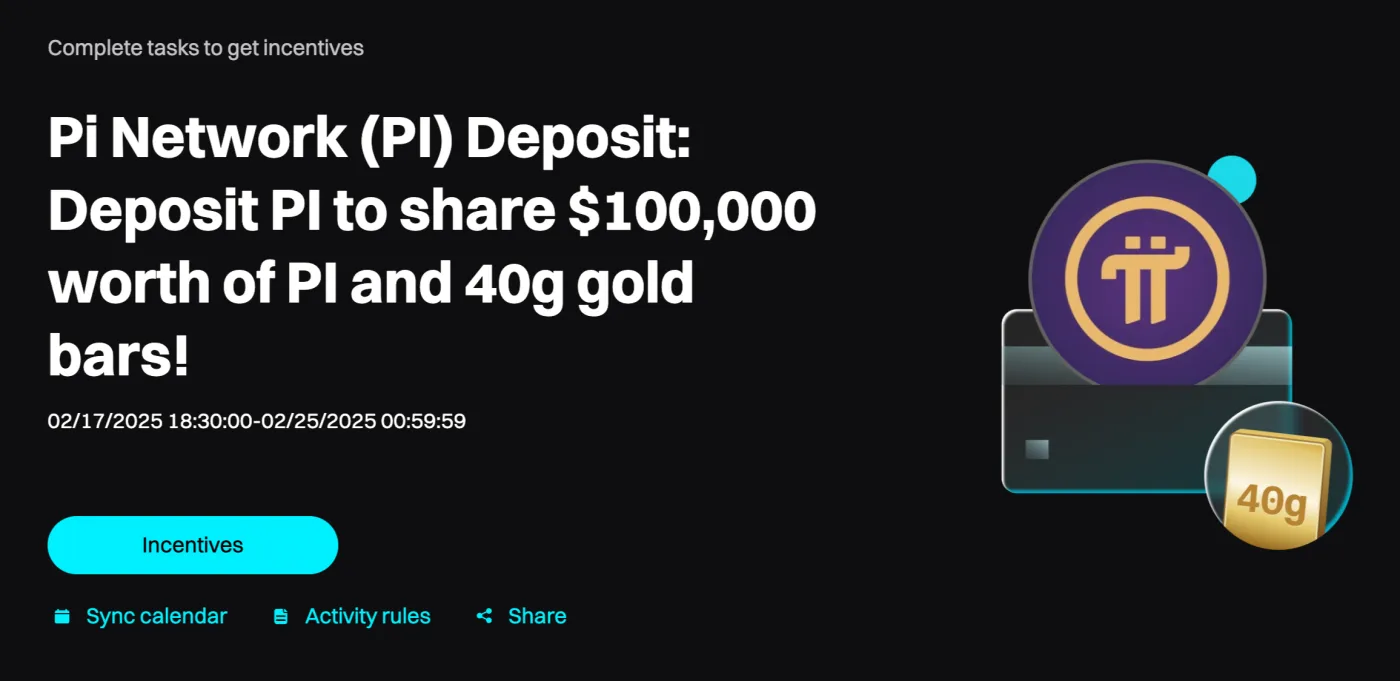
Here are the participation requirements and rewards. First, go to the event page and click the 'Join' button to register. Then, deposit at least $10 worth of $PI to get a chance at up to $620 USDT worth of $PI airdrops and a gold bar.
| Deposit 10 PI | Paid instantly | PI worth 10 USDT |
| Net deposit ≥ 100 PI | Must hold for 1 day | PI worth 20 USDT in total |
| Net deposit ≥ 1,000 PI | Must hold for 3 days | PI worth 120 USDT in total |
| Net deposit ≥ 10,000 PI | Must hold for 5 days | PI worth 620 USDT in total |
| Deposit 100 PI or more (lucky draw) | During the event period | 5g gold bar (8 winners in total) |
How to Sign Up for Bitget
To join Bitget's Pi Coin event or to trade, you first need a Bitget account. Follow the step-by-step guide below to complete your Bitget registration.
1. Visit the Official Bitget Website
Go to the official Bitget website. You can start the Bitget sign-up process by clicking the button below.
2. Create Your Account
Enter your email address and a password to create an account. Your password must be at least 8 characters long and include uppercase and lowercase letters, numbers and special characters.

3. Agree to the Terms of Use
Check all three terms of use boxes, then click the "Create Account" button.

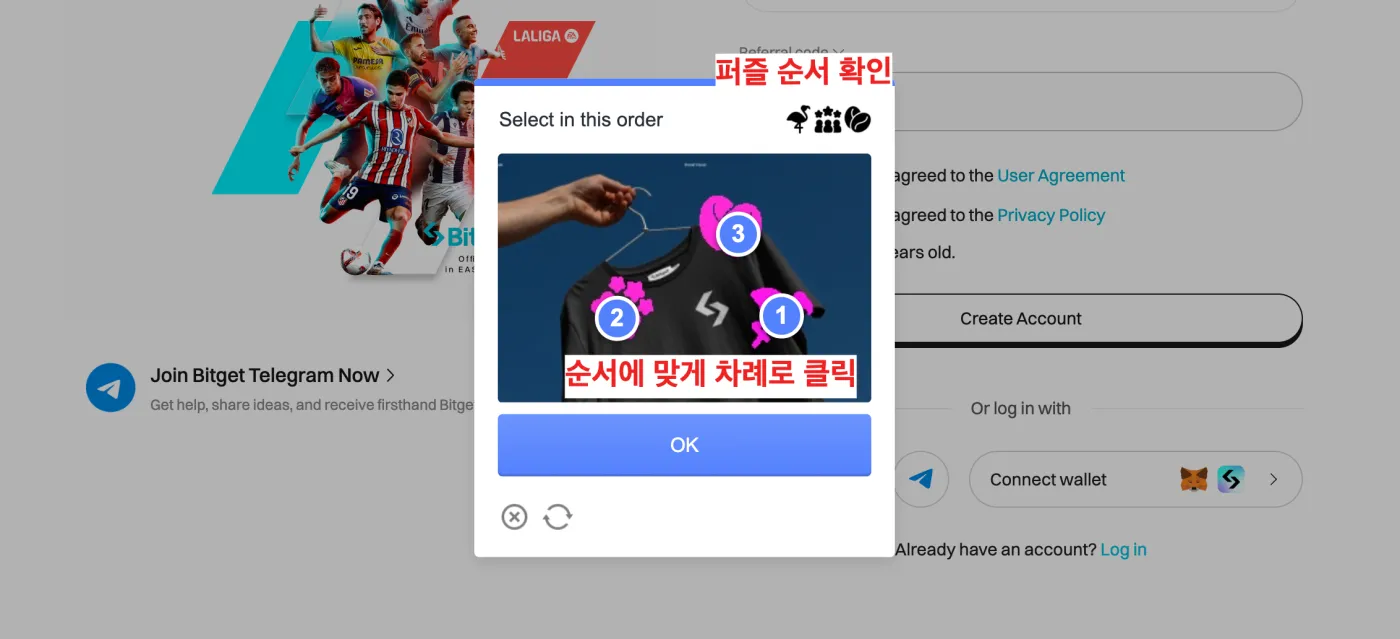
4. Complete the Security Check
A security check screen with a puzzle will appear. Click the images in the order shown, then press the "OK" button.
5. Verify Your Email
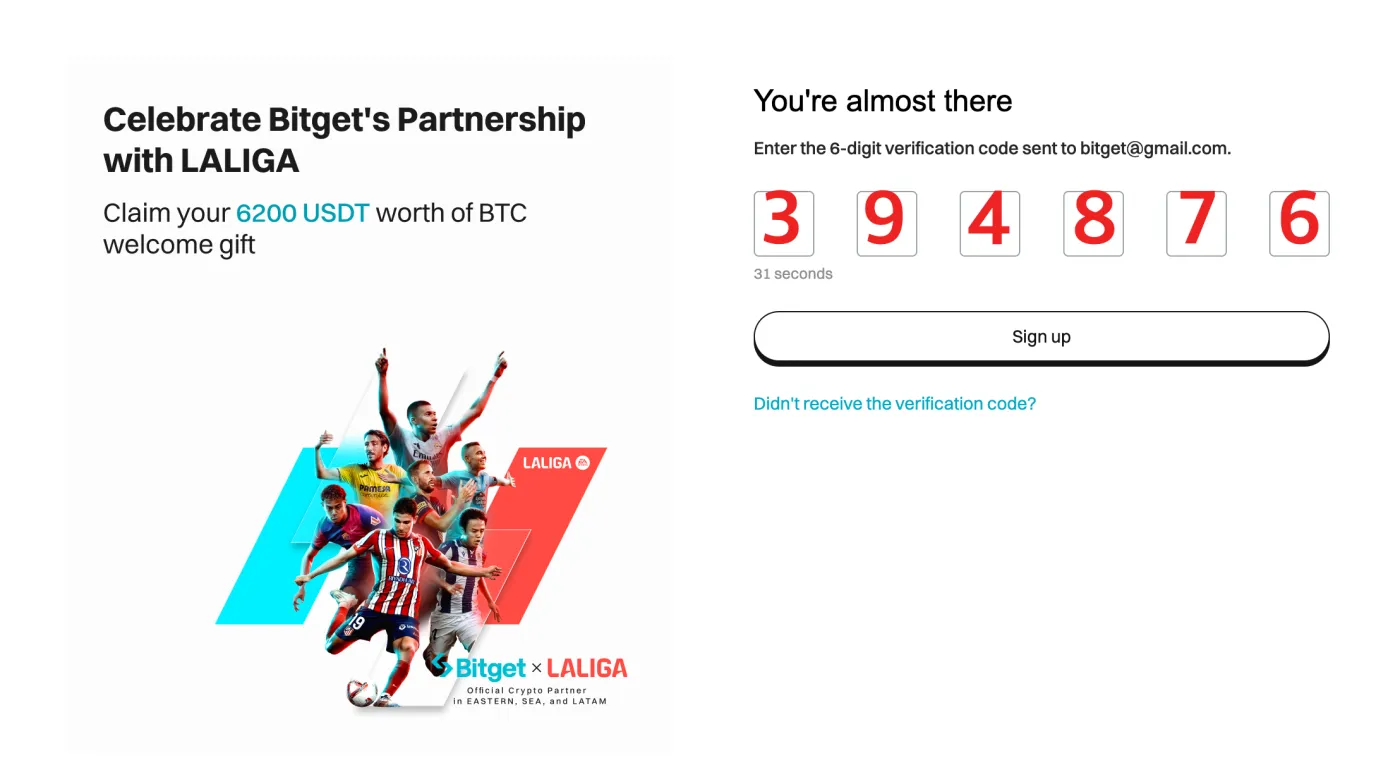
A 6-digit verification code will be sent to the email you entered. Enter the code, and your account will be created.
How to Deposit and Withdraw Pi Coin on Bitget
To trade Pi Coin on Bitget, you first need to deposit it into your Bitget account. Here's how.
1. Complete Bitget Identity Verification
After signing up for Bitget, you must complete KYC verification (identity check) before you can deposit or withdraw. This is to prevent fraudulent account creation, and you'll need to submit one of the following: your passport, driver's license or resident registration card.
Since this process requires a camera, it's easier to use the Bitget mobile app. Download the Bitget app from the app store, go to the identity verification page as shown below, and complete the process.
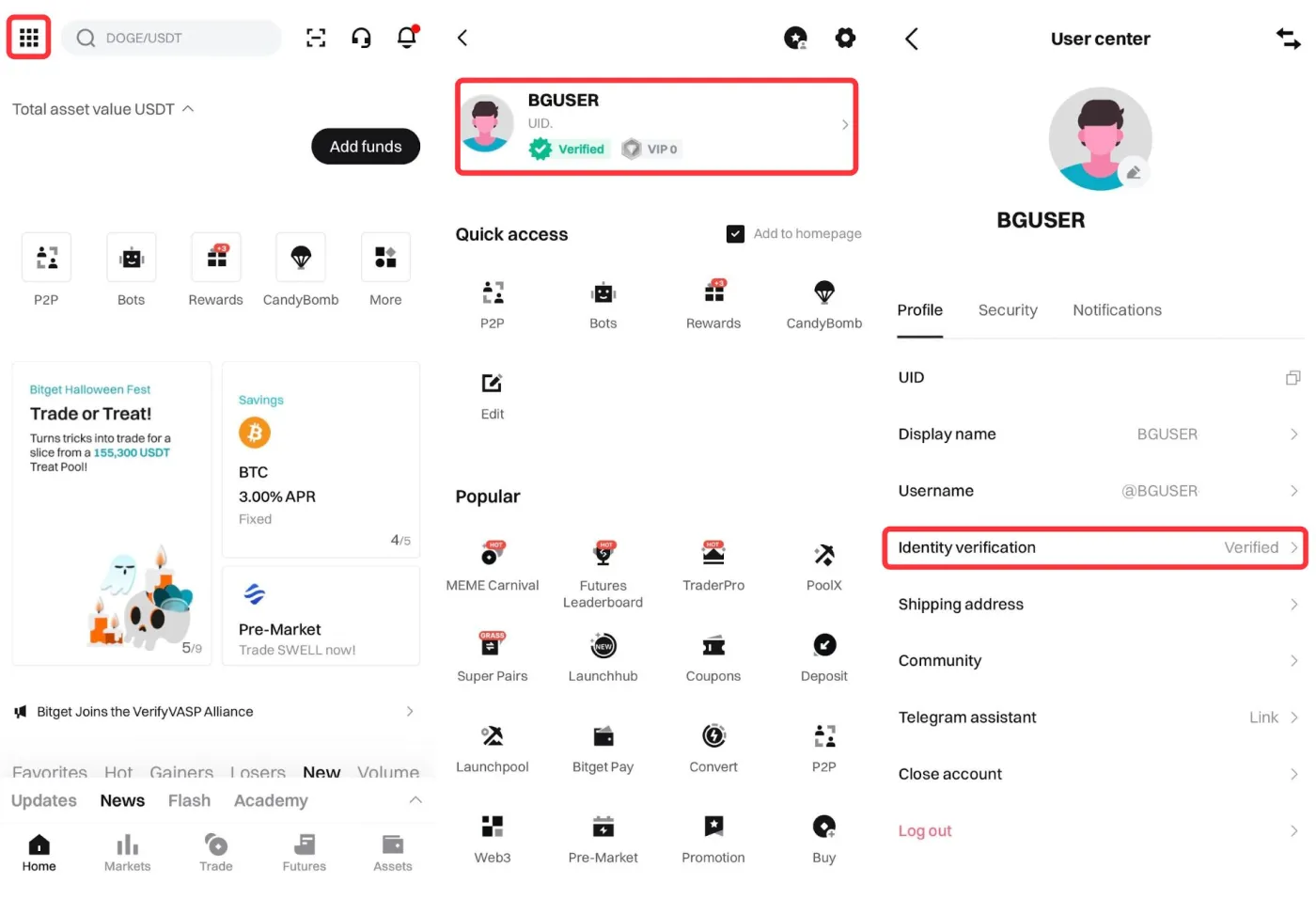
Once you've finished identity verification, the review will be completed in about 5 to 10 minutes. If verification succeeds, move on to the next step. If it fails, check the reason and try verifying again.
2. Find Your Pi Coin Deposit Address
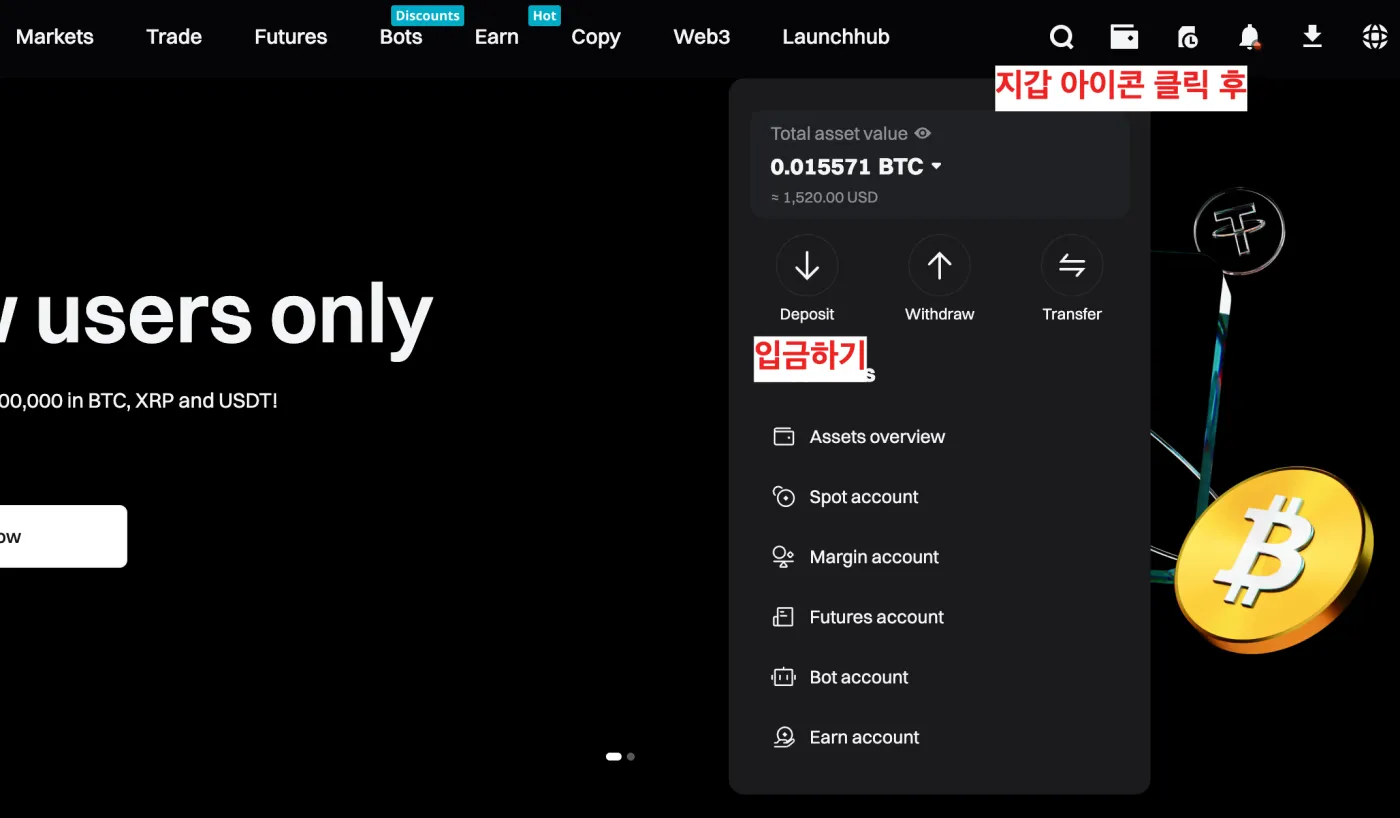
After your account is verified, you can deposit Pi Coin into Bitget. Log in to your account and click the wallet icon in the top right. Then select the ‘Deposit’ menu.
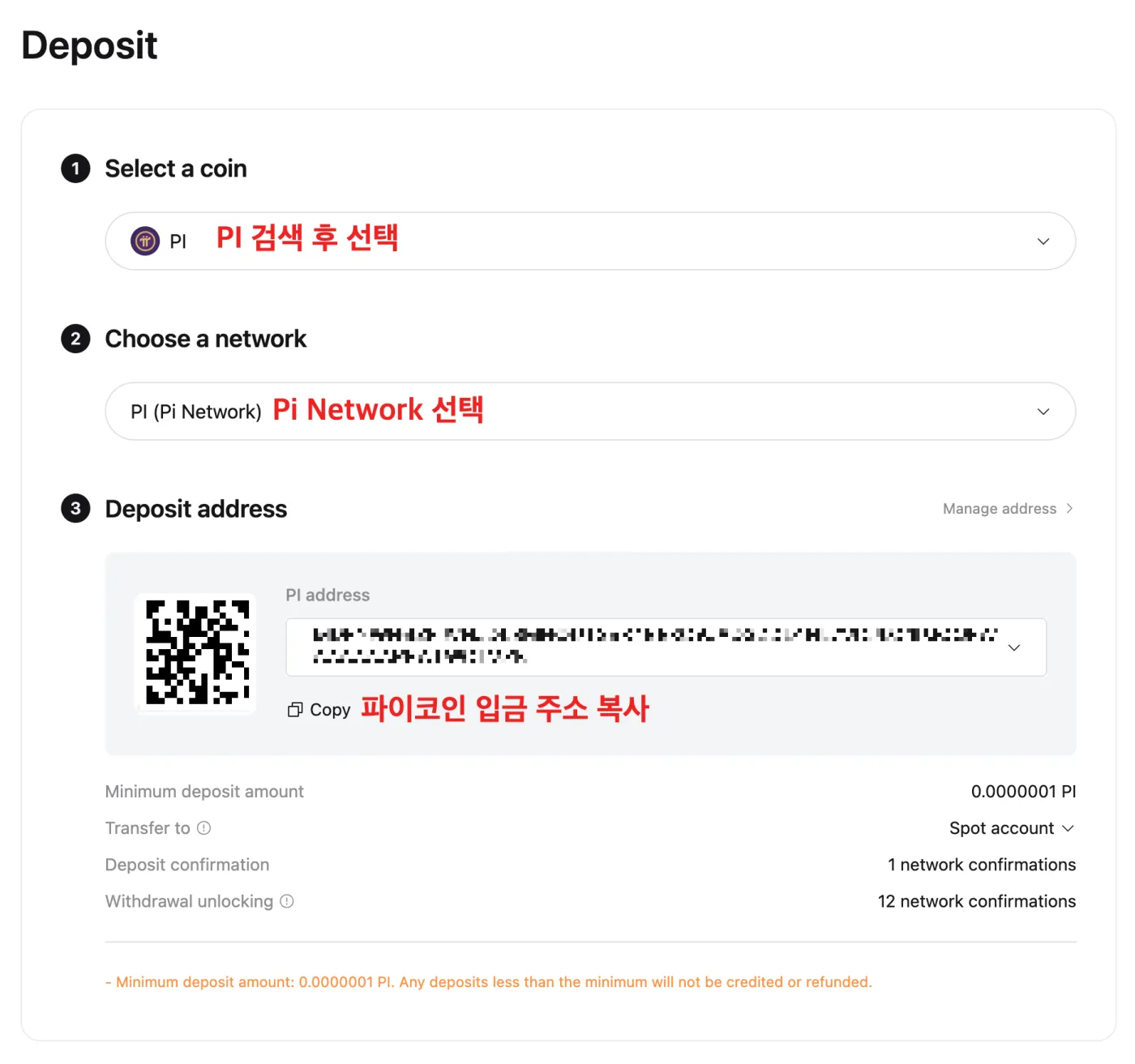
Search for "PI" in the deposit coin search box and select the Pi Network as shown below. Your personal wallet address for depositing Pi Coin will be displayed. Click the 'Copy' button below to copy the Pi Coin deposit address shown.
3. Withdraw Pi Coin
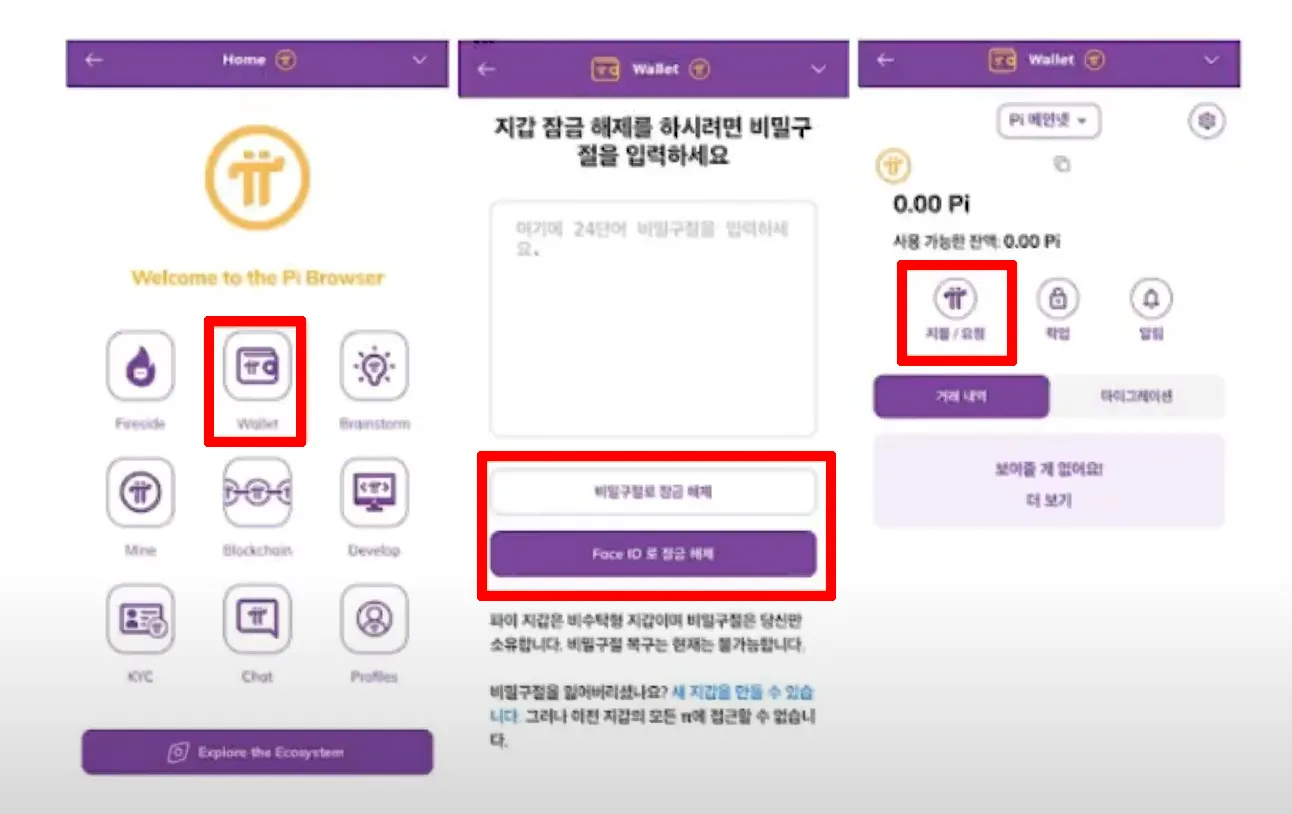
Open the Pi Network app and go to the ‘Wallet’ menu. Enter your 24-word mnemonic to unlock your wallet. Next, select the "Pay/Request" menu to start sending Pi Coin to Bitget.
Then, as shown below, click the "+ Send by entering a wallet address" button, and a window will appear where you can enter your Bitget wallet address.
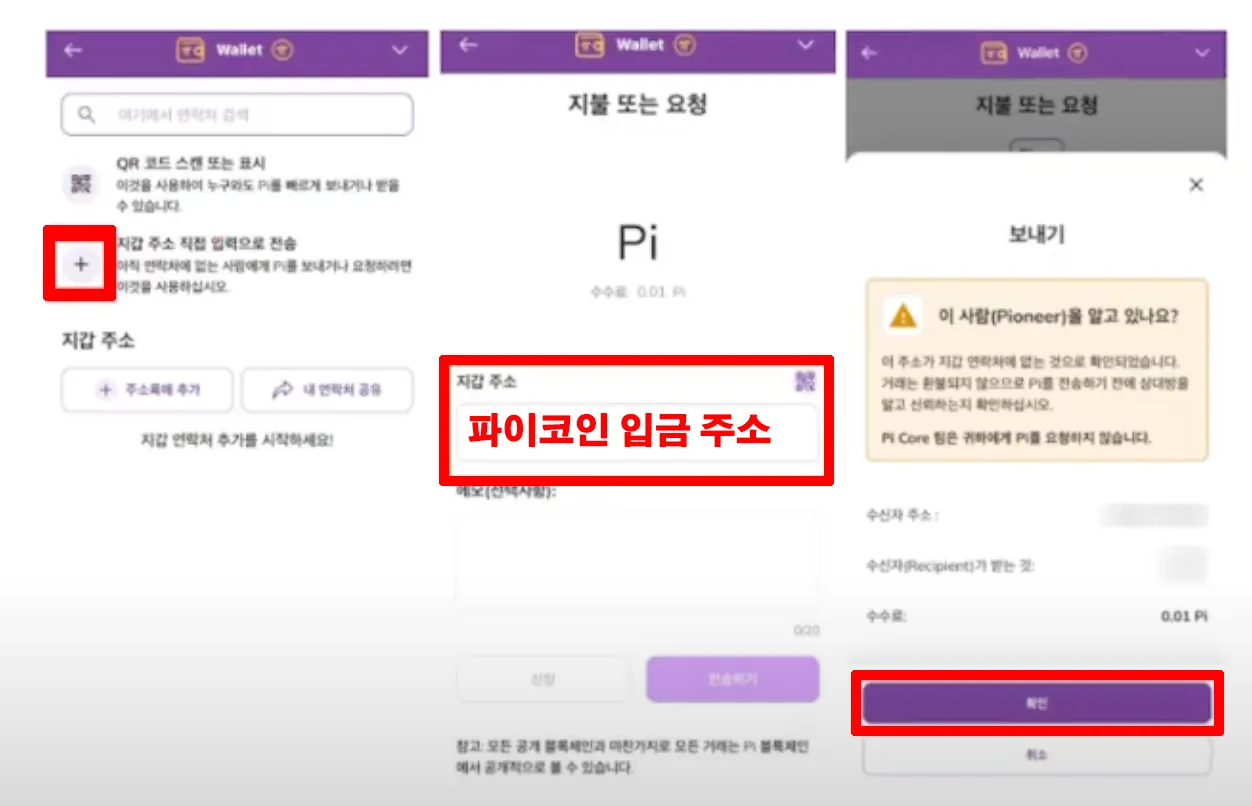
Enter the amount of Pi Coin to send to Bitget and the deposit address. For the deposit address, just paste the Pi Coin deposit address you copied from Bitget a moment ago. At this point, double-check that the deposit address is correct. If you send it to the wrong address, you could lose all of your Pi Coin. (We recommend sending a small test amount first.)
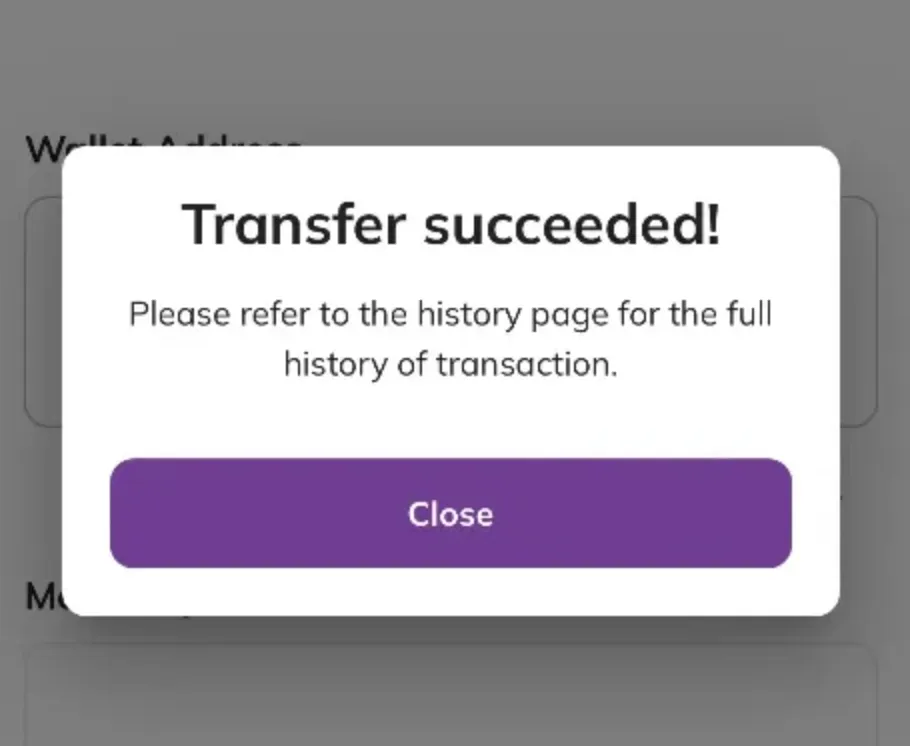
Once the request is complete, you'll see a withdrawal confirmation screen like the one above. Now, just wait a moment and you'll see the Pi Coin arrive in your Bitget exchange account.
How to Trade Pi Coin on Bitget
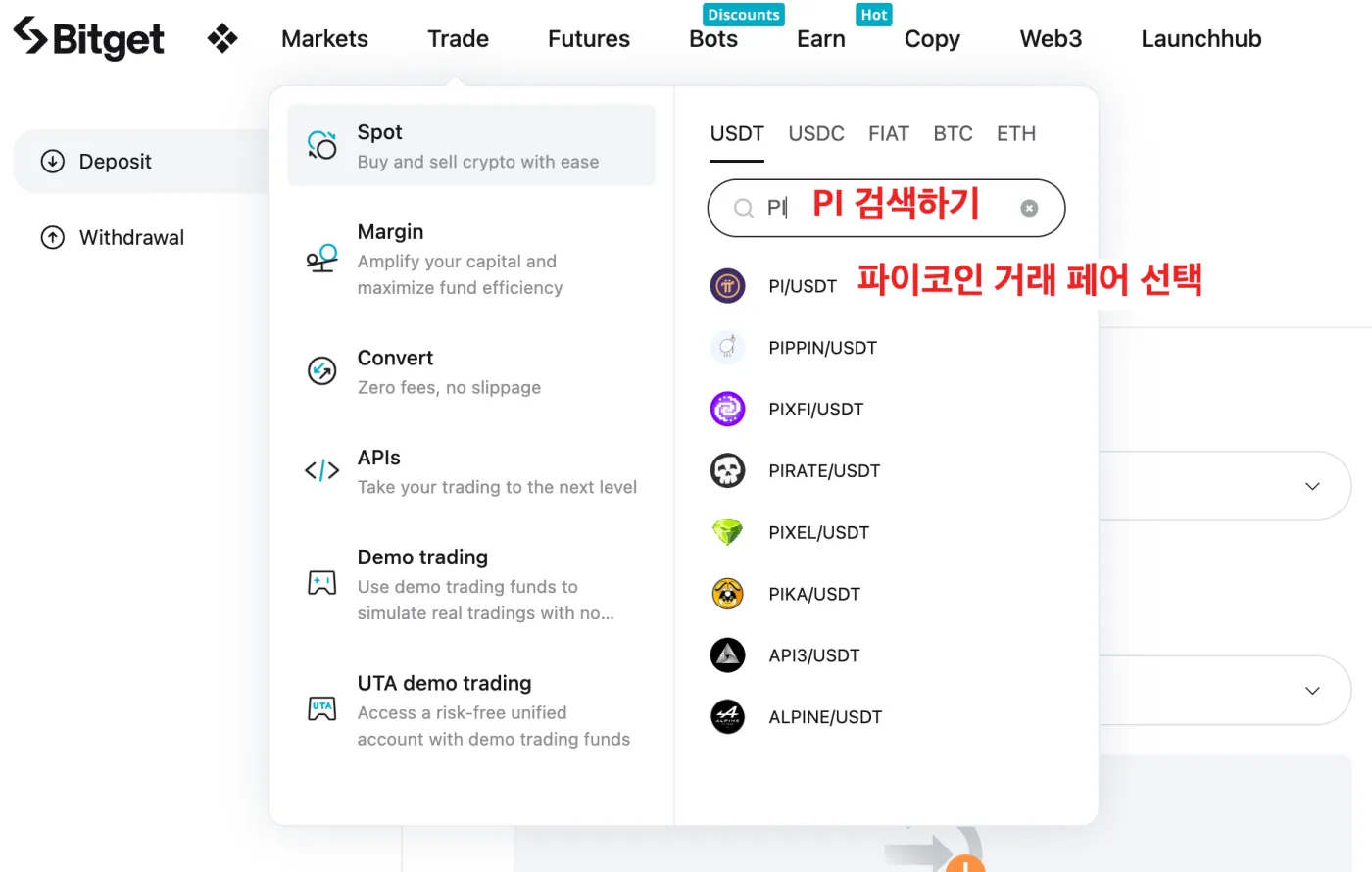
After logging in to Bitget, go to ‘Trade’ → ‘Spot’ in the top menu. Next, type "PI" in the search box and select the "PI/USDT" trading pair.
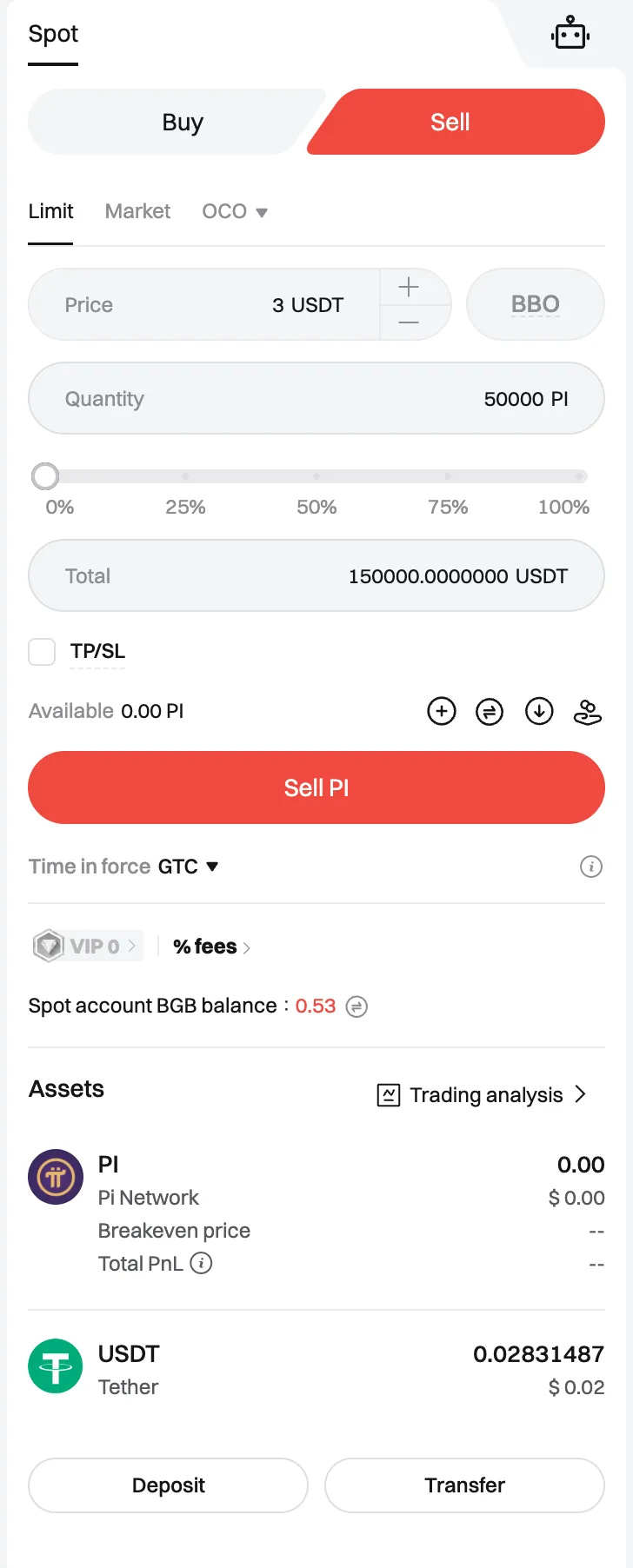
Then enter the amount you want to trade and choose Buy or Sell to trade Pi Coin. You can check your completed trades under Assets → Spot Wallet.
Wrapping Up
In this post, we covered the news of Pi Coin's listing on the Bitget exchange, along with how to sign up and how to deposit Pi Coin in detail. We also looked at how to sell the coins you withdrew from the Pi Network app on the Bitget exchange.
If you found this post helpful, please tap the heart below and share it widely. I hope the Pi Coin you've worked so hard to mine brings you great profits. Thank you for reading this long post.