How to Deposit and Withdraw Tether (USDT) on Upbit (Transfers to Overseas Exchanges and Personal Wallets)
4 min read · · Korean original
Contents 5
Today, we'll look at how to deposit and withdraw Tether (USDT) on Upbit. By following the tutorial below, you can safely transfer USDT to overseas exchanges such as Binance, Bybit, and OKX.
Introduction to Upbit Tether (USDT) Withdrawals
USDT is a stablecoin pegged 1:1 to the US dollar. Because it has low volatility and lets you transfer value reliably, it's widely used for moving assets.
Upbit recently listed USDT, making deposits and withdrawals to and from overseas exchanges and personal wallets faster and easier than ever.
| USDT Withdrawal Network | Fee | Estimated Transfer Time |
| Tron (TRC20) | Free | About 2 minutes |
| Ethereum (ERC20) | 4 USDT | About 4 minutes |
How to Deposit USDT to Upbit
Here is the 3-step process for depositing USDT to Upbit from an external platform. One thing to check before you deposit: deposits are only possible from official exchanges that have a Travel Rule partnership with Upbit (Binance, Bybit, OKX, Bitget, etc.) or from verified personal wallets.
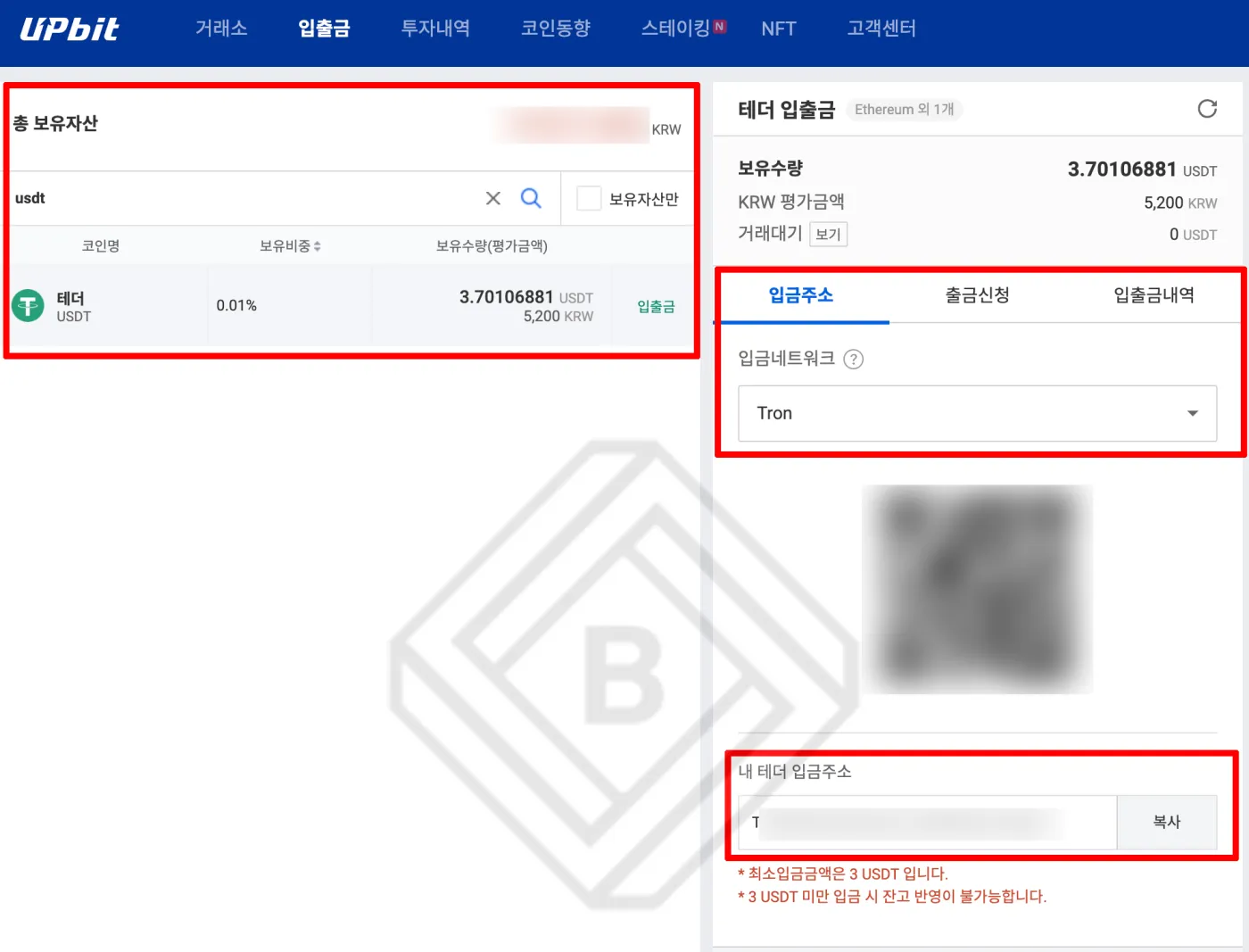
- Log in and tap 'Deposits/Withdrawals': After logging in to the Upbit website or app, select 'Deposits/Withdrawals' from the top menu.
- Search for USDT and deposit: Search for USDT in your assets, then select the deposit network. You can choose either the Tron or Ethereum network.
- Copy the address and request a withdrawal: Copy the address and paste it into the sending platform or wallet.
For example, if you're depositing USDT to Upbit from the Bybit exchange, you can do it as follows.
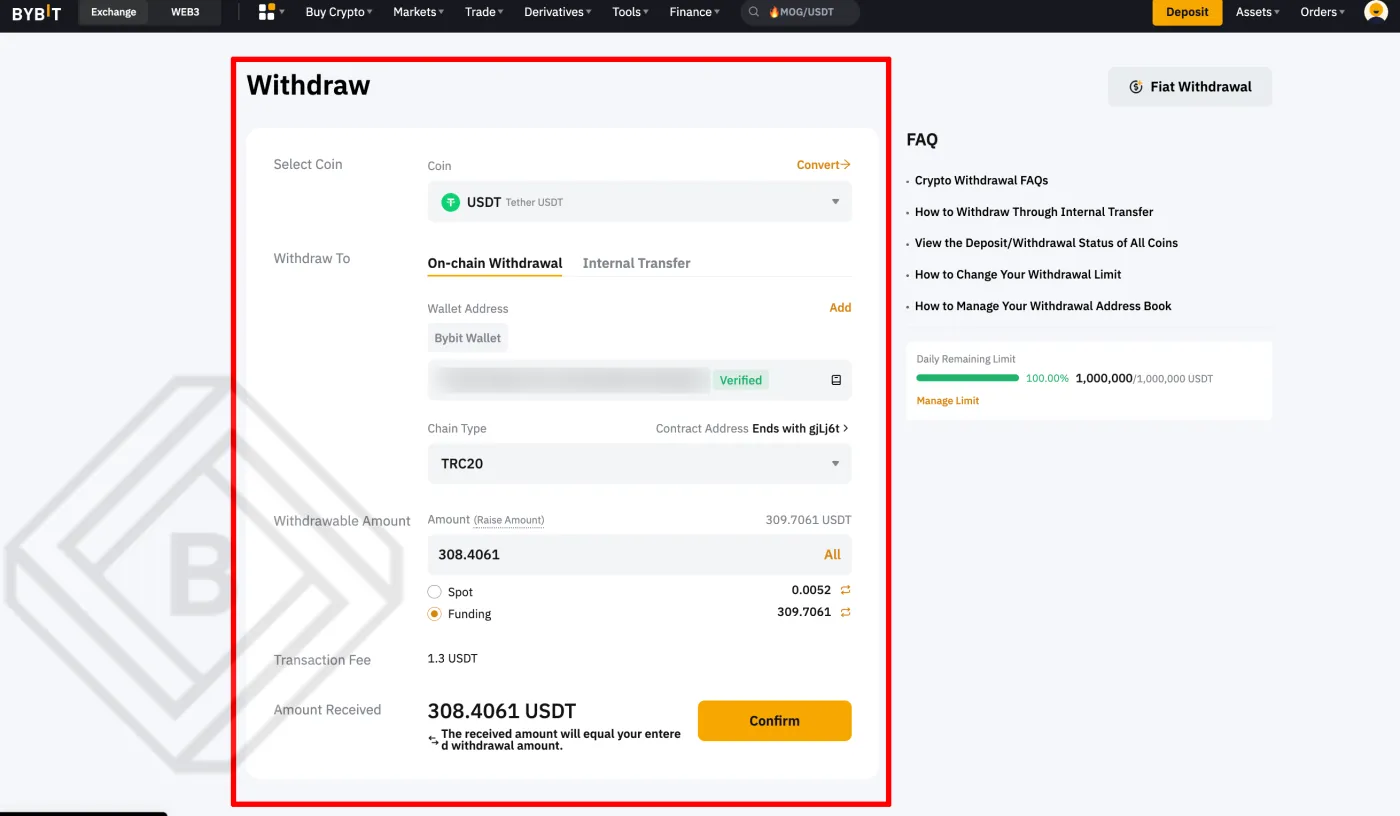
- After logging in to the Bybit exchange, select USDT under [Withdrawal].
- Select [On-Chain] as the withdrawal method, then select Tron (TRC20) as the chain type (network).
- Enter your Upbit USDT address (Tron network), then enter the amount.
- Check the 1.3 USDT withdrawal fee, then click [Confirm] to complete the process.
How to Withdraw USDT from Upbit
Here's how to withdraw USDT from Upbit to an external platform. Note that if you've deposited Korean won, you can withdraw USDT externally only after 24 hours.
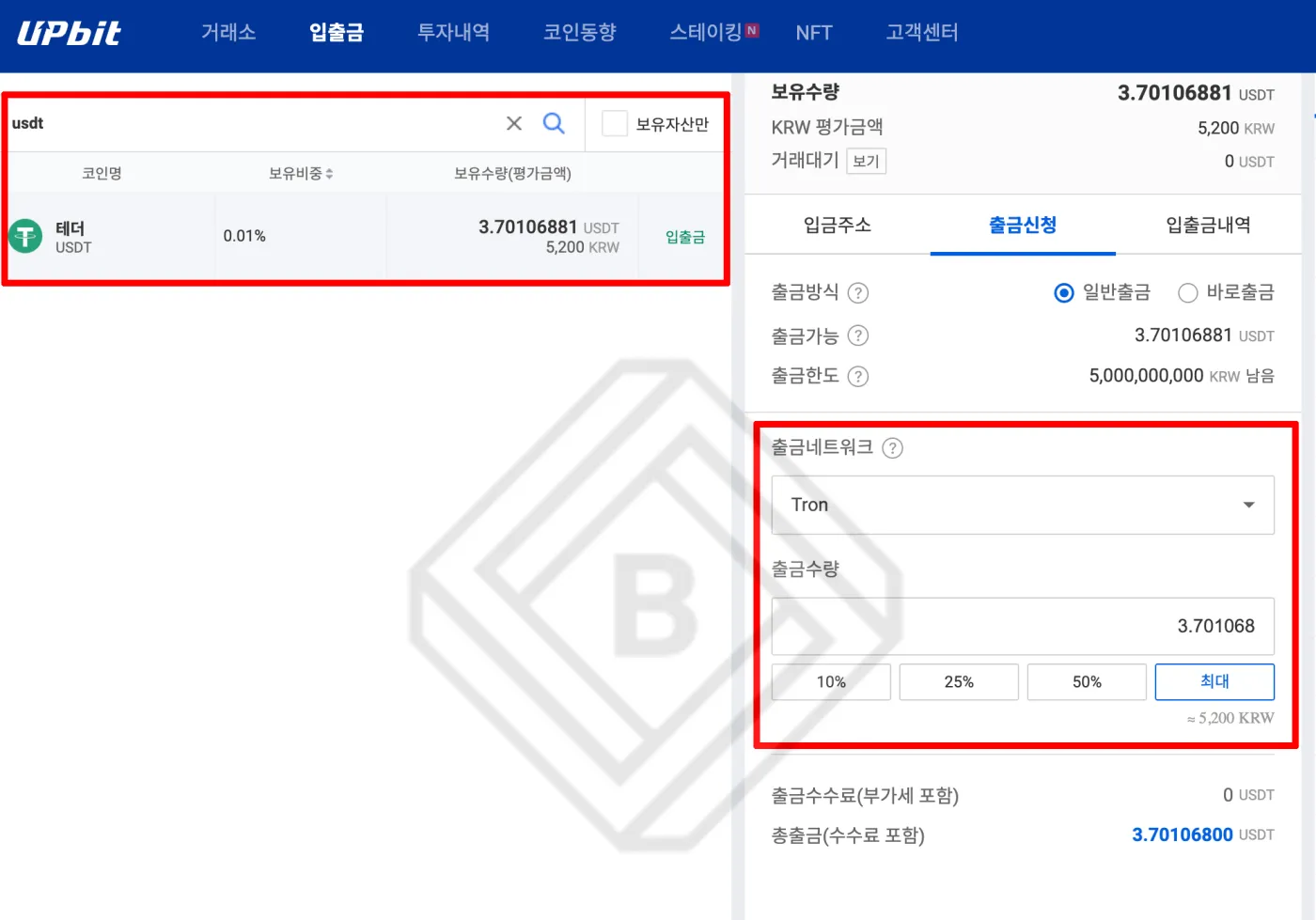
- Select the withdrawal network: Carefully select the network (TRC20 or ERC20) for the USDT you want to withdraw. Withdrawals are free when you use the Tron network.
- Enter the withdrawal details: Enter the amount of USDT to withdraw and the address.
- Verify and confirm the withdrawal: Complete two-factor authentication, then finalize the withdrawal.
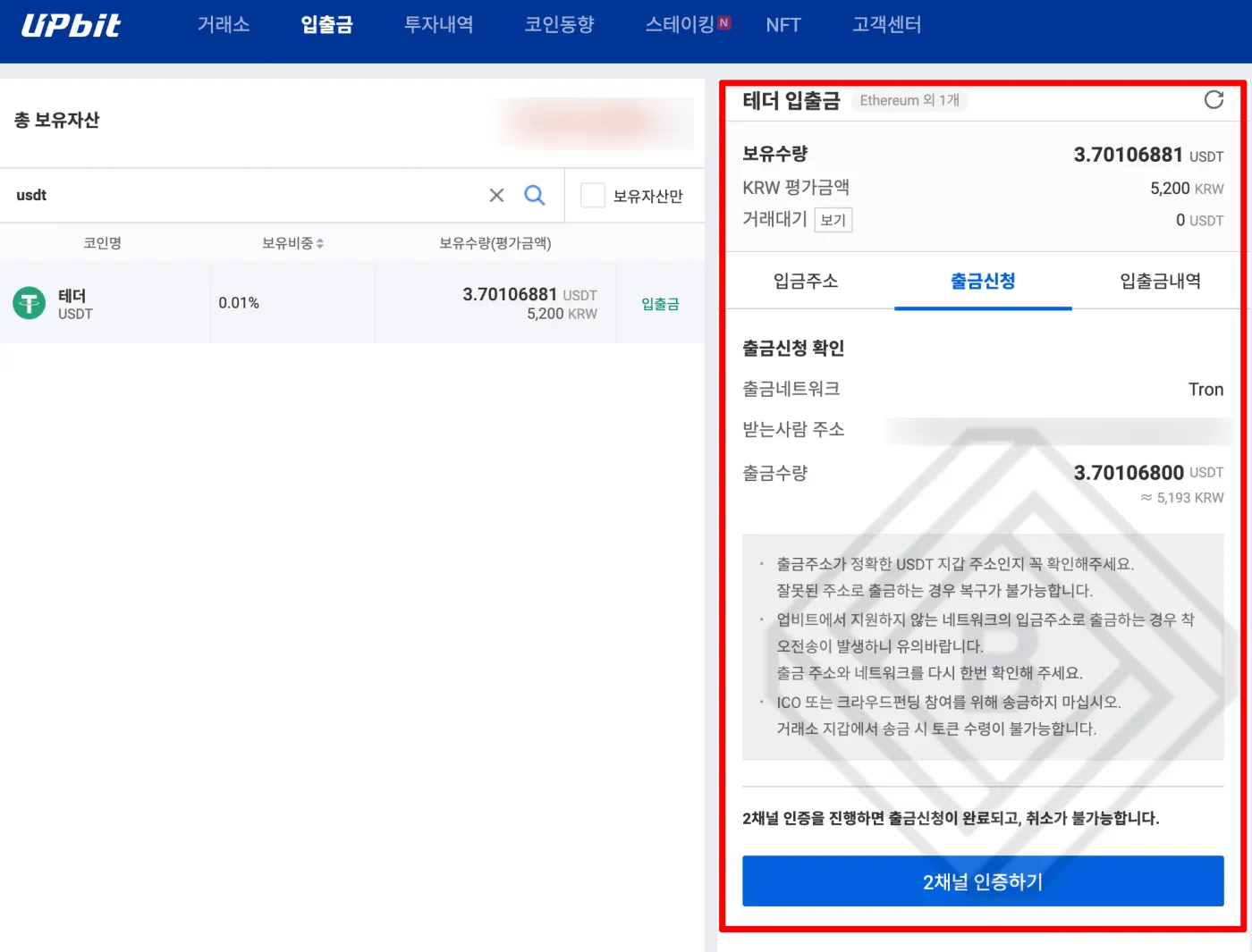
For example, if you're depositing USDT to the Binance exchange, you can do it as follows.
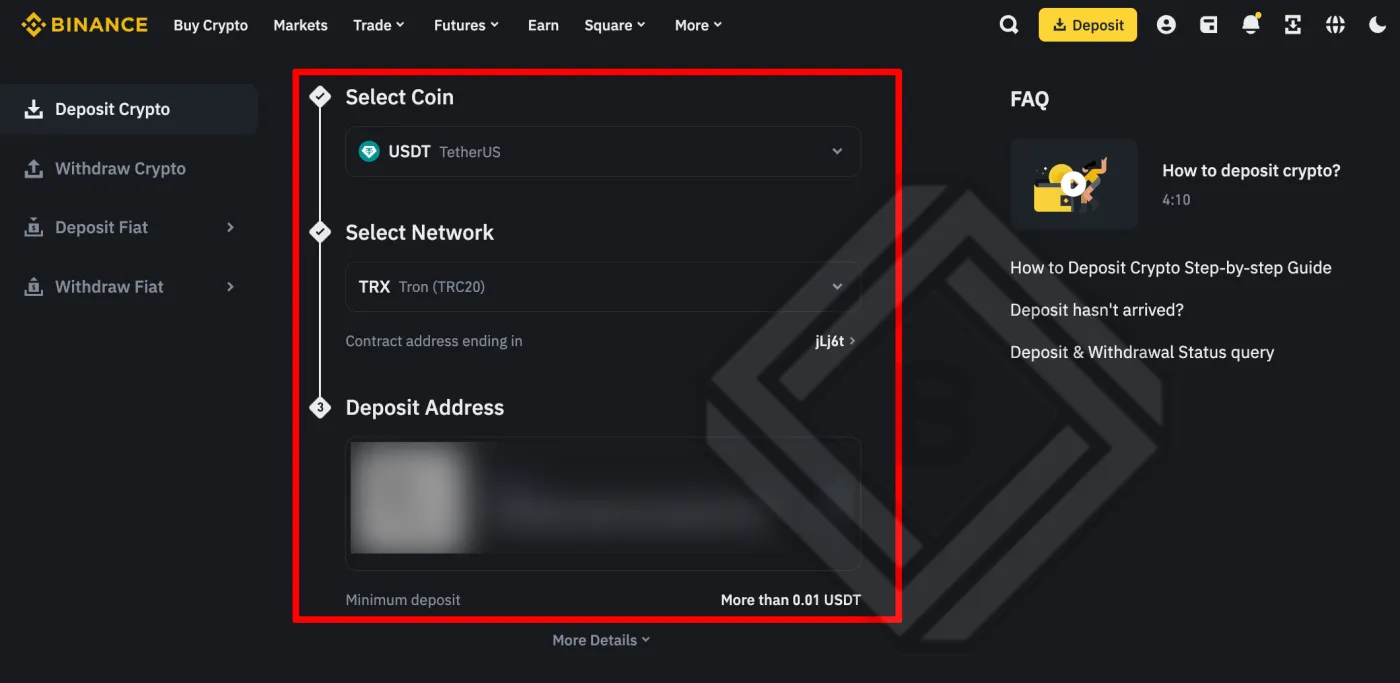
- After logging in to the Binance exchange, select USDT under [Deposit].
- When you select Tron (TRC20) as the deposit network, your deposit address [Deposit Address] will be displayed.
- Copy it and paste it into the USDT withdrawal address field on Upbit. Make sure you've selected the same network.
- Once you complete withdrawal verification, the USDT deposit to the Binance exchange will be completed.
Important Precautions for USDT Deposits and Withdrawals
There are 3 important precautions you should know when depositing or withdrawing USDT on Upbit.
- Choose the correct network and address: Sending USDT to the wrong network or address can result in lost funds. Before withdrawing, make sure you've selected the correct network, and double-check that the address is right.
- Check fees and minimum amounts: Check the fees and minimum deposit/withdrawal amounts that apply to each network. Upbit currently supports only the Tron and Ethereum networks, and the minimum deposit is 3 USDT.
- Check the Travel Rule support list: Due to the Travel Rule for virtual asset service providers, USDT deposits and withdrawals are not possible from unverified exchanges or personal wallets. Before proceeding, check the list of supported platforms for deposits and withdrawals.
Wrapping Up
That covers how to safely deposit and withdraw USDT on the Upbit exchange. The most important thing is to check the correct network and address before any deposit or withdrawal, and you also need to confirm that the other side is a virtual asset service provider (VASP) or personal wallet verified under the Travel Rule.
For now, the Tron network is free and fast, so it looks like the best option for USDT deposits and withdrawals. Be sure to check Upbit's minimum deposit amount (3 USDT) and the withdrawal fees on overseas exchange platforms so you can move your USDT cheaply and efficiently.