How to Cash Out from MetaMask (DeFi Swaps and Transfers to Upbit, Bithumb, and Binance)
6 min read · · Korean original
Contents 6
MetaMask is one of the most popular personal wallets for storing, managing, and exchanging a wide range of coins. However, you can't cash out directly into Korean won, so you need to either swap your coins on a decentralized exchange (DEX) or send them to a Korean or overseas exchange.
In this post, we'll look at how to safely withdraw the coins in your MetaMask wallet and convert them into cash. By following this tutorial, you'll be able to deposit and sell your coins on any exchange you use, including Upbit, Bithumb, and Binance.
Can I cash out directly from MetaMask?
No. You can't cash out directly from MetaMask. Because MetaMask is a blockchain "wallet," it has no feature for withdrawing money directly the way a Korean bank account does.
So, to cash out the coins in your MetaMask wallet, you need to send them to an exchange and sell them there. For unlisted coins, on the other hand, you'll need to swap them for a stablecoin such as USDT on a decentralized exchange like Uniswap or 1inch.
3 things you must know before cashing out
There are some important things you need to know before cashing out the coins in your MetaMask wallet. If you don't understand them well, you could lose all of your hard-earned assets, so please be careful.
First, fees. MetaMask itself doesn't charge a fee, but you pay gas fees when using a blockchain network. Gas fees are required whenever you send coins or sign transactions, and they're also called network fees.
On the Ethereum network, fees are paid in ETH, and on Solana you need SOL. On BNB Chain, you need BNB. On Ethereum layer 2 chains such as Arbitrum or Base, ETH on that particular chain is used for gas fees.
Second, double-check the wallet address. A wallet address is like a "bank account number," and you must enter it exactly right. If you enter it incorrectly, your assets will be lost and can't be recovered.
Finally, check whether the exchange supports the coin. Confirm that the coin is listed, and check which networks are supported. If the coin isn't listed or the network isn't supported, never deposit it to the exchange.
Getting ready to cash out: registering your MetaMask wallet
For coins that are listed on an exchange, you first need to register your MetaMask wallet with a Korean exchange such as Upbit or Bithumb before cashing out the coins in it. Be careful: if you send coins without registering, your deposit may not be processed due to the Travel Rule.
Here's how to register your MetaMask wallet. For example, on Upbit, go to the "My Info" page as shown below, then open the [Personal Wallet Address Management] tab.
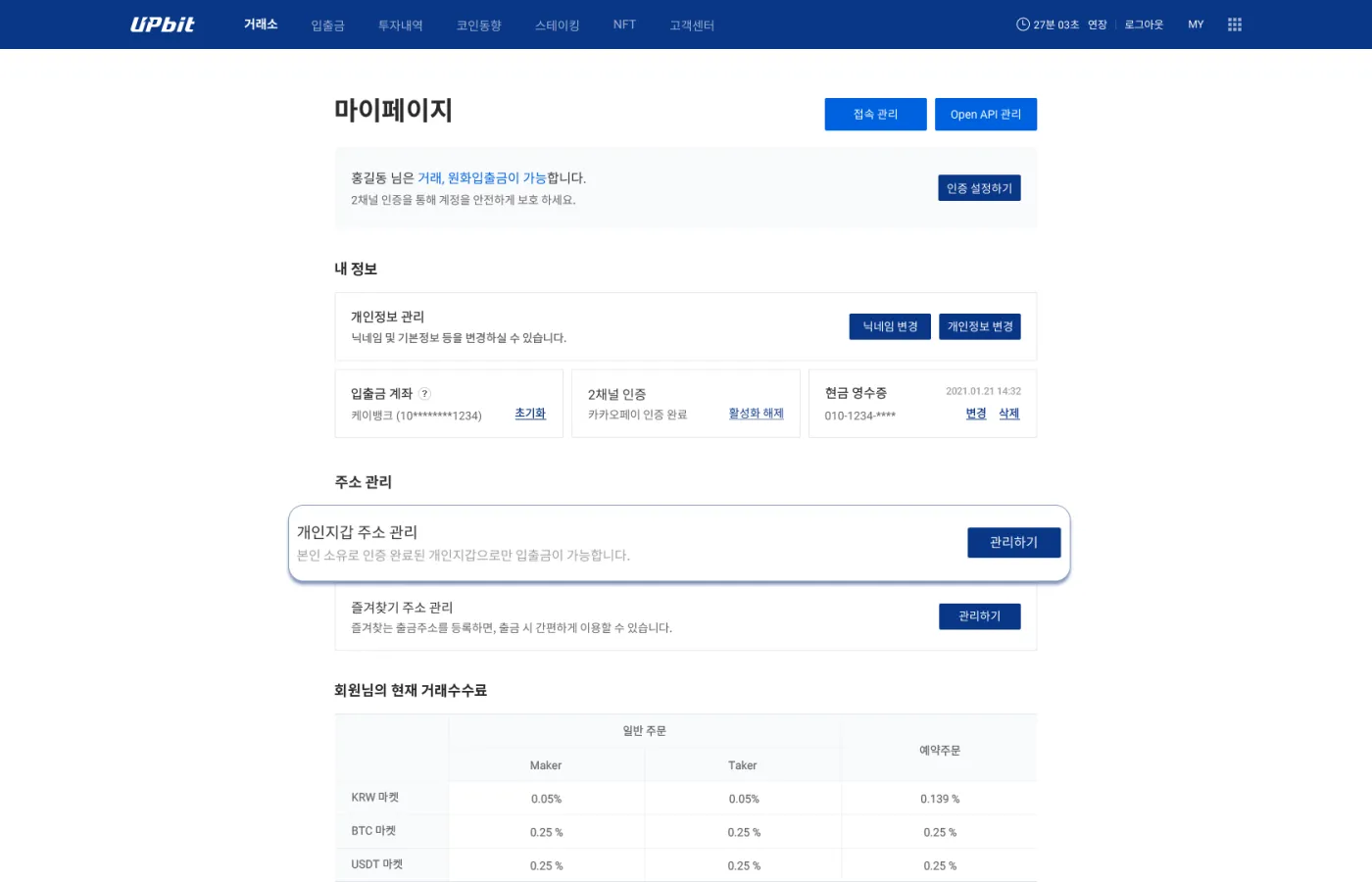
Here, click the [Manage] button, and you can add your MetaMask wallet address.
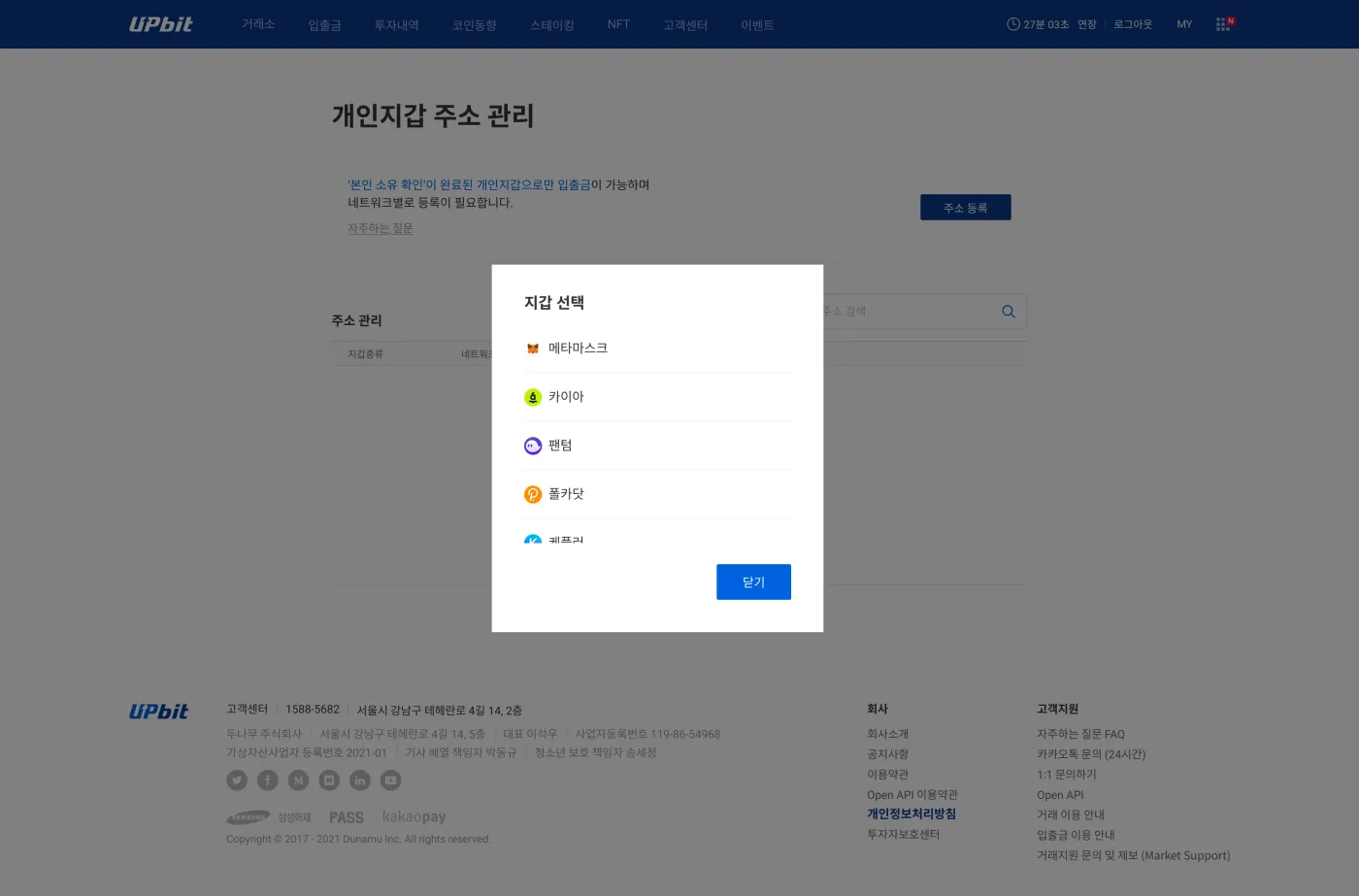
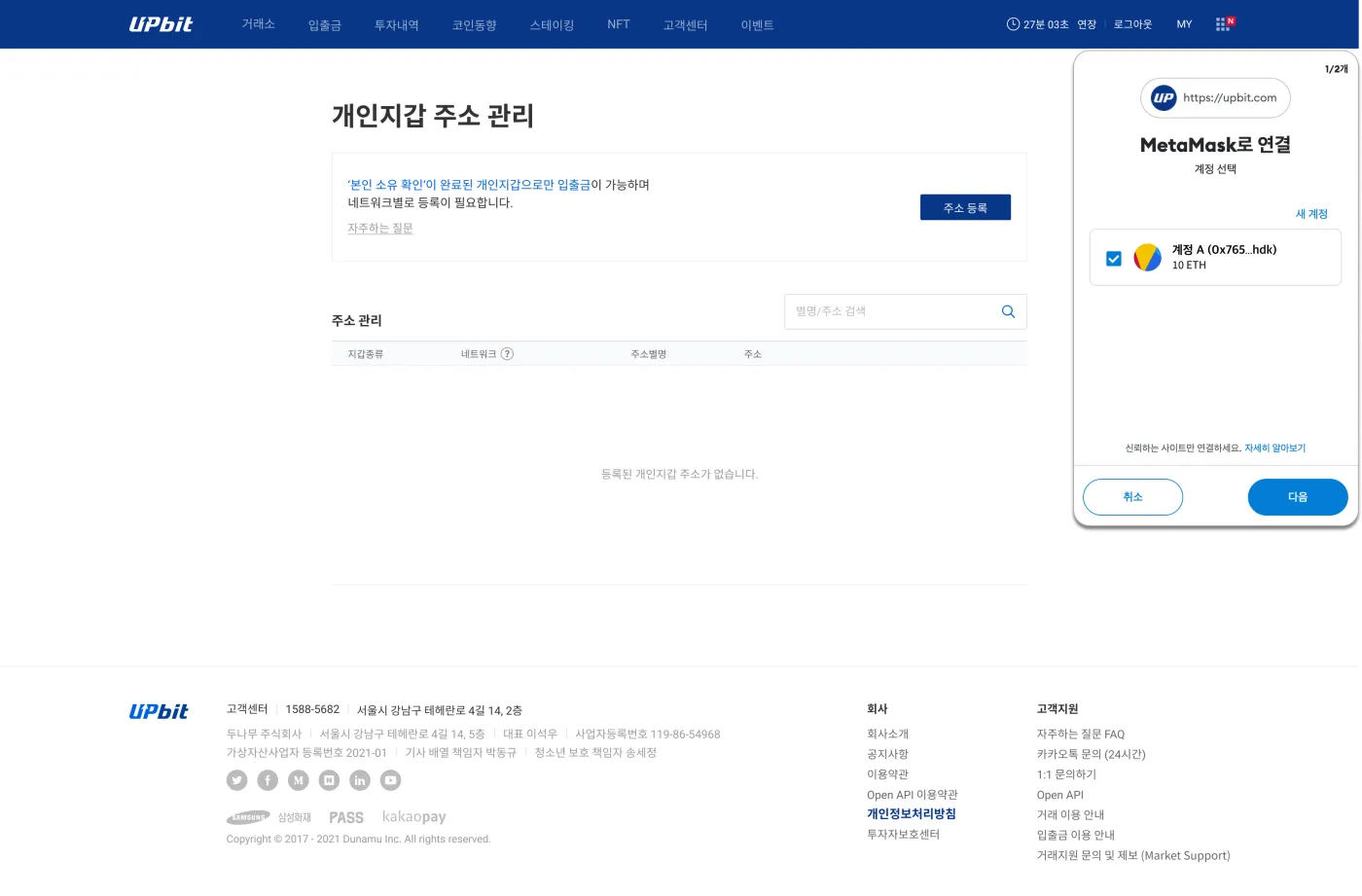
When you click [Register Address], a MetaMask verification pop-up appears as shown below. Once you sign the MetaMask verification, your wallet address registration is complete.
How to withdraw from MetaMask to Upbit
Now that we've checked the basics for sending coins and registered the wallet, let's get down to cashing out.
Step 1: Select a network and start the transfer
When you open MetaMask, you'll see the assets you hold. Select the blockchain network you want in the top left, then press the [Send] button to start the transfer.
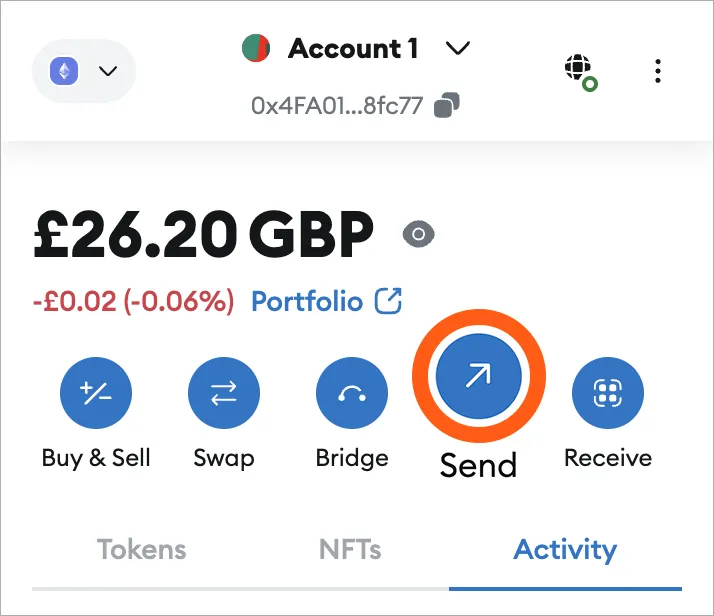
At this point, make sure you're working on the correct network. If this is your first time withdrawing from MetaMask, be sure to do a test transfer with a small amount first.
Step 2: Enter the deposit address and choose the coin
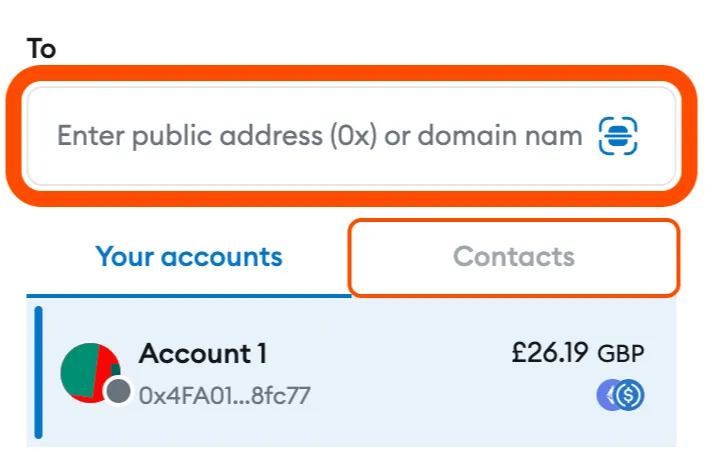
Enter the deposit address you copied from Upbit into MetaMask's recipient address field. Paste the deposit address exactly into the field under "To."
Next, select the coin you want to withdraw and enter the amount. For example, the screenshot below shows sending 0.001 ETH on the Ethereum network.
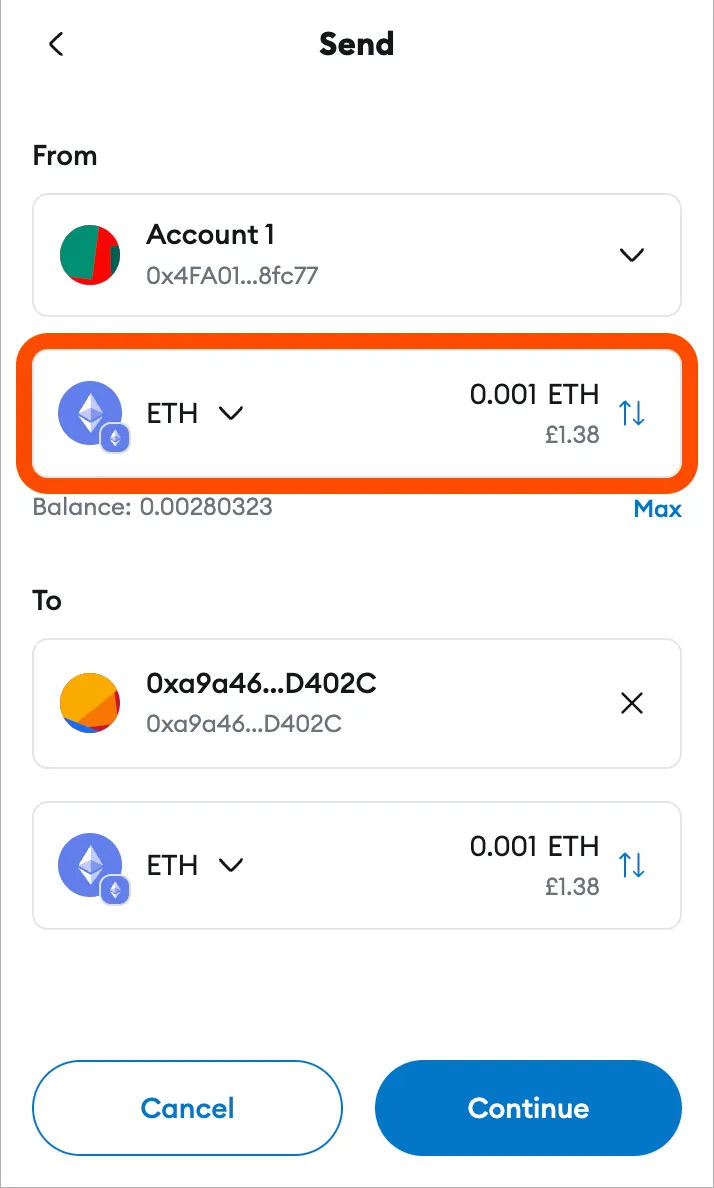
Before approving the withdrawal, double-check that the address you entered is correct. Also double-check that the network you're currently using is correct. If everything is right, press [Continue] to proceed.
Step 3: Review and approve the transaction
A final review screen appears based on what you just entered. Carefully check the amount, address, network, and fee. If you make a mistake, it can't be undone.
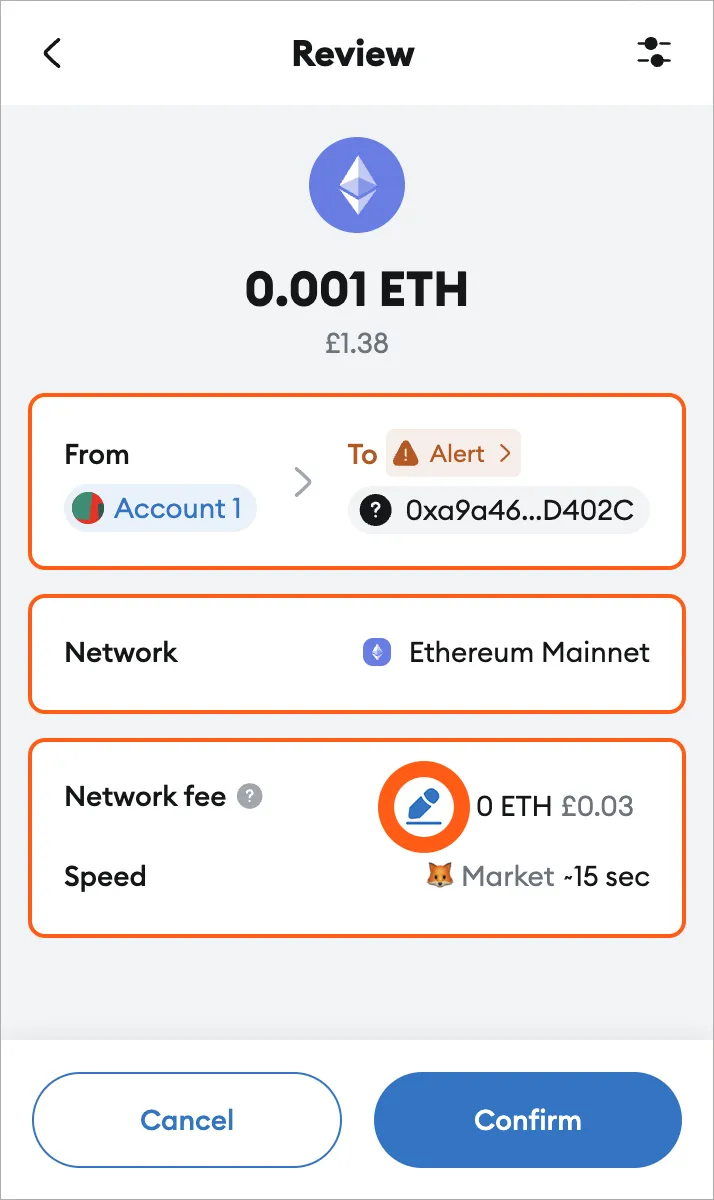
If everything is correct, press the [Confirm] button to approve the transaction. About 5 to 20 minutes after you send the coins from MetaMask, the deposit to Upbit will be complete.
Step 4: Deposit complete and cash out
Once the coins arrive in Upbit, you can sell them in the KRW market or the BTC/USDT market. And with that, the whole process of cashing out coins withdrawn from MetaMask is complete.
How do you cash out unlisted coins?
Do you have unlisted coins stored in MetaMask? In that case, you can cash out in a slightly different way. First, go to the official Uniswap website.
Step 1: Connect your wallet and go to the trading page
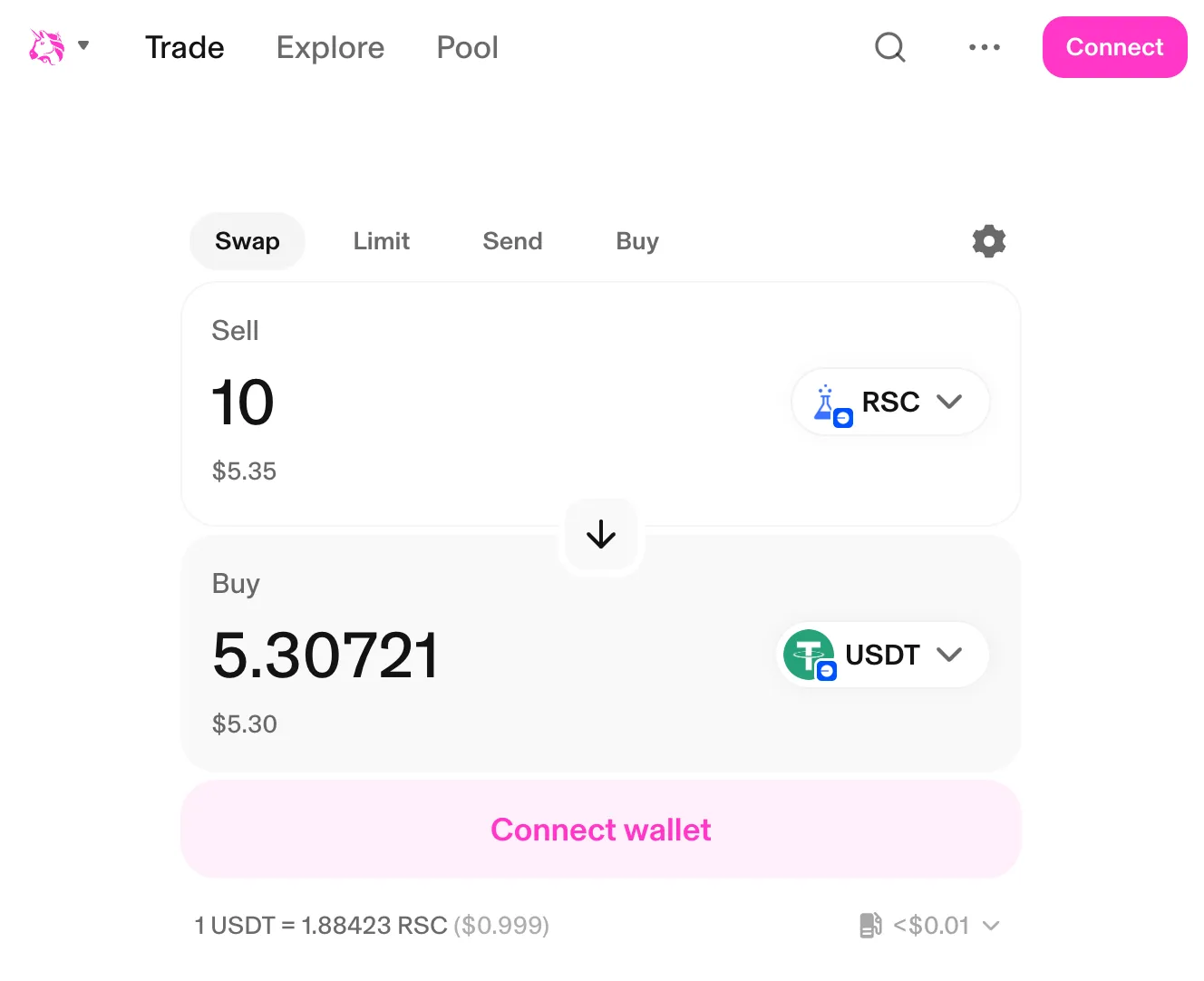
Click [Connect] in the top right of Uniswap and connect the personal wallet you use, such as MetaMask or the OKX Web3 Wallet.
Next, go to the [Trade] section as shown below, and in the [Sell] field, enter the name or contract address of the coin you want to sell. In [Buy], simply select USDT or whichever stablecoin you want to cash out into.
Step 2: Approve the trade and complete the swap
When the trade quote appears, review it and sign with your wallet. Once the swap is complete, all you need to do is send that USDT to an exchange and sell it. This way, you can cash out unlisted coins that aren't officially listed on exchanges.
You can find the exact name and contract of the coin on CoinMarketCap and the project's official website. When you do, make sure the contract isn't a wrong one, and that it isn't a different coin with the same name. Also, be sure to check that there's enough liquidity before swapping.
Wrapping up
MetaMask is a personal wallet that lets you store and send a wide range of coins. It doesn't have a direct cash-out feature, but if you make good use of Korean and overseas exchanges and DEXs, you can convert your assets into cash without much difficulty.
The key here is to get the supported coins and networks exactly right before depositing to an exchange. Also, if you're sending a large amount or aren't yet familiar with transferring assets over a blockchain, be sure to run a test transfer with a small amount first.
Finally, for unlisted coins that aren't listed on Upbit, Bithumb, and similar exchanges, use a DEX or check whether they're listed on overseas exchanges such as Binance, Bybit, Bitget, or OKX. Overseas exchanges support more coins than Korean exchanges, so in many cases you can cash out easily.