How to Do Cross-Chain Swaps and Bridging on PancakeSwap
4 min read · · Korean original
Contents 5
PancakeSwap supports cross-chain swaps across a total of 4 chains, including Ethereum. The others are BNB Chain, Arbitrum, and Base. With PancakeSwap, you can easily bridge and swap assets between these chains in a single click.

PancakeSwap's cross-chain bridging runs quickly and securely on Across Protocol technology, and its advantage is that it is faster and cheaper than other bridges.
What Is a Cross-Chain Swap?
A cross-chain swap is a feature that lets you directly exchange tokens that live on different blockchains. Here are some examples:
- USDT on BNB Chain → USDC on Ethereum
- ETH on Base → WBTC on Arbitrum
In the past, the usual approach was to use a bridge such as Wormhole or LayerZero and then swap on a separate DEX. On PancakeSwap, you can bridge and swap together with just a single click.
| From | To | Example |
|---|---|---|
| BNB | Ethereum | USDT → ETH |
| Arbitrum | Base | WETH → USDC |
| Base | BNB | USDC → BNB |
| Ethereum | Arbitrum | DAI → WBTC |
How Does PancakeSwap Cross-Chain Swap Work?
PancakeSwap cross-chain swaps use Across Protocol. Across Protocol is a fast and efficient bridge infrastructure, and it has been integrated into the PancakeSwap UI.
- Intent-Based Bridge: once the user sets the transfer they want (e.g., ETH → USDC), relayers (Relay Agents) that can handle it the fastest and cheapest process it
- Optimistic settlement based on the UMA oracle
- 30+ relayers compete to process transfers
- Across currently accounts for about 20% of all cross-chain volume ($23B+ cumulative, over 16 million transfers processed)
How Do You Do a Cross-Chain Swap on PancakeSwap?
Here's how to bridge across chains and swap through PancakeSwap.
Step 1. Go to the PancakeSwap website
Visit the official PancakeSwap website using the link below.
Step 2. Select the token and chain you're sending
Under 'From', select the chain you want to bridge and swap from. Here, we'll use $BNB on BNB Smart Chain as an example.

Step 3. Select the token & chain you're receiving
Under 'To', select the receiving chain and asset. Here, we selected $ETH on the Arbitrum network.
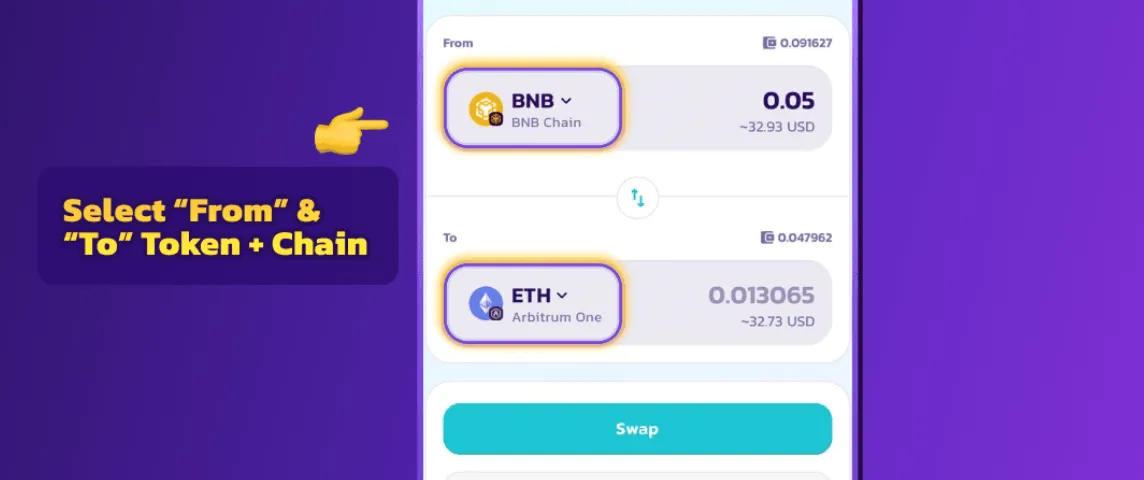
Step 4. Click "Swap"
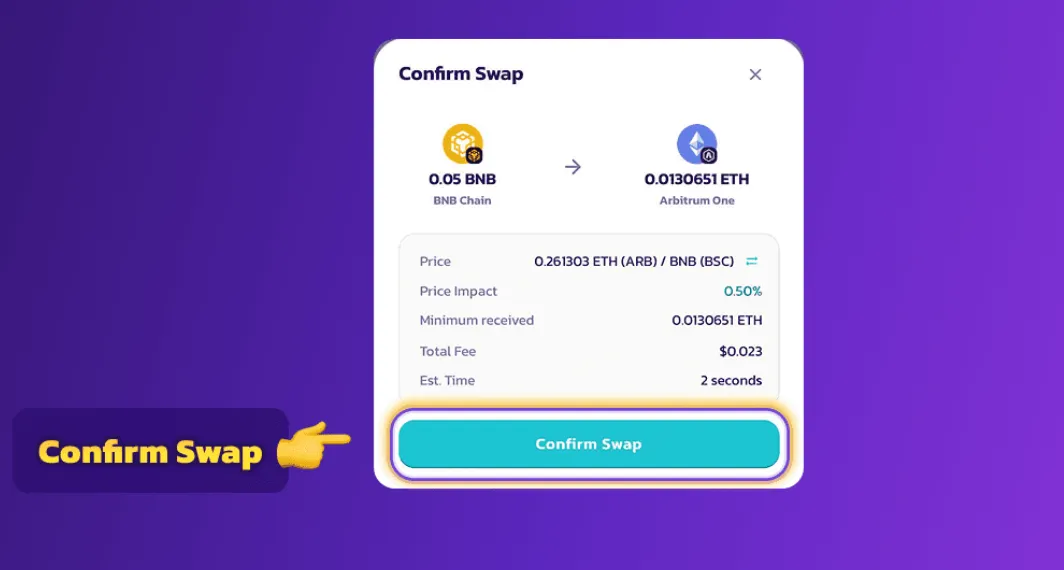
When you click Swap, a confirmation window appears. Once you press 'Confirm Swap', PancakeSwap automatically sets up the transfer route through the Across bridge, and a relayer carries out the transfer.
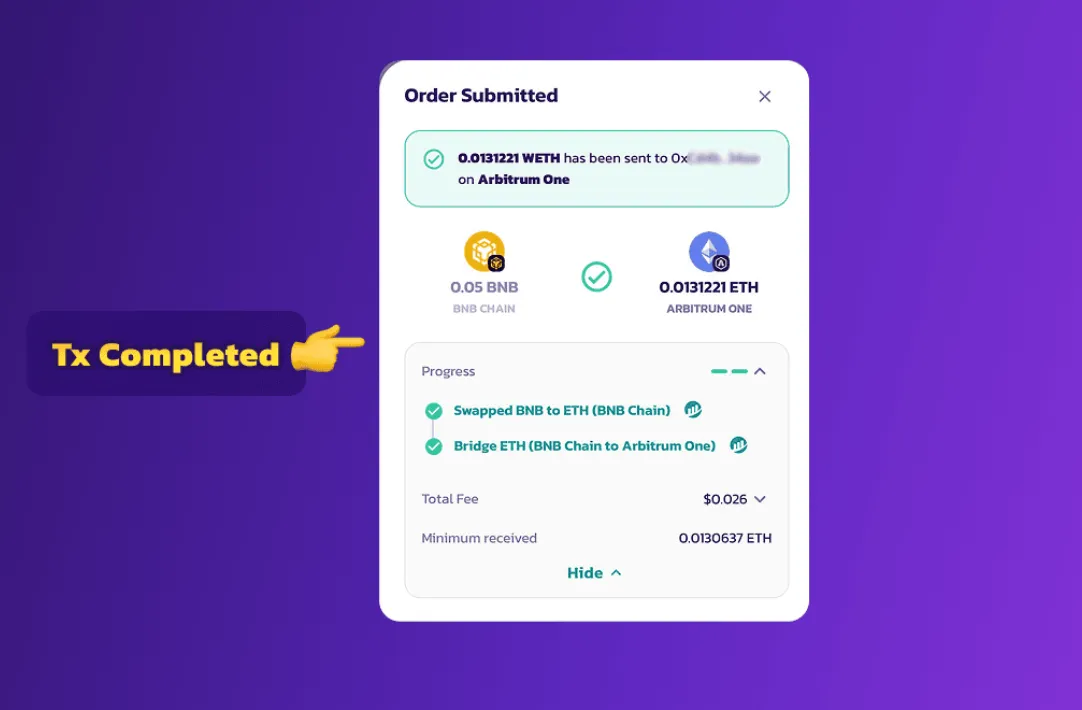
Step 5. Check the completion message
Once the swap is complete, you can see the transaction details as shown below. Bridging and swapping may take a little while.
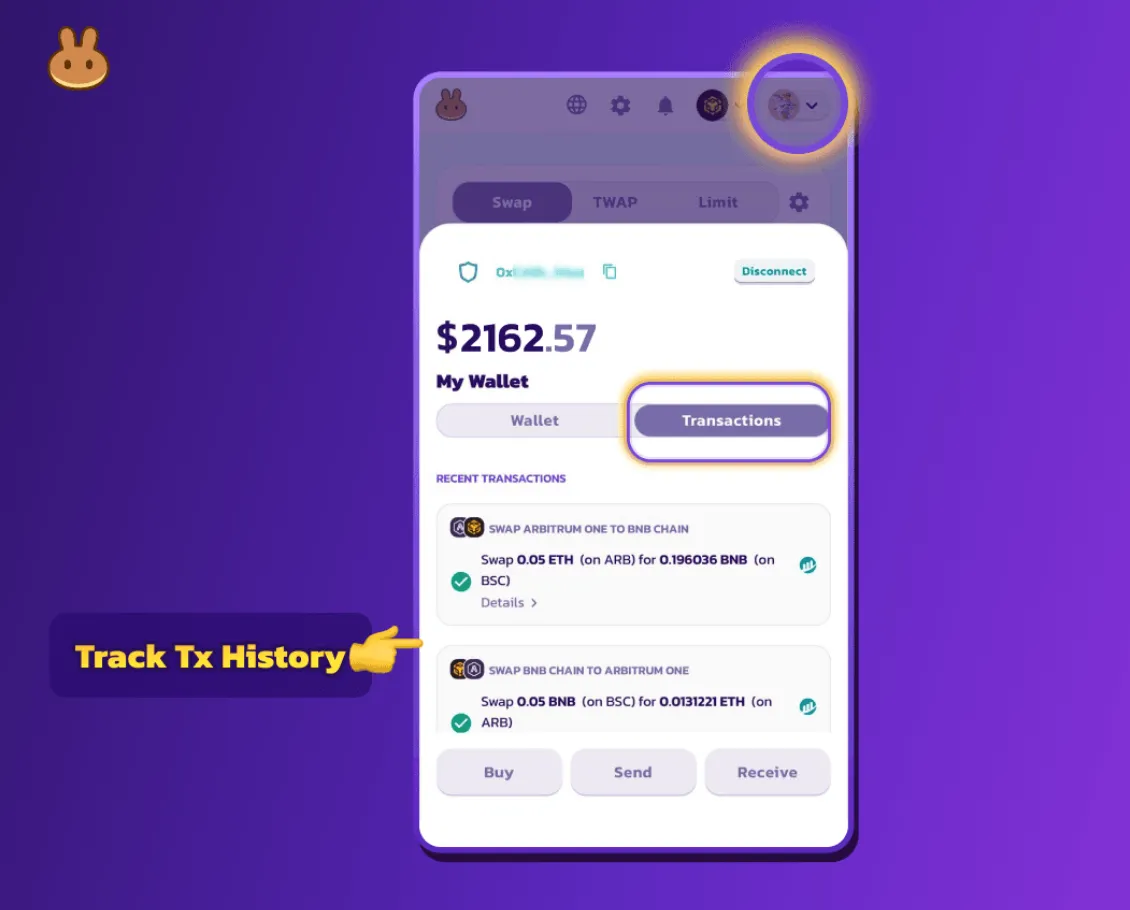
If you want to see the details of a completed transaction, click your profile in the top right and check the 'Transactions' tab.
How Much Are the Bridge and Swap Fees?
PancakeSwap's fees are among the most efficient of any DeFi bridge. Regular token swaps are charged the standard AMM fee of about 0.25%.
| Item | Description |
|---|---|
| PancakeSwap fee | Only the standard AMM fee applies (0.25%, etc.) |
| Bridge fee | Paid separately to Across relayers (calculated automatically based on the market) |
| Security mechanism | Optimistic settlement based on the UMA oracle + distributed processing by 30+ relayers |
| Failure rate | Very low (under 1% based on Across's cumulative transfers) |
When moving between different chains, a separate bridge fee for the Across relayers is calculated automatically based on market conditions and added on top. Because multiple relayers handle this through competitive bidding, the fee is generally cheaper than on other bridges.
Wrapping Up
PancakeSwap's cross-chain bridge and swap feature simplifies "moving and trading between chains," which used to be one of the most tedious tasks for DeFi users. As of June 2025, PancakeSwap fully supports cross-chain swaps on the following networks.
- Ethereum
- BNB Chain
- Arbitrum
- Base
All things considered, PancakeSwap is arguably the best bridge solution in terms of fees, speed, and reliability for beginners and small-amount users who want something easy to use.