How to Register a KB Kookmin Bank Account on Bithumb and Lift the Transfer Limit
4 min read · · Korean original
Contents 7
There has been a big change at the crypto exchange Bithumb. From now on, Korean won (KRW) deposits and withdrawals are only possible through a KB Kookmin Bank account. NongHyup Bank accounts can no longer be used.
From now on, you need to register a KB account not only for deposits and withdrawals but for trading itself. So if you use Bithumb but haven't linked your account yet, we hope you'll follow this tutorial and get it done.
- Starting March 24, 2025, Bithumb's bank for KRW deposits and withdrawals switched to KB Kookmin Bank.
- If you don't register a KB Kookmin Bank account, not only deposits and withdrawals but also trading on the KRW market will be restricted.
- Be sure to also check the points to watch out for, such as lifting limited-account restrictions and reactivating dormant accounts.
Why You Need to Register a KB Kookmin Bank Account
Starting March 24, 2025, existing NongHyup accounts can no longer be used, and only KB Kookmin Bank accounts can be registered. If you don't register an account, you can't deposit or withdraw KRW, and you can't trade any coins, including Bitcoin and Ethereum. So if you want to keep using Bithumb, you must link a Kookmin Bank account.
How to Link a Kookmin Bank Account to Bithumb
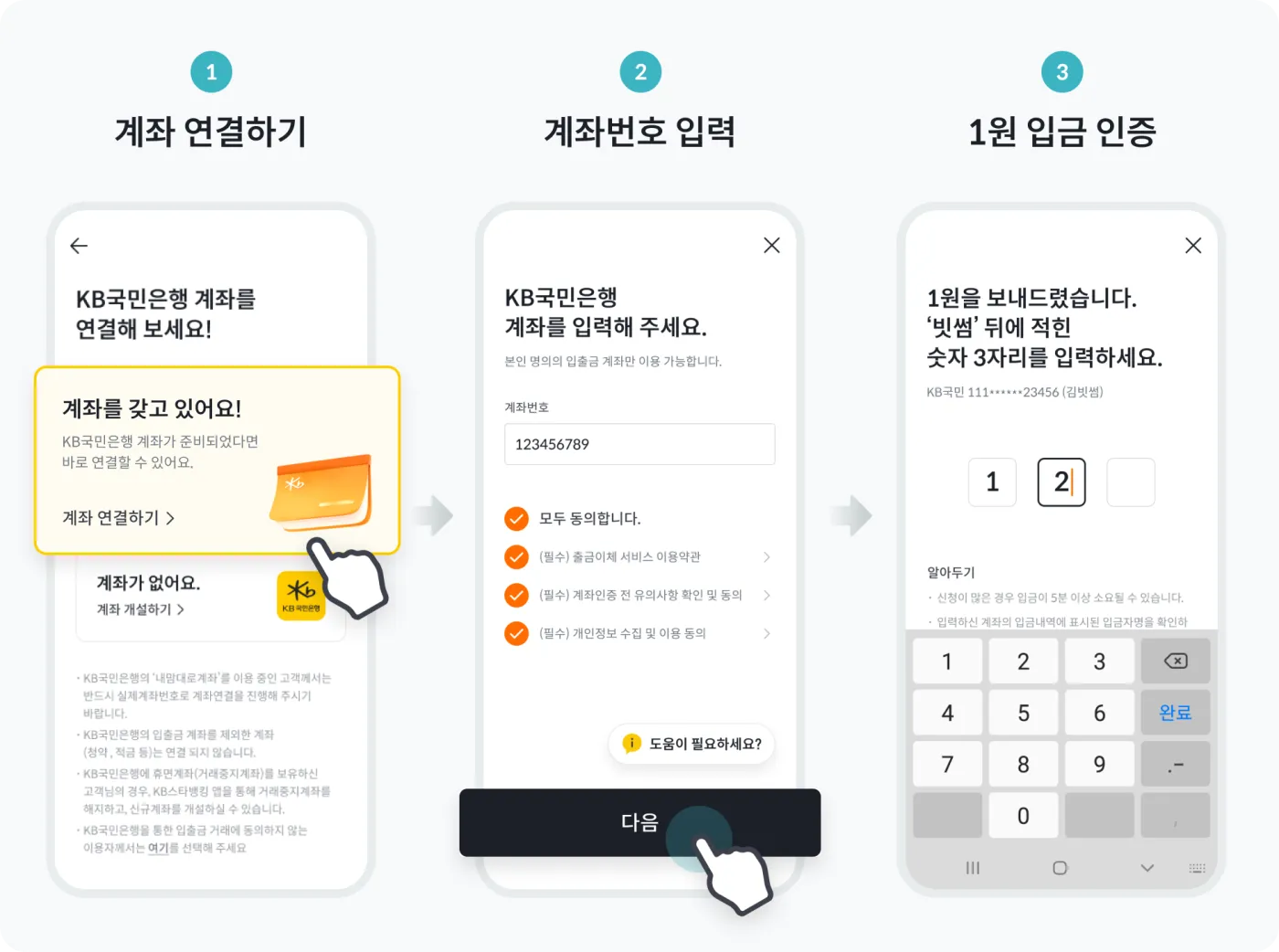
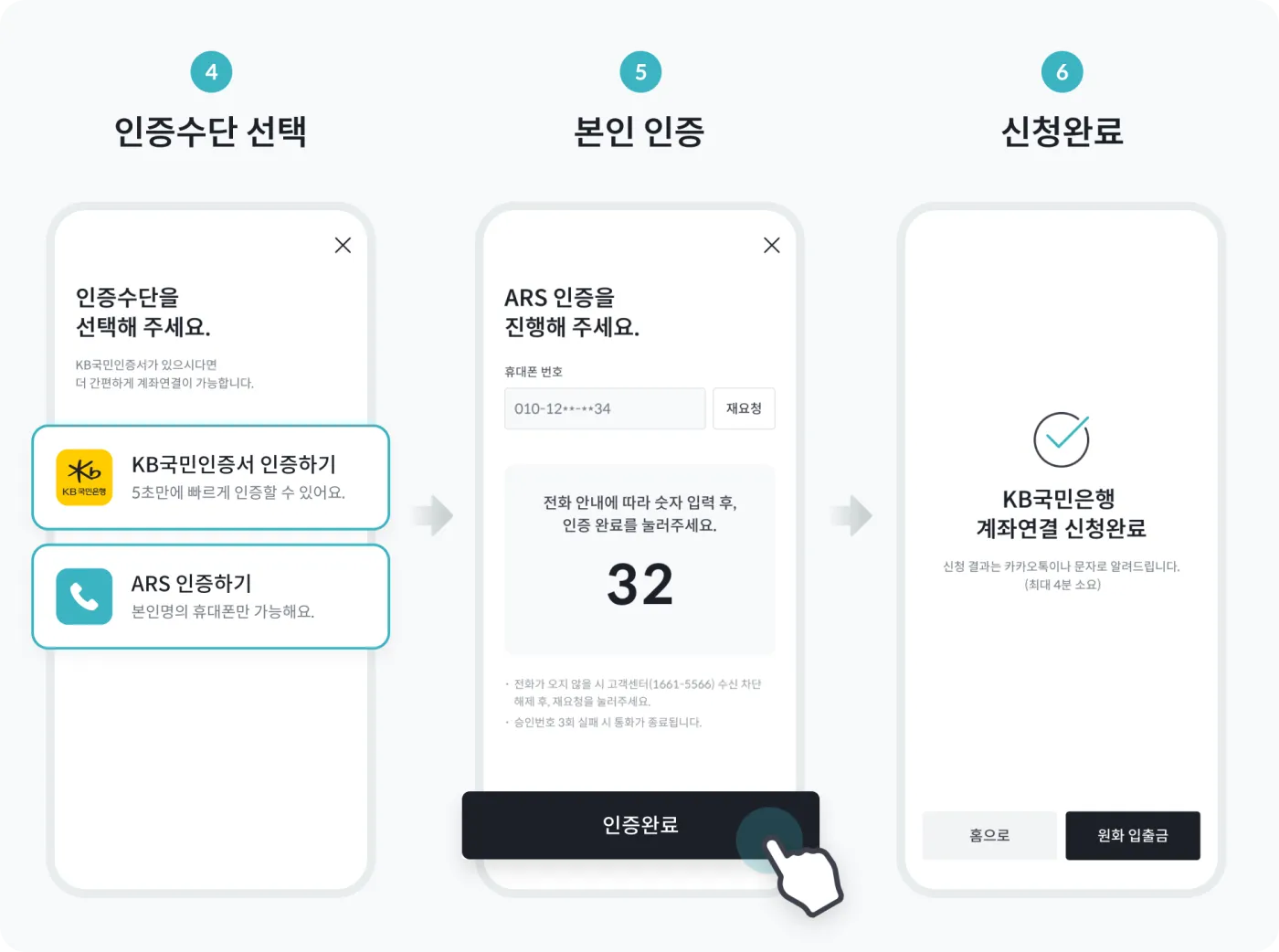
Here's how to link a Kookmin Bank account to the Bithumb exchange. First, log in to Bithumb and go to the [Deposit/Withdrawal] menu. Then click KRW, and you can proceed with linking your KB Kookmin Bank account as shown below.
What If You Don't Have a KB Kookmin Bank Account?
If you don't have a Kookmin Bank account, you can open your 'first account' remotely through the KB Star Banking mobile app. Download 'KB Star Banking' from the app store and go through the account opening process. In this case, the account is first created as a limited account, with limits of KRW 1,000,000 per day for non-face-to-face withdrawals and KRW 3,000,000 for withdrawals at a branch counter.
KB has something called the ‘Custom Account Number’ (내맘대로 계좌). It's a system that links a number of your choice to your actual account number. This account can't be registered on Bithumb, so be sure to sign up and register using your actual account number.
How Do You Lift the Transfer Limit?
If you've opened an account but it has a transfer limit, you can apply to have the limit lifted through the path below. In the KB Star Banking app, go to 'All Menu' → 'Inquiry' → 'All Accounts' → 'More Menu' → 'Lift Transfer Limit' and submit your request.
If you already have a sufficient crypto trading record with your previous NongHyup account, your request to lift the limit may be approved right away in KB Star Banking or internet banking. If you don't have a trading record, you'll need to build one with your KB account after March 24, 2025, and then apply to have the limit lifted.
What If You Have a Dormant Account?
What if you used to have a KB Kookmin Bank account, but it's now dormant? You can reactivate it remotely. However, to clear dormant status remotely, your existing deposit account needs to have a certain amount of funds in it. If the balance is below the interbank transfer fee, you can't do it remotely. In that case, it's a hassle, but you'll need to visit a KB branch in person.
What If You Don't Want to Use KB Kookmin Bank?
If you don't want to register with Bithumb through a KB Kookmin Bank account, you can request a withdrawal of your KRW assets on Bithumb to an account at another bank. In this case, you can contact the Bithumb customer center (1661-5566) directly to have it processed.
Wrapping Up
That covers how to link a KB Kookmin Bank account to the Bithumb exchange and apply to lift the transfer limit. As Bithumb has switched its partner bank from NongHyup Bank to Kookmin Bank, only users who have registered a Kookmin Bank account will be able to deposit and withdraw KRW and trade crypto from now on.