How to Margin Trade with Bithumb's 'Coin Lending': Leverage and What to Know Before You Use It
7 min read · · Korean original
Contents 6
Hello, this is Bitpunk. In this post, we'll look at how to do 'margin trading' using the Coin Lending (Lending Plus) service on the Bithumb exchange.
We'll also go over everything you need to know about Bithumb's coin lending service, including exactly how it works, how to use it, the auto-liquidation threshold, leverage ratios, and the risks involved.
- Lending Plus is Bithumb's official service that lets you put up collateral and borrow coins for margin trading.
- Borrowed coins can only be traded within Bithumb and cannot be withdrawn externally.
- You must understand the key risks, such as auto-liquidation (repayment level 1.07), fees, and sharp price swings, before using it.
1. What Is Coin Lending, or 'Lending Plus'?
'Coin Lending' or 'Lending Plus' is a loan service offered by Bithumb that lets you borrow other coins using the assets you hold (KRW, Bitcoin, etc.) as collateral. This allows you to carry out margin trading strategies such as leveraged 'long' or 'short' positions on the Bithumb exchange.
Coins borrowed through the coin lending service cannot be withdrawn and can only be used within the Bithumb exchange. In addition, fees start accruing the moment you take out the loan.
The basics of the coin lending service are as follows, and you must be familiar with them before using the service. In particular, it's important to check the related fees and the auto-liquidation threshold carefully.
| Item | Description |
|---|---|
| Eligible collateral | Major assets such as KRW, BTC, ETH |
| Coins available to borrow | 10+ coins including BTC, ETH, XRP, USDT |
| Lending period | Up to 30 days (early repayment possible at any time) |
| Maximum lending limit | Up to KRW 500 million (varies by membership tier) |
| Withdrawal | No external withdrawal; usable only within the Bithumb exchange |
| Daily fee | 0.05% (accrues cumulatively) |
| Auto-liquidation fee | 1–1.5% (based on collateral assets) |
| Auto-liquidation threshold (repayment level) | Automatically liquidated when the repayment level is 1.07 or below |
2. How Can You Use the Coin Lending Service?
Bithumb's coin lending service can be used for 'leveraged buying' or 'leveraged selling' strategies. Each strategy can broadly be divided by bull market or bear market, as follows.
(1) Bull Market: Leveraged Buying
- This strategy involves borrowing additional funds on top of your own assets to buy more coins.
- For example, if you expect BTC to rise, you can borrow USDT and buy more BTC.
- If it works, your profits are larger, but if the price falls, your losses grow as well.
| Item | Example |
|---|---|
| Collateral | Holding BTC worth KRW 50 million |
| Borrowed asset | Borrow 20,000 USDT (worth KRW 30 million) |
| Strategy | Buy additional BTC (leveraged buying strategy) |
| Period | 14 days |
| Repayment method | After the price rises, sell 0.25 BTC, then buy back USDT to repay |
(2) Bear Market: Short-Selling Strategy
- If you expect a particular coin to fall, you can borrow that coin and sell it.
- Then, when the price has dropped, you can buy it back to repay the borrowed coins.
- This strategy can be used when you expect a correction or want to open a short on a specific coin.
For example, let's say you hold Bitcoin on the Bithumb exchange and expect Ethereum to fall. In this case, you can borrow Ethereum using your Bitcoin as collateral, sell it, and then buy it back later to successfully execute a short strategy.
| Item | Description |
|---|---|
| Collateral | 1 BTC (at a price of KRW 150 million) |
| Borrowed asset | 10 ETH (worth KRW 40 million) |
| Outlook | Short ETH (expecting a decline) |
| Period | 30 days |
| Repayment | After the drop, buy ETH and repay the borrowed amount |
3. How to Use the Coin Lending Service: Step-by-Step Guide
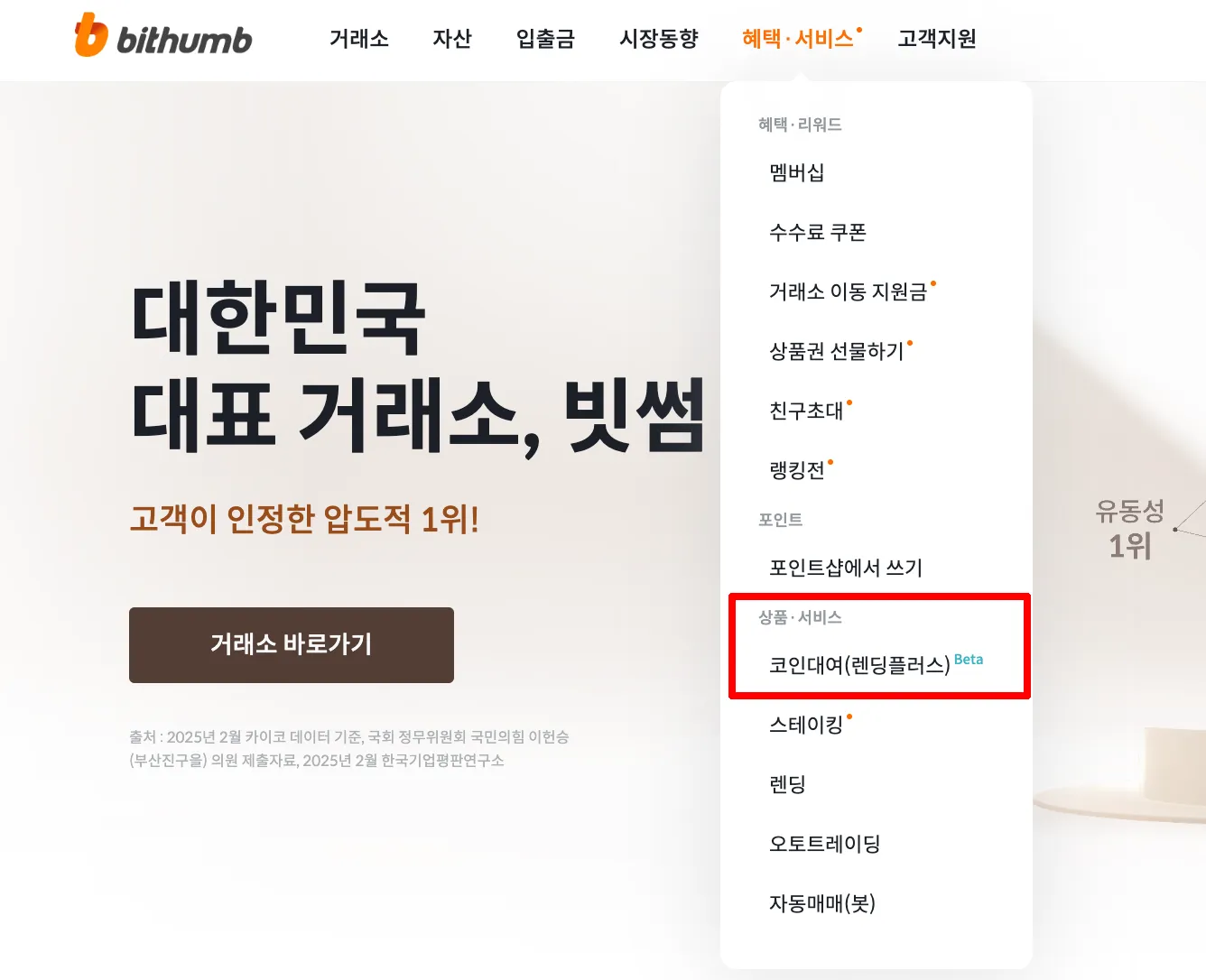
Step 1. Log In and Open the Service
- Log in to the Bithumb app or website
- Click the top menu → [Benefits & Services] → [Coin Lending (Lending Plus)]
- Bithumb new sign-up link (KRW 50,000 bonus)
Step 2. Check the Eligibility Requirements
- The coin lending service is available only to members at the 'White' membership tier or above
- You must also meet a trading volume requirement of at least KRW 10 million over the past month
Step 3. Start Your Application
- Agree to the terms and type out the service notice yourself
- Take a quiz to confirm you understand the basic concepts
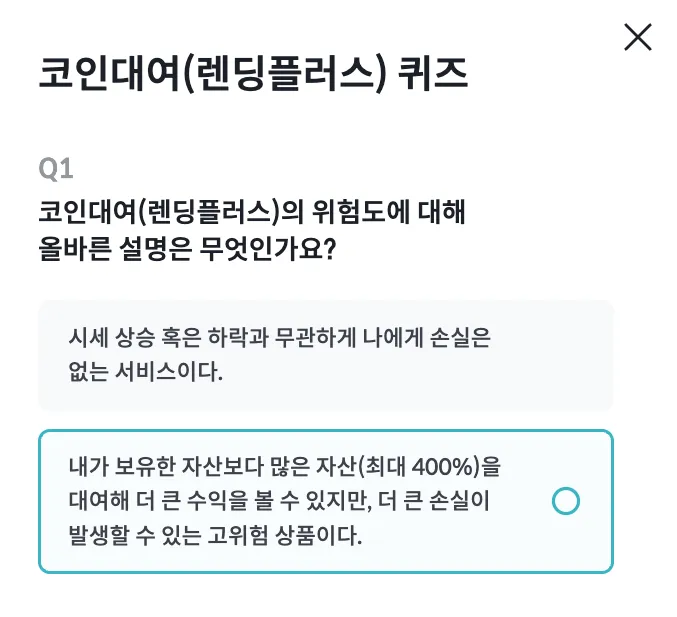
Step 4. Apply for a Loan and Start Trading
- Set the coin to borrow, the quantity, and the period
- Collateral is calculated automatically → application complete
- Borrowed coins are deposited to your account immediately and can be traded (withdrawal is not possible)
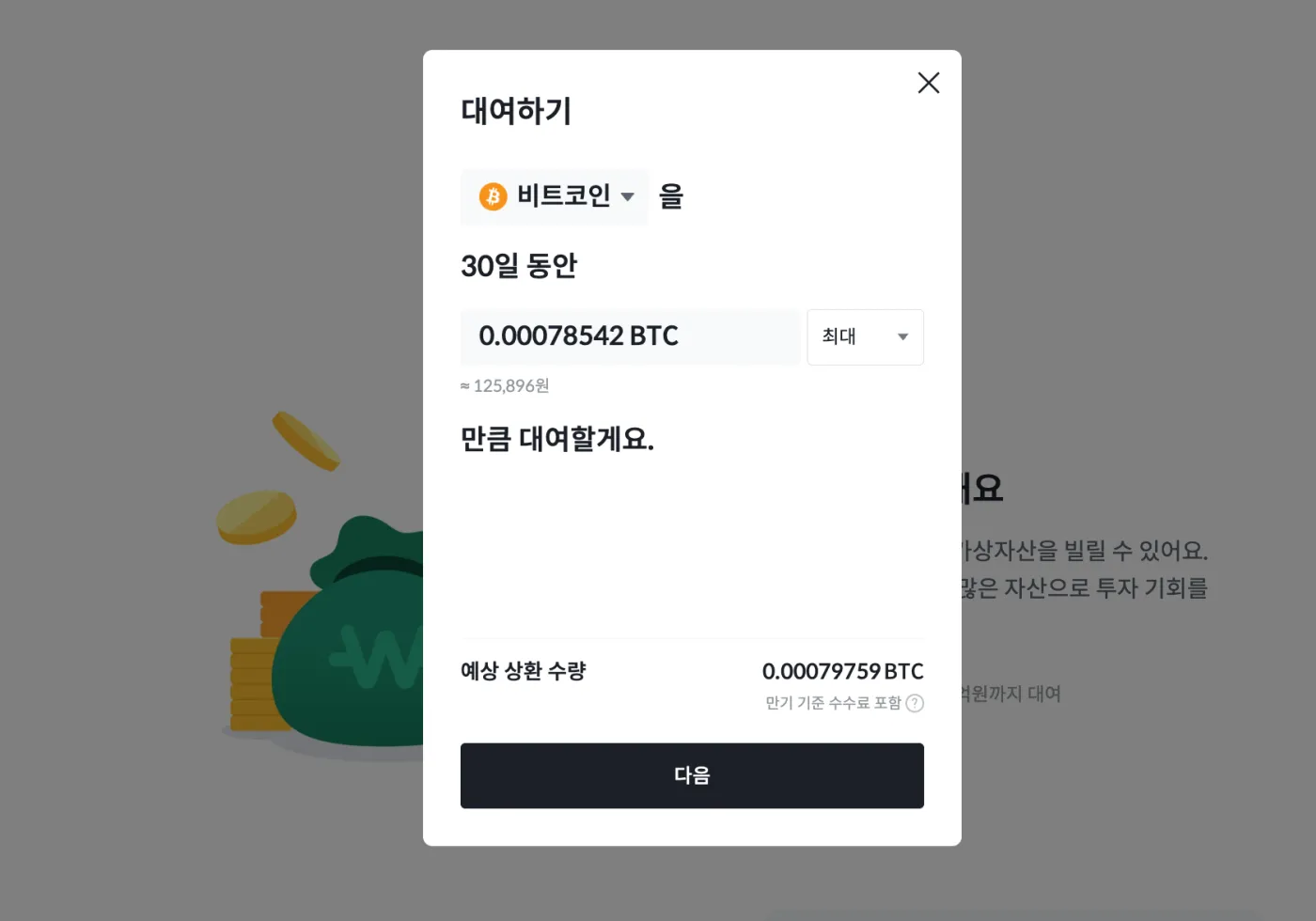
Step 5. Repay
You can repay the borrowed coins yourself at any time if you wish. To repay, you need to hold the required number of coins in your account, and fees are charged based on the period.
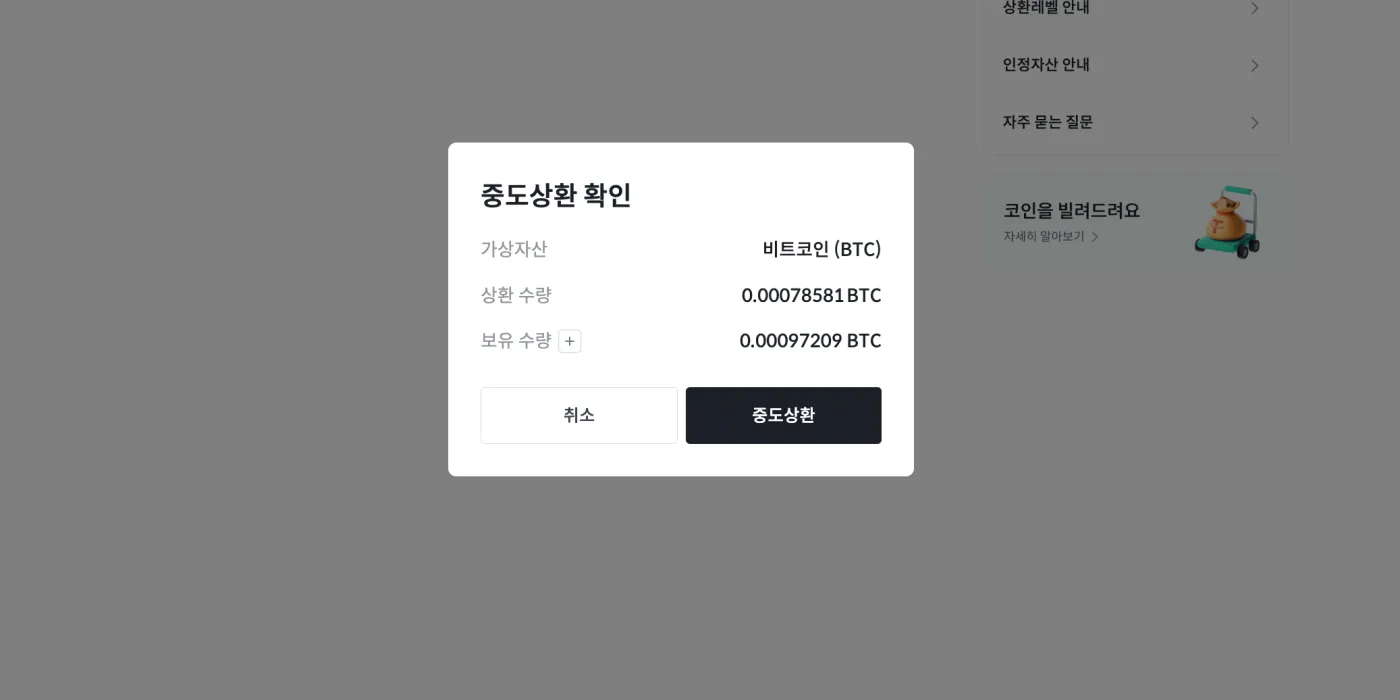
If 30 days pass after borrowing, repayment at maturity is processed automatically. You can check detailed information about your borrowed coins on the 'Coin Lending (Lending Plus)' page.
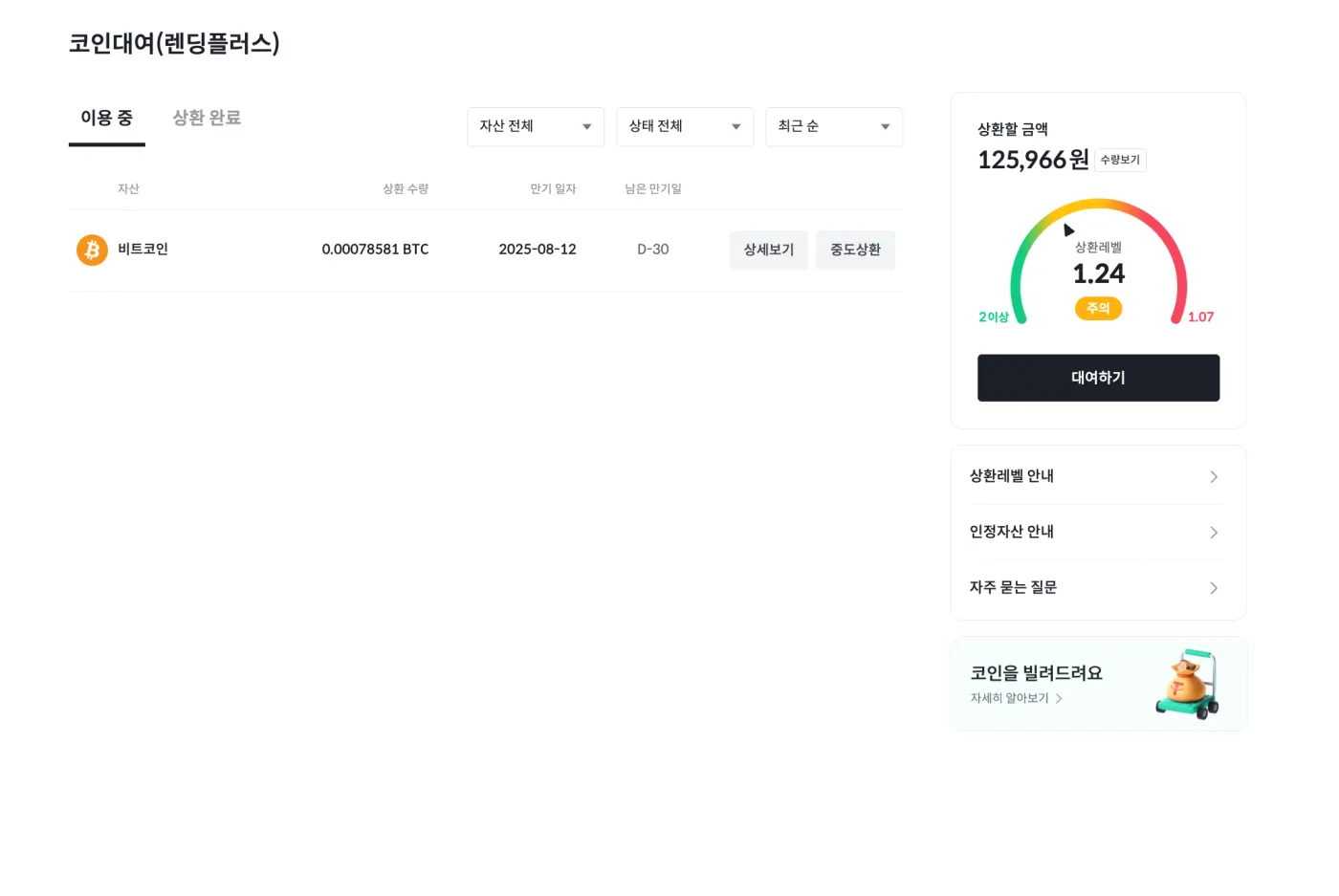
4. What Are the Repayment Level and Liquidation?
The repayment level is what determines auto-liquidation. If the repayment level falls to 1.07 or below, all of your collateral is sold at market price. A risk management fee of 1–1.5% is also charged. So it's important to manage your repayment level carefully to avoid being liquidated.
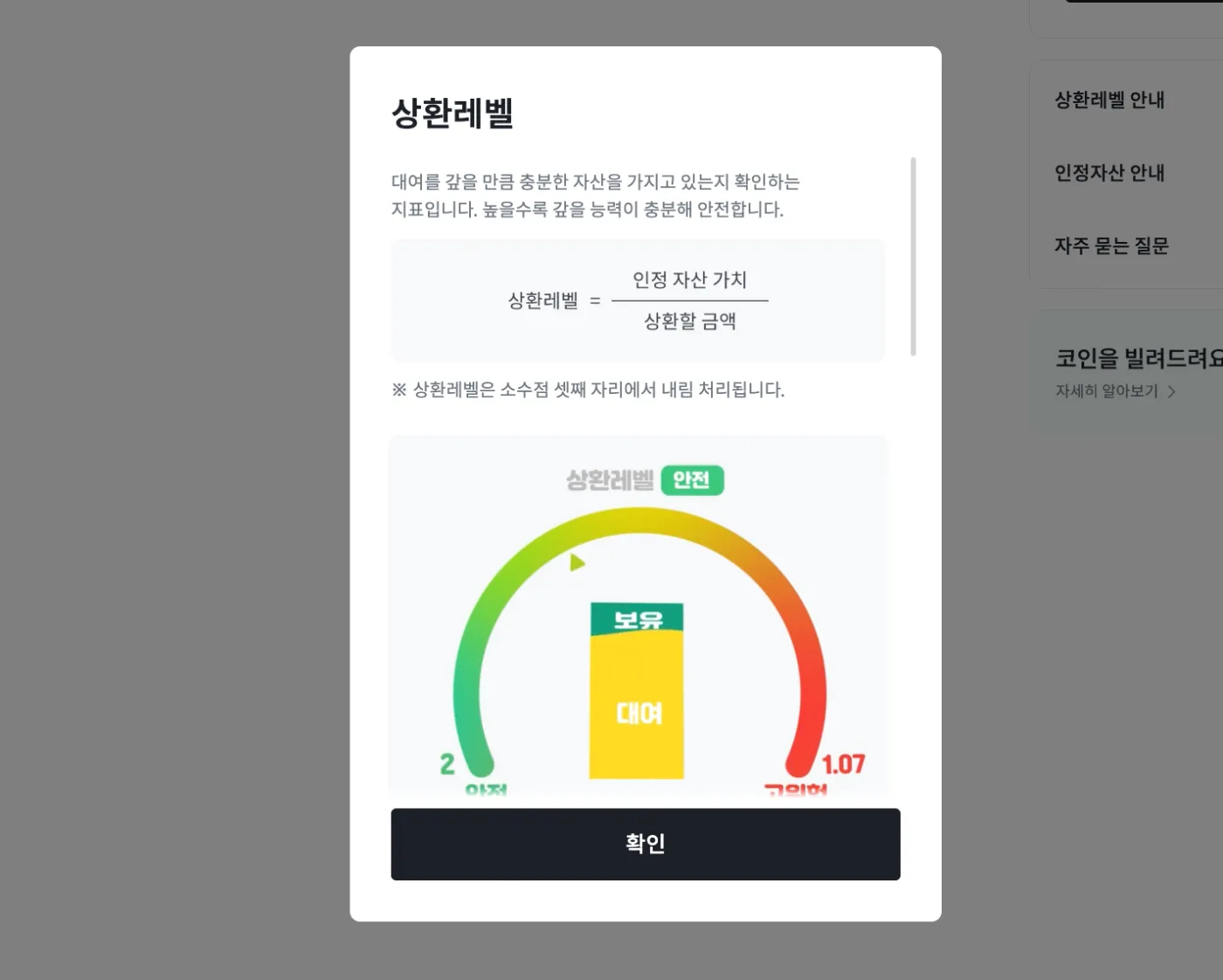
The repayment level is calculated as (recognized asset value ÷ amount to be repaid). Working backward, this means you could be liquidated if the value of your collateral drops by about 7%.
However, taking fees and volatility into account, you could say there is a risk of liquidation if the price drops by roughly 6.5%. Bithumb recommends keeping your repayment level at 1.2 or higher.
5. Frequently Asked Questions (FAQ)
- Q1. How do I apply?
- After logging in to Bithumb, you can apply under 'Coin Lending (Lending Plus)' in the 'Benefits & Services' menu. To apply, you need to agree to the terms, write out the notice, and pass a quiz on your understanding of the service.
- Q2. Which coins can I borrow?
- Currently, you can borrow a total of 10 digital assets, including USDT, BTC, ETH, XRP, SOL, ADA, ONDO, PEPE, SUI, and DOGE. However, borrowing may be temporarily restricted if the funding limit is exhausted, and the list may change or expand in the future.
- Q3. What is the maximum lending period?
- Up to 30 days, and early repayment is possible at any time.
- Q4. What is the lending limit?
- It varies by membership tier, and you can borrow up to KRW 500 million.
- Q5. What are recognized assets?
- Recognized assets are the portion of your collateral's value that counts toward calculating your lending limit. This value changes with real-time prices and is a key standard for valuing your collateral.
- Q6. What are the fees for the coin lending service?
- The daily fee is 0.05%, and if auto-liquidation occurs, a fee of 1% up to a maximum of 1.5% is charged.
- Q7. Can I withdraw the coins I borrowed?
- Digital assets borrowed through lending cannot be withdrawn and can only be traded within the Bithumb exchange.
- Q8. Can I buy more collateral while I have a loan open?
- Yes. Raising your repayment level by buying more can reduce your liquidation risk.
- Q9. How does repayment work?
- Repayment takes place in one of three ways: early repayment, repayment at maturity, or auto-liquidation. If you don't have the assets to repay, your collateral is automatically sold to settle the loan.
- Q10. How does auto-liquidation work?
- Liquidation occurs when the value of your collateral falls below a certain level, and the system sells collateral assets sequentially to prevent cascading liquidations.
- Q11. Can anyone use it?
- Only members with a Bithumb membership tier of ‘White’ or above who meet certain trading volume requirements can use it. In addition, you must agree to the terms and pass the comprehension quiz to use the service.
6. Wrapping Up
Bithumb's Coin Lending (Lending Plus) service is a way to do margin trading on a Korean exchange. However, margin trading comes with high fees as well as the risk of liquidation.
So before doing leveraged trading through the coin lending service, it's important to understand that it is a high-risk product and to fully understand how the service is structured.
Used well, the coin lending service can bring higher returns, but your losses can also grow larger. If you use this service, it's recommended that you manage your repayment level carefully and avoid using excessive leverage.