How to Create a Klip Wallet with KakaoTalk
2 min read · · Korean original
Contents 4
In this post, I'll walk you through how to easily create a Klip wallet using KakaoTalk. It only takes about 3 minutes to set up a Klip wallet, so follow along to the end!

What Is a Klip Wallet? 📎
A Klip wallet is a convenient tool for storing and trading cryptocurrencies such as Ethereum and Klaytn. Since all you need is KakaoTalk to set it up, it's a popular mobile wallet for quick and easy transactions.
How to Create a Klip Wallet 👛
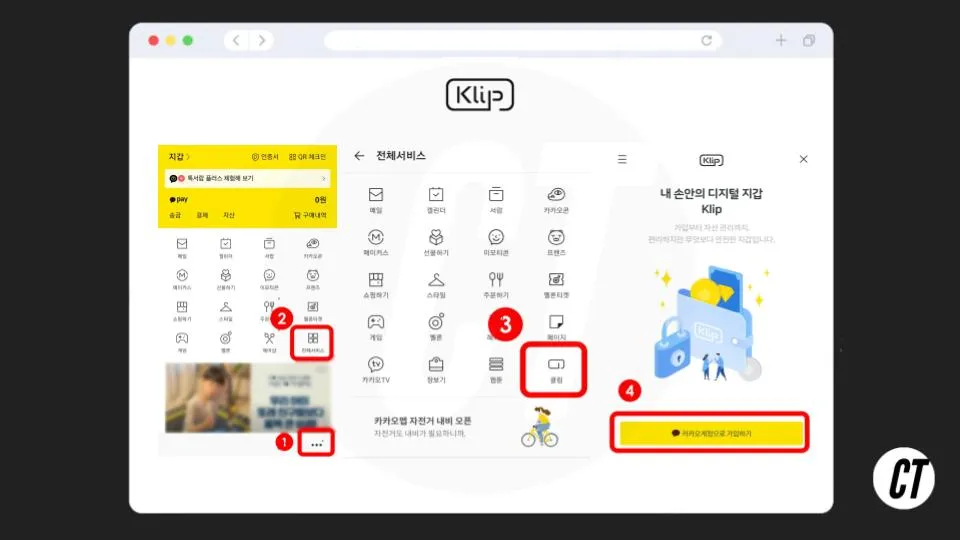
Step 1: Open the KakaoTalk App
The very first thing to do is open the KakaoTalk app. Once KakaoTalk is open, tap the "More" button at the bottom right.
Step 2: Tap All Services
After selecting "More," find and tap "All Services."
Step 3: Select Klip
Next, find "Klip" and tap it.
Step 4: Sign Up with Your Kakao Account
You'll see a button to sign up with your Kakao account. Go ahead and tap it.
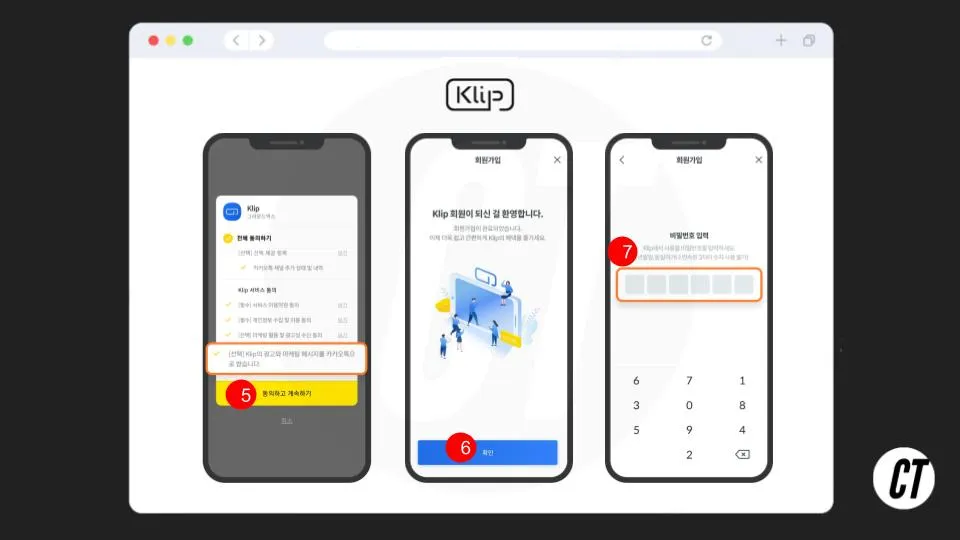
Step 5: Agree to the Terms and Continue
You can check [Agree to All] to proceed right away, or you can proceed while leaving out the [Optional] marketing information item at the very bottom.
Steps 6–7: Wallet Created and Password Setup
Your Klip wallet has been created. Now just enter the 6-digit numeric password you'll use for Klip, and you're all set.
How to Use Your Klip Wallet: The Basics 👼
Now that your Klip wallet is set up, let's check your wallet address. Your address is used when receiving cryptocurrency from others. Here's how to find it:
- Tap the View My Address button: On the Klip wallet screen, tap the "View My Address" button to see your address.
- Copy your address: Tap the menu at the top left, copy your address, and paste it wherever you need it.
To send cryptocurrency with Klip, just follow these steps:
- Send Tokens: On the Klip wallet screen, select "Send Tokens."
- Enter the wallet address and send: Enter the wallet address you want to send to, or upload a QR code image. It's important to double-check that the address is entered correctly. If everything looks right, tap Confirm.
- Send to a KakaoTalk friend: You can also easily send to any of your KakaoTalk friends who have a Klip wallet. Use "Select KakaoTalk Friend" to check and send.
Wrapping Up ✍️
We've gone over how to create a Klip wallet through KakaoTalk in a few simple steps, and how to manage and send cryptocurrency with it. Go ahead and create your own easy-to-use Klip wallet with KakaoTalk right now!