How to Get an Extra 25% Off Binance Fees | Setting Up BNB Fee Payment
3 min read · · Korean original
Contents 5
Did you know that if you use BNB coin when trading on Binance, you can get up to an extra 25% off the standard fees?
In this post, we'll take a detailed look at how to enable the "Pay fees with BNB" option on the Binance exchange.
To get the "BNB extra discount" on Binance, you need to change the fee option in your account yourself. Simply holding BNB does not apply the discount.
How do you set up the extra BNB fee discount?
Let me walk you through the settings for getting an extra fee discount with BNB on the Binance exchange. First, on PC: log in to Binance and go to the fee page.
Scroll down a bit and you'll see an item called "BNB Discount." Turn that button on. The toggle needs to light up yellow, as shown below, for you to pay fees with BNB and get the 25% discount.
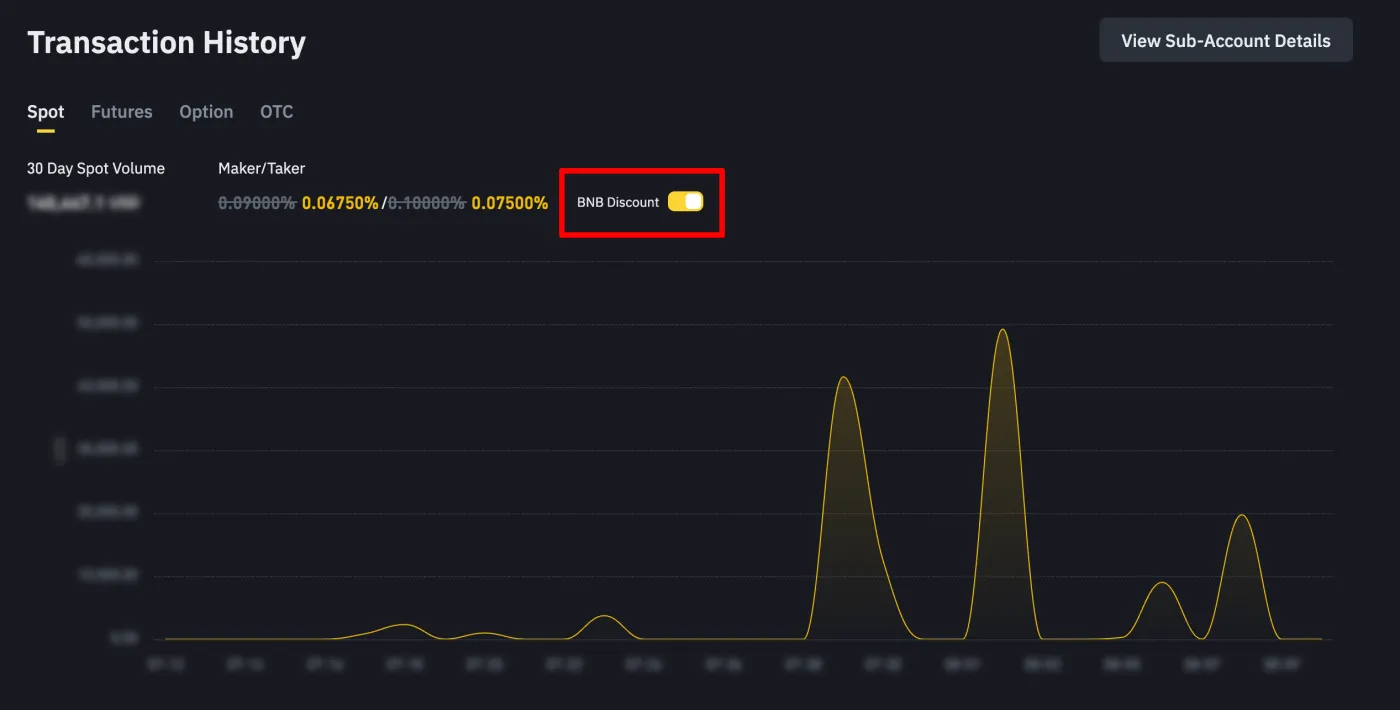
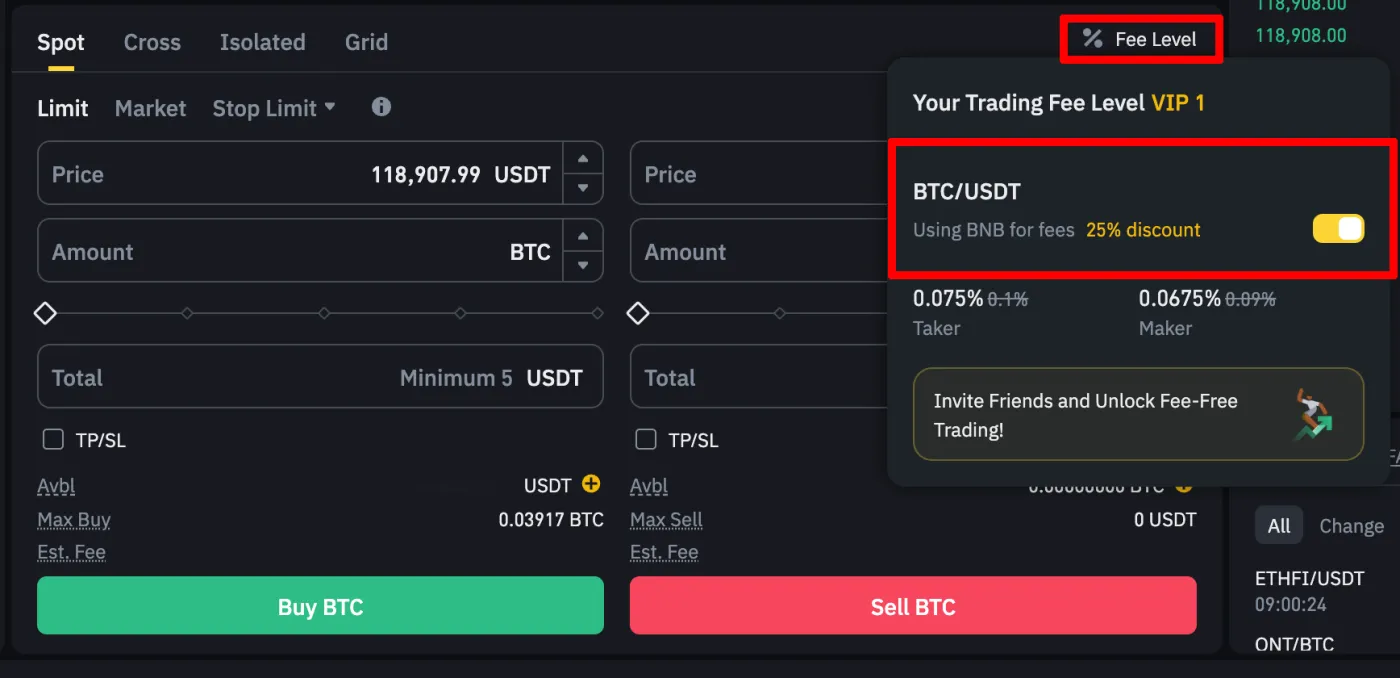
For this account, the 25% discount is applied to the standard taker fee of 0.1%, so it shows a fee of 0.075%.
You can also enable the BNB fee payment option from the fee settings on Binance's spot and futures trading pages. Click "Fee Level" at the bottom and turn on the BNB fee discount option (Using BNB for fees).
How do you set it up in the Binance app?
If you use the smartphone app, you can enable the BNB fee discount in your account settings. After logging in to your account, tap the Binance icon at the top to go to the account settings page.
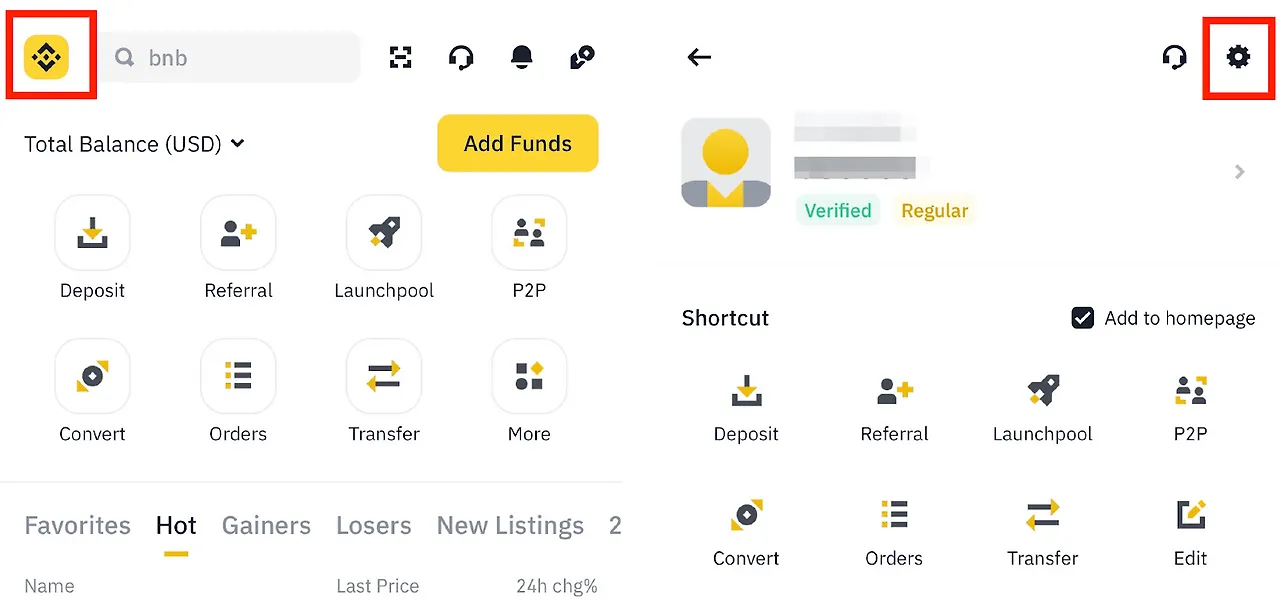
The "Settings" option will appear. Go down to "BNB Discount" and you'll see the "Using BNB" options. Here you can choose from various fee discount options using BNB.
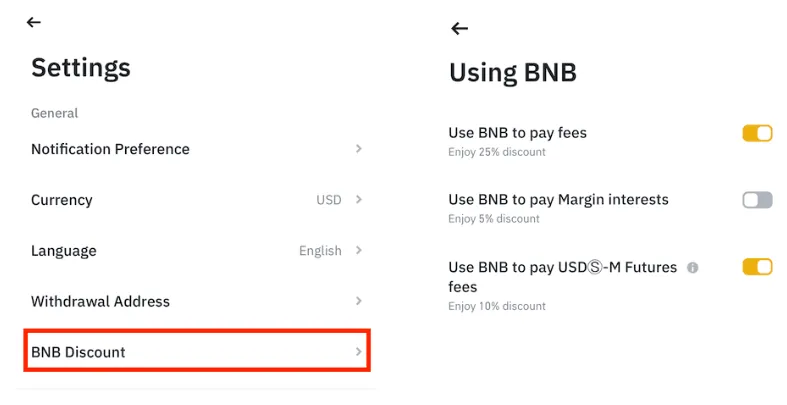
The BNB fee discount can be used to pay spot trading fees, margin loan interest, and futures trading fees. Want the discount on spot and futures trading, the most commonly used options?
Then just select "Use BNB to pay fees (25% off spot)" and "Use BNB to Pay USD-M Futures fees (10% off futures)" as shown above.
How do you pay fees with BNB?
To pay fees with BNB coin, you need to hold BNB in your spot or futures wallet. Once you've finished setting up BNB payment as described above, the BNB you hold will be automatically deducted for fees from now on.
If you've used up all the BNB you hold, regular fees will be charged even if the button is on. So, if you want to keep saving on fees, it's important to make sure you have enough BNB before trading.
How do you get 45% off Binance fees?
Besides getting 25% off fees with BNB coin, you can also get a trading fee discount by entering a referral ID when you sign up for Binance. Combined with the BNB discount, that's a powerful discount of up to 45%.
When signing up, enter ABV8BWDG in the referral ID field yourself. Or, click the link below to go to a sign-up page with the 20% fee discount already applied.
- Sign up for Binance (20% fee discount): https://www.binance.com/join?ref=ABV8BWDG
Wrapping up
That covers how to enable the BNB fee payment option on the Binance exchange. When you pay fees with BNB on Binance, you can get 25% off spot fees and 10% off futures fees.
On top of that, using a special referral code when you sign up gets you a 20% fee discount. This way, you can get up to 45% off your final fees when trading on Binance.