How to Update Your ID Information on Binance (Changing KYC/Identity Verification)
4 min read · · Korean original
Contents 3
Identity verification (KYC) is mandatory on the Binance exchange. Users who haven't completed identity verification can't trade, deposit, or withdraw on the exchange. So whenever your existing identity information changes, for example when you get a reissued ID, it's a good idea to update it on Binance as well.
In this post, we'll look at the situations in which you need to update your identity verification information on Binance, along with a detailed guide on how to do it.
1. Situations That Require an Identity Information Update
You should update your identity verification information in the following situations. Not updating right away won't immediately cause problems, but it's a good idea to keep your information up to date in advance for account security and smooth use of the exchange.
| ID expired | Submit your newly issued ID |
| Name change | Official legal documents required |
| ID number change | Update the new number after reissuance |
| Nationality change | Submit a new ID and nationality documents |
| Language change | Submit an ID in a language the system can recognize (English) |
1.1 ID Expired
When the ID card or passport registered on Binance has expired, you must update your new ID information. An expired ID is no longer valid, so if you don't renew it in time, your account use may be restricted.
1.2 Name Change
If your name has been legally changed due to marriage, divorce, or other legal reasons, you also need to update your identity information. If the name on your ID doesn't match the name on your Binance account, your account use may be restricted.
1.3 ID Number Change
If your ID card or passport has been reissued with a new number, you should update it immediately. Your passport number in particular is important identity information internationally, so if it changes, it's important to update it quickly for your safety.
1.4 Nationality Change
You also need to update your identity information when your nationality changes. In this case, you must submit an ID or passport that matches your new nationality. However, a change of nationality may be affected by specific regulations or policies required by Binance, so it's best to check the exact information beforehand and then proceed.
1.5 Language Change
If your existing ID is in a language the Binance system can't recognize, you need to submit an ID in a recognizable language (usually English).
2. How to Update Your Identity Verification Information on Binance
The process for updating your identity verification information on Binance is as follows. Follow the step-by-step guide below to update your ID information to the latest details and use the exchange safely.
2.1 Log In and Go to the Profile Page
First, log in to your Binance account. Next, go to the Identity Verification Update page to start changing your identity information.
2.2 Select the Reason for the Update
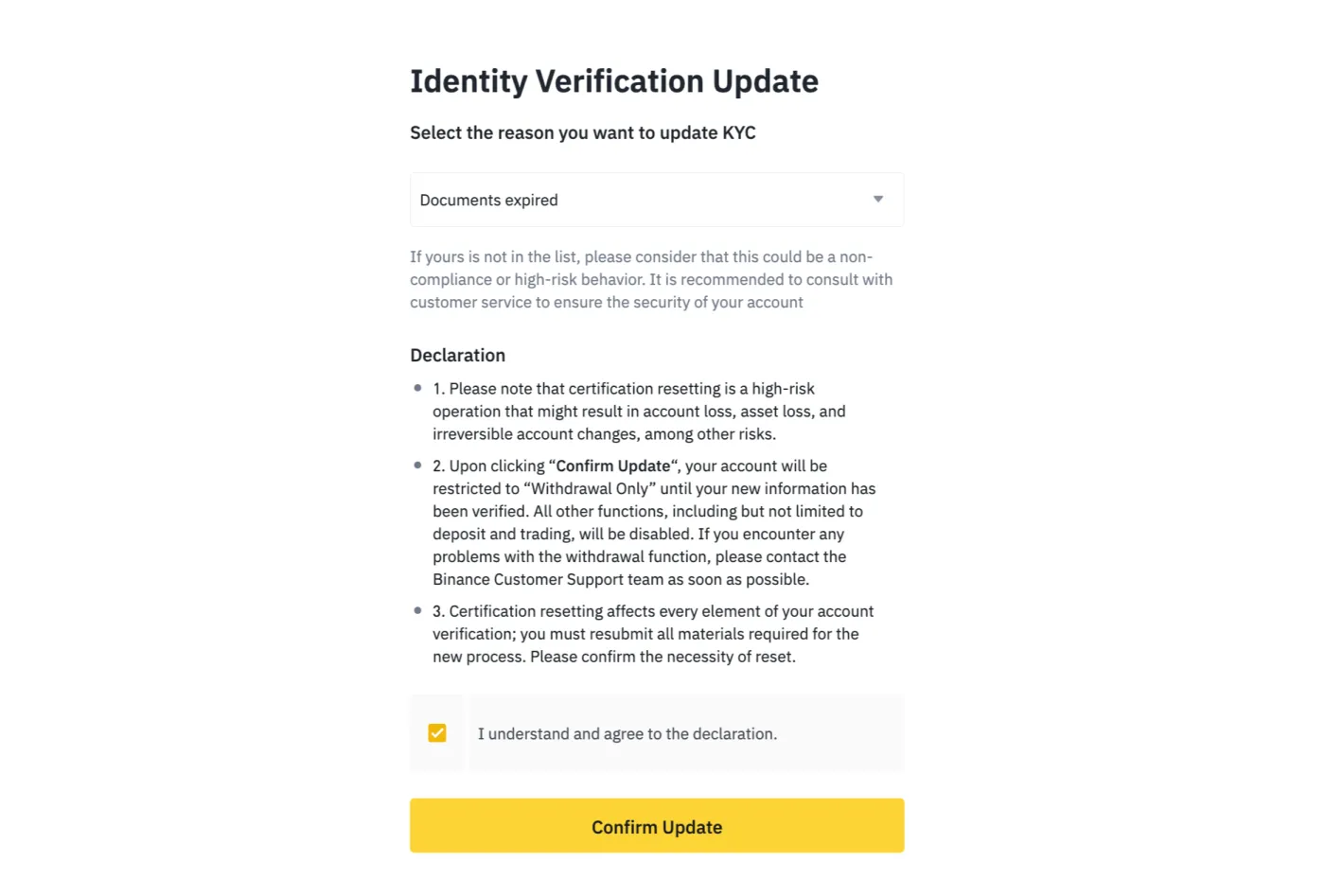
On the Identity Verification Update page, you can select the reason for updating your identity information. Just choose the reason that applies to you, such as an expired ID, a name change, or a nationality change.
2.3 Submit the Declaration and Complete Face Verification
After selecting the reason for the update, you need to read and agree to the declaration. Tick the checkbox, then click the 'Confirm Update' button. At this point, additional security steps such as face verification are carried out to prevent unauthorized use by others.
2.4 Submit Your New Identity Information
You can now submit your new ID information. After updating your information, you can check the processing status by email. Identity verification updates are usually processed automatically, but in some cases they can take up to one week.
When updating your identity information, you must never use someone else's ID or transfer your account to another person. Doing so violates Binance's policies and may result in your account being suspended or legal penalties.
Wrapping Up
We've now looked at the cases in which you need to update your identity information on Binance, along with how to carry out the update. If your identity information update isn't processed automatically, you can contact Binance customer support for further assistance.