Bithumb Event | How to Get KRW 70,000 When You Sign Up | Referral Code BITCOINONE
5 min read · · Korean original
Contents 7
- What Is Bithumb's New-Member "Referral Code"?
- What Are the Steps to Get the New-Member Reward?
- Reward (1): Enter the Referral Code and Get KRW 50,000
- Reward (2): How to Get an Extra KRW 20,000 with the Welcome Mission
- Can You Withdraw the KRW 70,000 Right Away?
- Common Reasons the Reward Isn't Paid
- Wrapping Up
New to the Bithumb exchange? Enter a special "referral code" when you sign up, and you can receive up to KRW 70,000 in rewards. The referral code to enter is BITCOINONE, and you must enter it within 7 days of signing up.
Will you really get the KRW 70,000 benefit? If you complete your Bithumb signup by following this tutorial, you can receive up to KRW 70,000 in rewards.
The KRW 70,000 reward works like this: you first receive "KRW 50,000" when you enter the referral code, then receive an additional "KRW 20,000" by completing the Welcome Mission.
What Is Bithumb's New-Member "Referral Code"?
Bithumb's "referral code" is a code that new members can enter. If you enter a special referral code and link your bank account, you can receive a reward.
Sign up for Bithumb through the link below. Or, if you enter the referral code yourself after signing up, you can receive the KRW 50,000 reward right away.
Note that the referral code you use must be a partner code issued by Bithumb, and you need to be careful to enter it exactly, without any typos.
You can enter the referral code while signing up, or enter it separately in the app after signing up. However, you must enter it within one week of signing up to receive the reward.
What Are the Steps to Get the New-Member Reward?
To receive the reward when signing up for the Bithumb exchange, you must complete the following 3 steps. Here's a table summarizing the steps you need to finish.
| Step | What to do | When it's complete |
|---|---|---|
| Step 1 | Sign up for Bithumb | Immediately |
| Step 2 | Enter referral code BITCOINONE |
Must be entered within 7 days of signing up |
| Step 3 | Link a KRW bank account in your own name | Reward paid immediately upon completion |
Reward (1): Enter the Referral Code and Get KRW 50,000
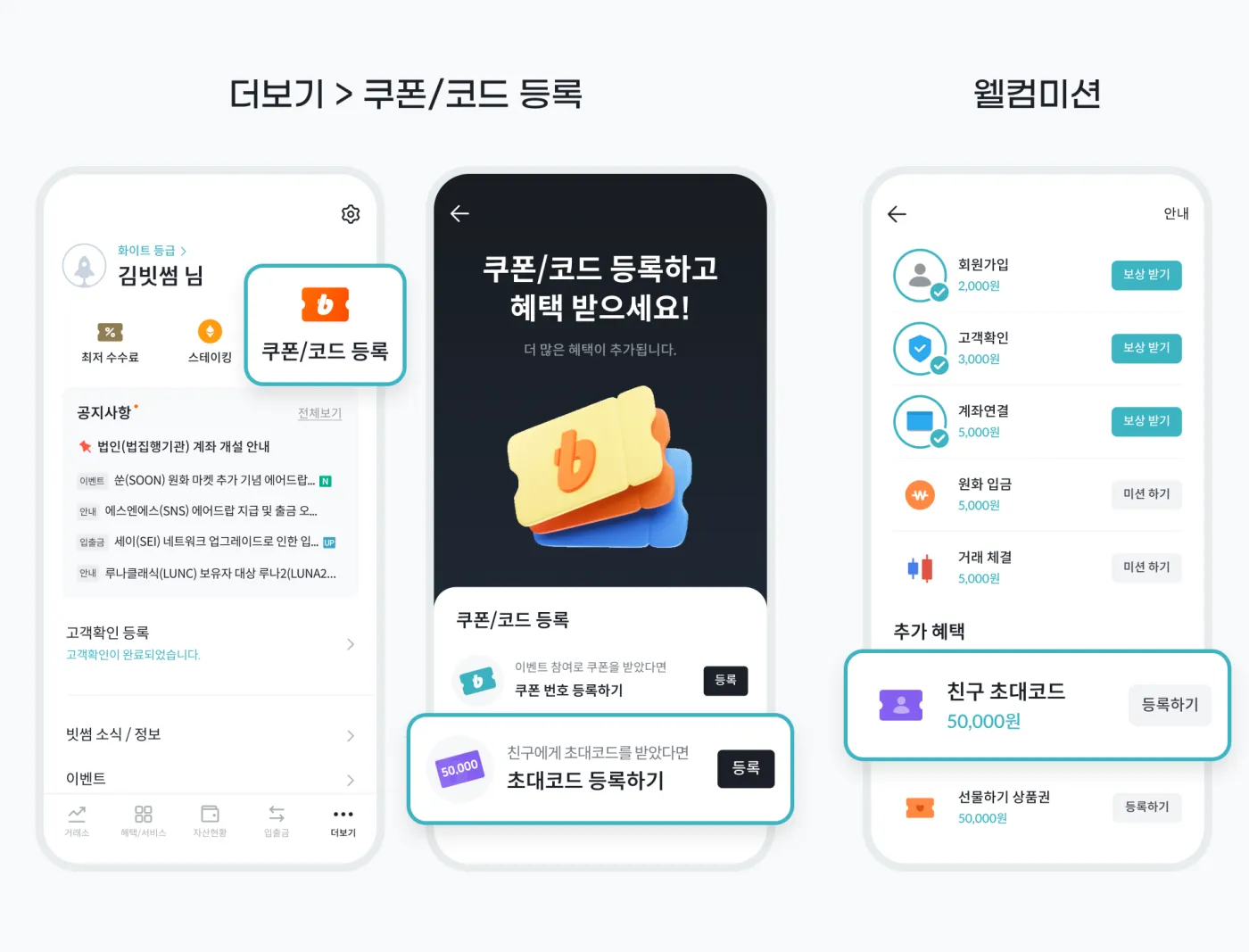
Shall we start with the first reward? Here's how to register the Bithumb referral code coupon. In the mobile app, go to [More] > [Register Coupon/Code] > [Register Referral Code].
When the input screen appears as shown below, enter BITCOINONE exactly. This lets you receive the KRW 50,000 new-member reward.
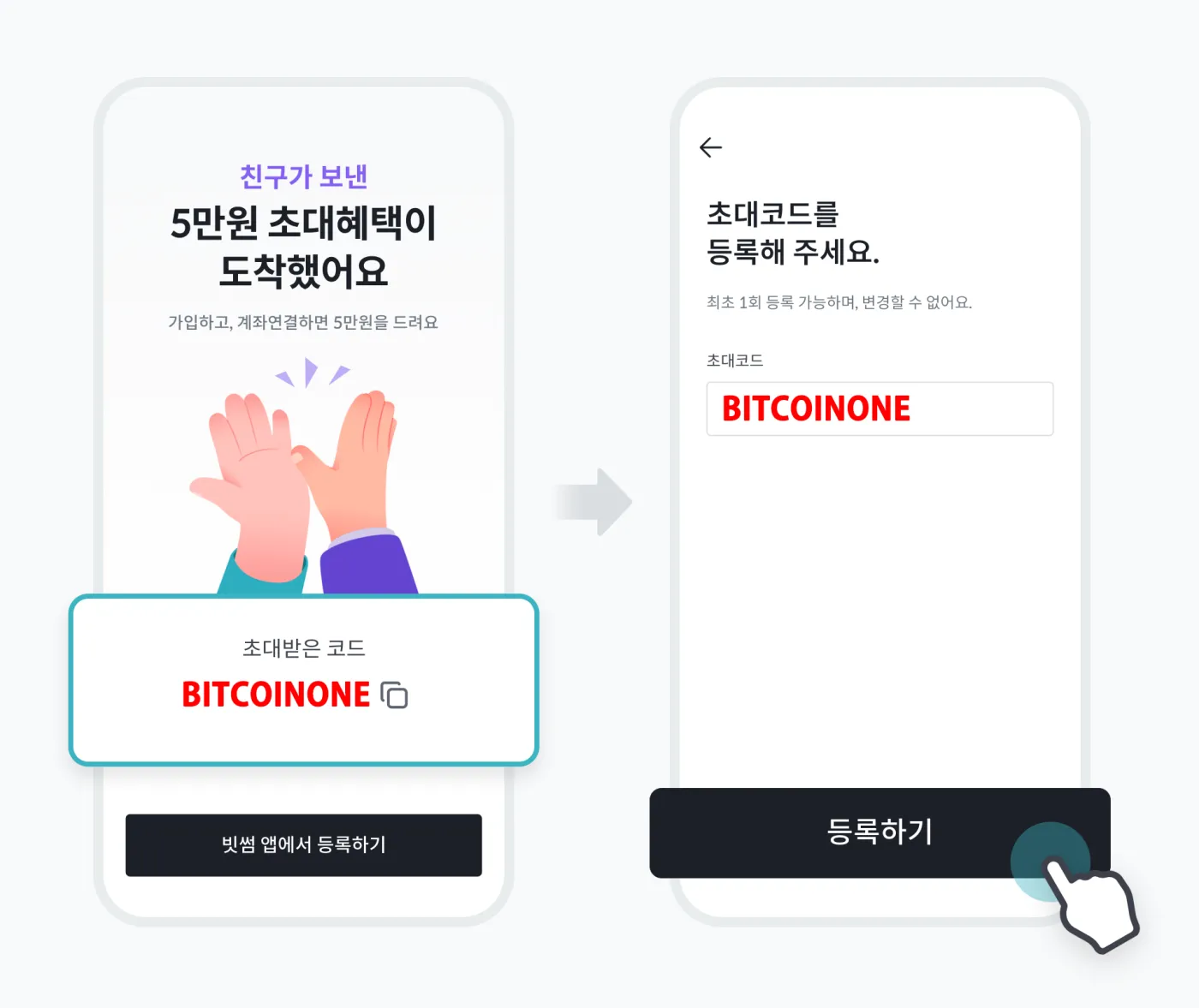
You must enter the referral code exactly, without any typos. Also, after entering the referral code, you need to finish linking a bank account to your Bithumb account before the KRW 50,000 reward is finally paid.
Reward (2): How to Get an Extra KRW 20,000 with the Welcome Mission
Once you've completed all of the above, you'll receive KRW 50,000 as a referral reward. On top of that, you can get an additional KRW 20,000 by completing some basic missions.
Here's how. Open the Bithumb app as shown below, go to the "Benefit Zone", and tap "Welcome Mission".
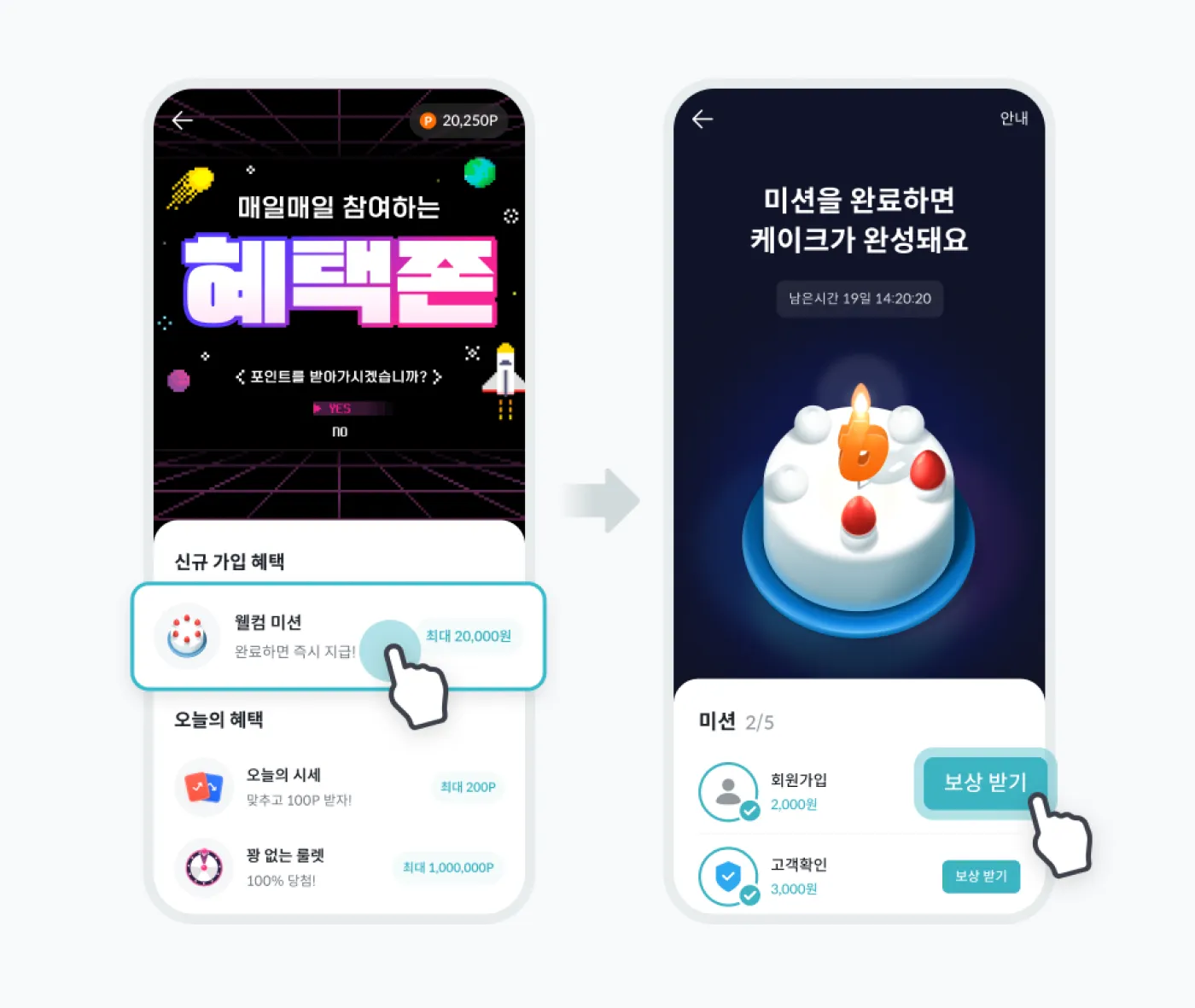
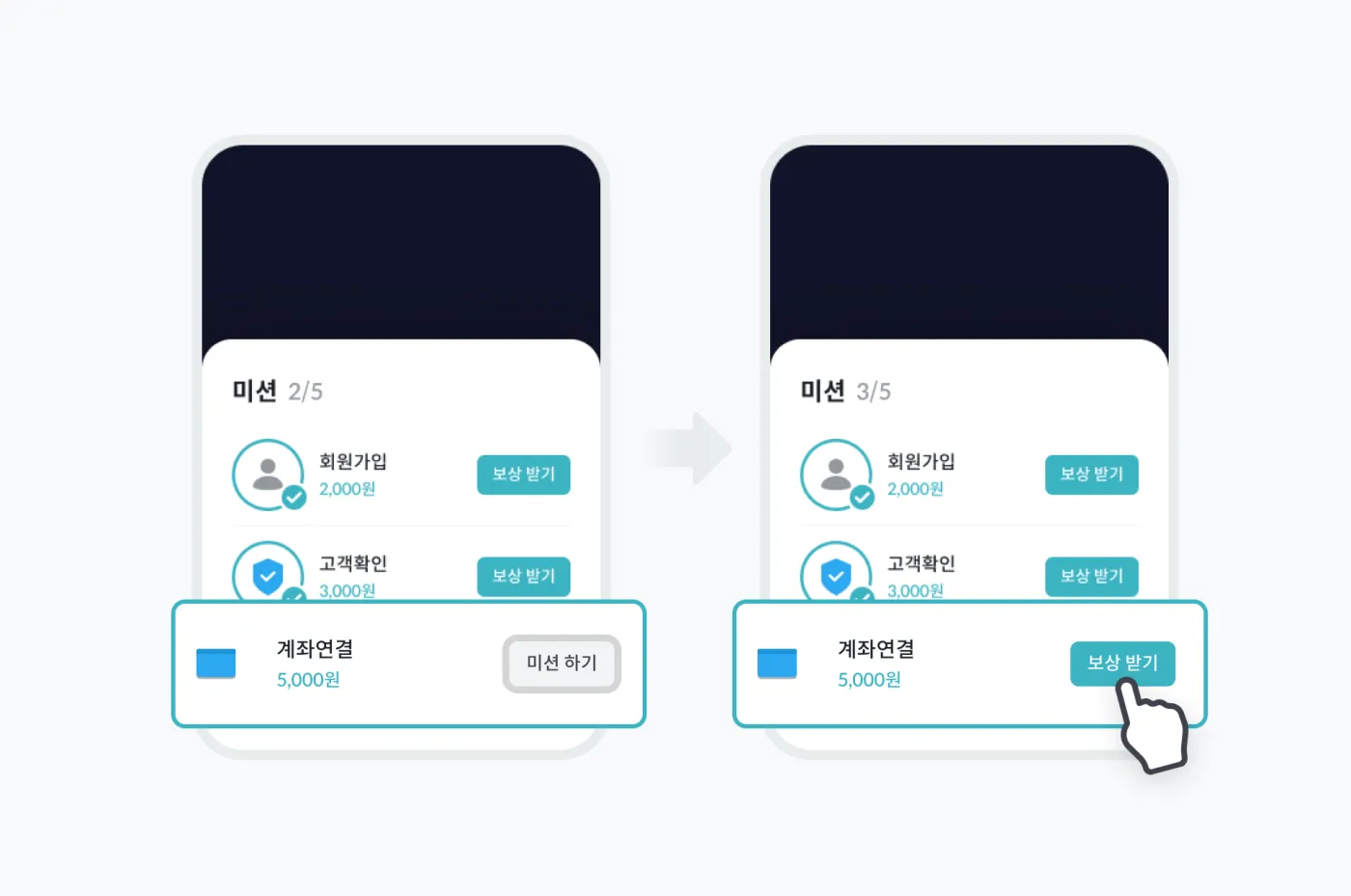
You'll then see that the "Claim Reward" button has been activated, as shown below. Tap that button to receive an additional KRW 20,000 reward. This way, you can receive a total of KRW 70,000 (KRW 50,000 + KRW 20,000) as your Bithumb new-member reward.
Can You Withdraw the KRW 70,000 Right Away?
The "KRW 70,000" reward paid when you sign up for Bithumb is given as points within Bithumb and cannot be withdrawn right away. However, you can use it to buy assets such as Bitcoin or Tether. And if you meet the following conditions, you can withdraw it externally (to your own bank account).
| Purpose | Required condition | Description |
|---|---|---|
| Keep the reward | At least 1 trade in the KRW market (any amount) | Prevents expiry and keeps the reward |
| Withdraw the reward | Buy or sell KRW 70,000 or more | Withdrawals to bank account and external wallets become available |
In other words, if you simply want to keep the reward from disappearing, you only need to make one trade. If you want to send it to an external wallet or withdraw it to your bank account, you must complete at least one trade of KRW 70,000 or more before you can withdraw.
 How to Register a KB Kookmin Bank Account on Bithumb and Lift the Transfer Limit4 min read
Common Reasons the Reward Isn't Paid
Anyone signing up for Bithumb for the first time ever can receive the new-member reward. However, you'll only receive it if you enter the code provided above exactly. Also, the reward may not be paid in the following cases.
| Reason | Description |
|---|---|
| Referral code entry period exceeded | The code was not entered within 7 days of signing up |
| Account linking not completed | A KRW bank account in your own name has not been registered |
| Duplicate participation in first-time events | Payment is restricted if you're participating in another first-time-ever event |
| Closed or restricted account | The account has been closed or is under usage restrictions at the time of payment |
| No trade completed | The reward expires if you don't trade for 30 days after it's paid |
The most common mistakes are entering the referral code after 7 days have passed, or forgetting to link a bank account. Be sure to check these so you don't end up signing up without receiving the reward. Also, don't forget that you need to complete at least one trade after receiving the KRW 70,000.
Wrapping Up
Don't have a Bithumb account yet? When you sign up, enter the referral code BITCOINONE and receive a reward of up to KRW 50,000. Next, complete the additional mission and receive KRW 20,000.
That covers how to sign up for the Bithumb exchange and receive KRW 70,000 worth of rewards. For more details, you can also check Bithumb's announcement.