Upbit Coin Borrowing Guide: Limits, How to Apply, and Managing Margin Liquidation Risk
8 min read · · Korean original
Contents 9
- What is Upbit Coin Borrowing?
- What are the borrowing limits and conditions?
- How do I apply for Coin Borrowing?
- How much are Upbit Coin Borrowing fees?
- What are the lending ratio and forced repayment?
- How do I repay borrowed coins?
- How can I make a profit with Coin Borrowing?
- How do I check my Coin Borrowing history?
- Frequently Asked Questions (FAQ)
As the crypto market moves into the regulated financial system, the various derivatives-style services offered by exchanges in Korea and abroad are drawing more attention. Two of these are Bithumb's coin lending service and Upbit's Coin Borrowing.
Much like margin trading in the stock market, Upbit's Coin Borrowing service lets you borrow virtual assets using your own assets as collateral, so you can speculate on price movements. It is essentially a form of margin trading.

Used well, Upbit Coin Borrowing lets you add leverage to your spot investments as part of a deliberate strategy. However, you must also factor in the service fees and the risk of liquidation.
In this post, we'll take a detailed look at Upbit Coin Borrowing's eligibility requirements, how to apply, borrowing limits, risk management, profit scenarios, and how to repay.
What is Upbit Coin Borrowing?
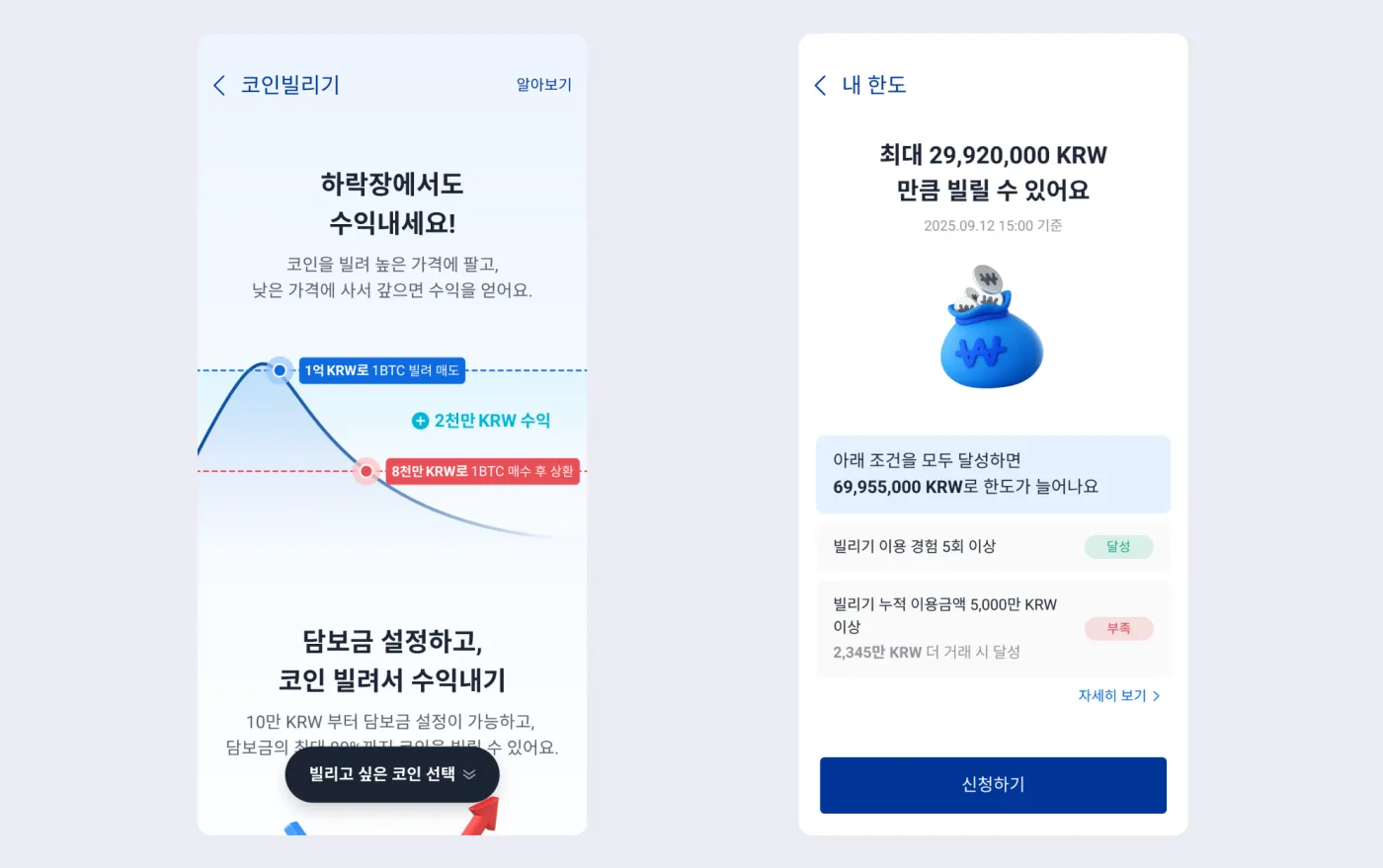
Upbit's 'Coin Borrowing' service lets users borrow Bitcoin, Ethereum, USDT and more, using the assets they hold as collateral, and then put those borrowed assets to work.
Coin Borrowing can be described as a kind of spot-based quasi-margin trading. You can borrow virtual assets against the Korean won you hold to scale up your investment, and you can earn returns without owning the coins yourself.
- Collateral: Korean won held in your account
- Borrowable assets: BTC, ETH, USDT, etc.
- Uses: arbitrage, trading, staking, etc.
What are the borrowing limits and conditions?
Upbit's Coin Borrowing service follows Article 9 of the Financial Services Commission's 'Guidelines on Credit Extension by Virtual Asset Service Providers.' Depending on conditions, you can borrow up to KRW 425 million. Your maximum limit varies with your user level, verification status, trading history, and so on.
| Condition | Borrowing limit (max) |
|---|---|
| Basic user | A few million KRW |
| Verified and conditions met | KRW 100 million to 400 million or more |
| Maximum limit | KRW 425 million |
How do I apply for Coin Borrowing?
Open the Upbit app and go to 'More' > 'Coin Borrowing'. Next, choose the asset you want to borrow and your lending ratio. The lending ratio can be set from a minimum of 20% to a maximum of 85% of your collateral.
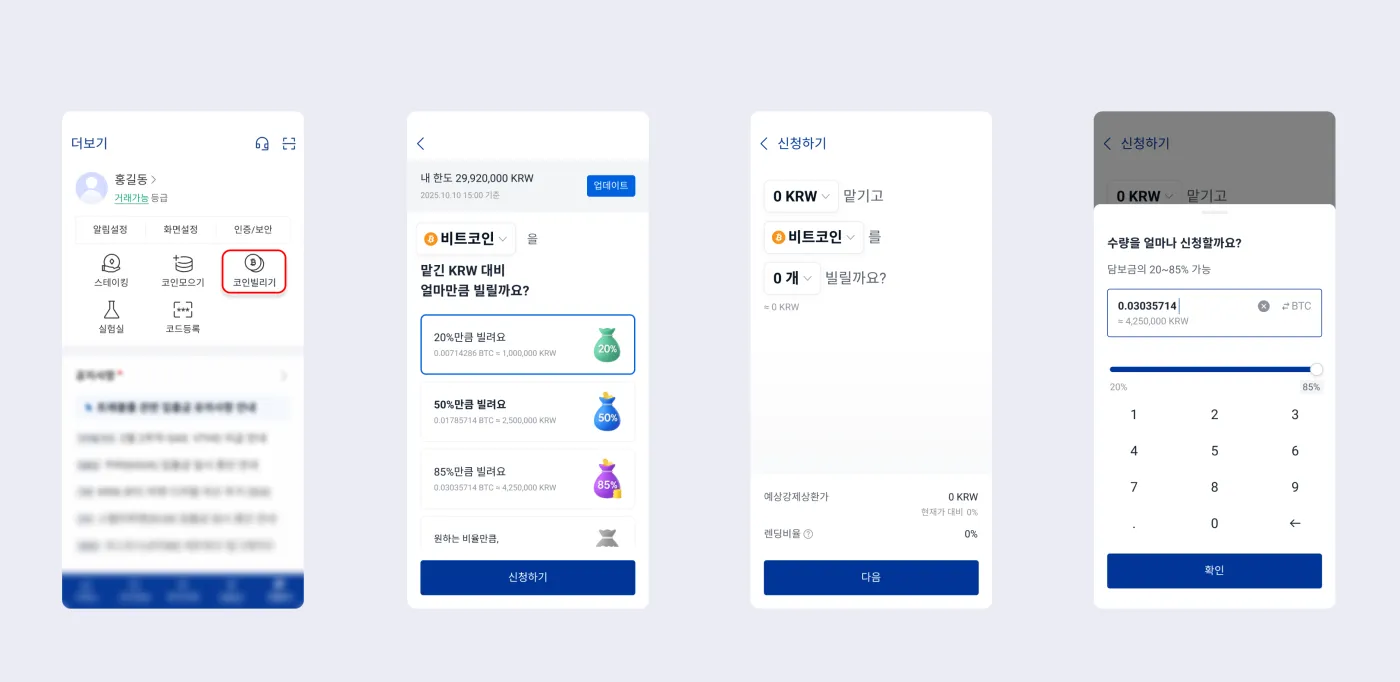
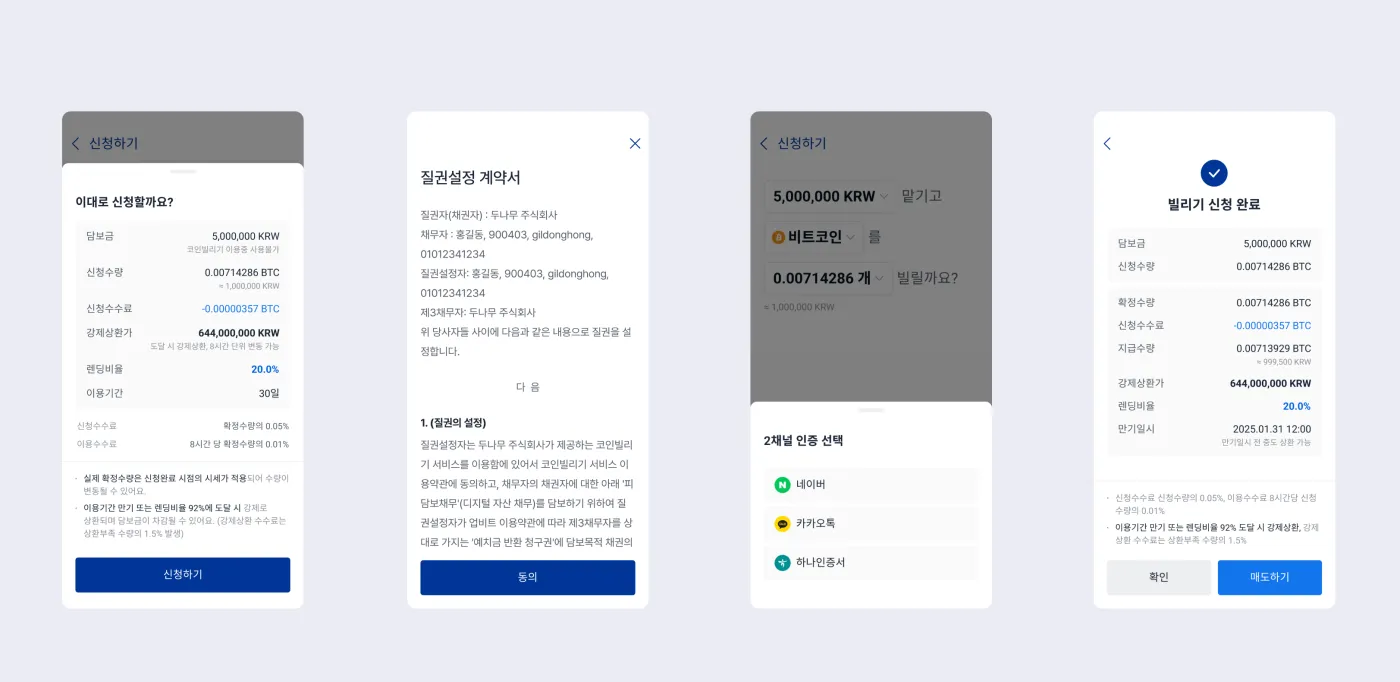
Then enter the amount of KRW you want to put up as collateral, along with the virtual asset and quantity you want to borrow. Finally, review the fees, the forced repayment price, and the contract, then agree, and you're done.
How much are Upbit Coin Borrowing fees?
Upbit Coin Borrowing has three main fees: ① the application fee, ② the usage fee (interest), and ③ the forced repayment fee.
① Application fee
This fee is charged as soon as your application is completed, with 0.05% of the confirmed quantity deducted automatically. For example, if you borrow 5,000 USDT, you'll pay an application fee of 2.5 USDT.
② Usage fee (interest)
The usage fee is charged every 8 hours after your Coin Borrowing application is completed. Each charge is 0.01% of the quantity in use, which adds up to about 0.03% per day. Over 10 days, that's a cumulative 0.3%, which works out to an interest rate of 10.95% per year.
③ Forced repayment fee
The forced repayment fee applies when your position is forcibly liquidated because your lending ratio exceeds 92%, or when you don't hold enough of the borrowed coin at maturity. The forced repayment fee is 1.5% and is applied to the shortfall in the repayment quantity.
| Fee type | When it's charged | Fee rate | Notes |
|---|---|---|---|
| Application fee | When you apply for Coin Borrowing | 0.05% of the confirmed quantity | Automatically deducted from the quantity of coins you applied for |
| Usage fee | Every 8 hours after the application is completed | 0.01% of the quantity in use | Charged repeatedly over time (interest) |
| Forced repayment fee | Lending ratio exceeds 92%, or a shortfall exists at maturity repayment | 1.5% of the repayment shortfall | Extra cost incurred when collateral falls short |
What are the lending ratio and forced repayment?
① What is the lending ratio?
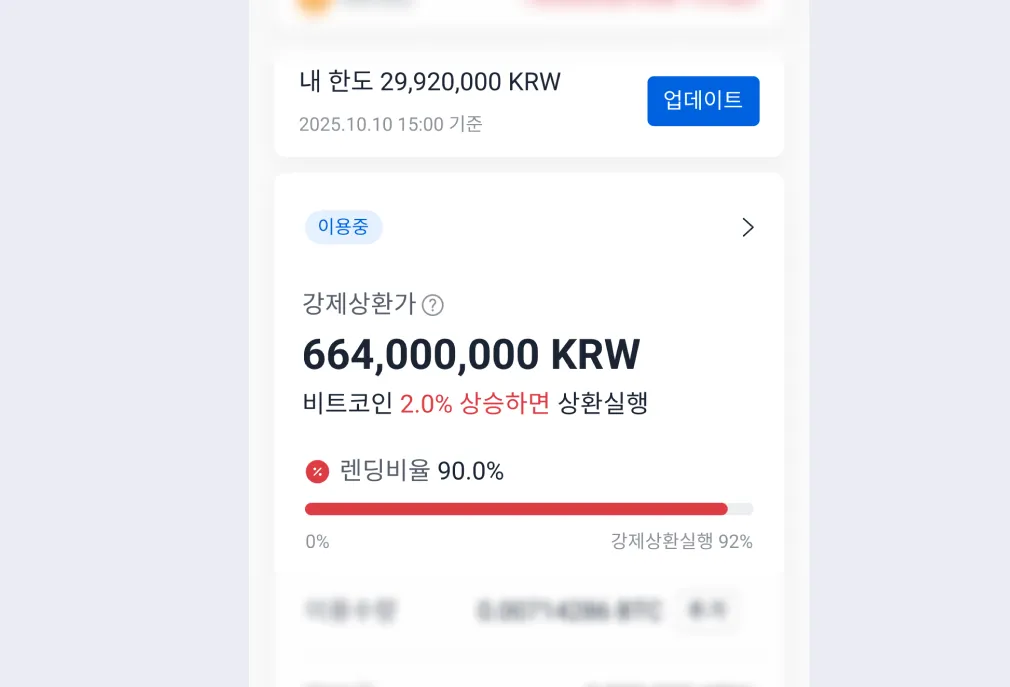
The lending ratio is the value of the assets you borrow relative to the value of your collateral. It can be set from a minimum of 20% to a maximum of 85%. For example, if you put up KRW 100 million as collateral and set a 50% lending ratio, you can borrow coins worth up to KRW 50 million.
| Status | Lending ratio | Action |
|---|---|---|
| Safe | 20 - 70% | Can be maintained stably |
| Warning zone | 85 - 92% | Consider depositing more collateral |
| Danger zone | Over 92% | Automatic liquidation |
② What is forced liquidation?
If your lending ratio exceeds 92%, forced liquidation happens automatically. Since this can lead to larger losses, it's essential to monitor your ratio frequently.
How do I repay borrowed coins?
Coins borrowed through Upbit Coin Borrowing can be repaid at any time. You can repay all of the borrowed coins or just part of them.
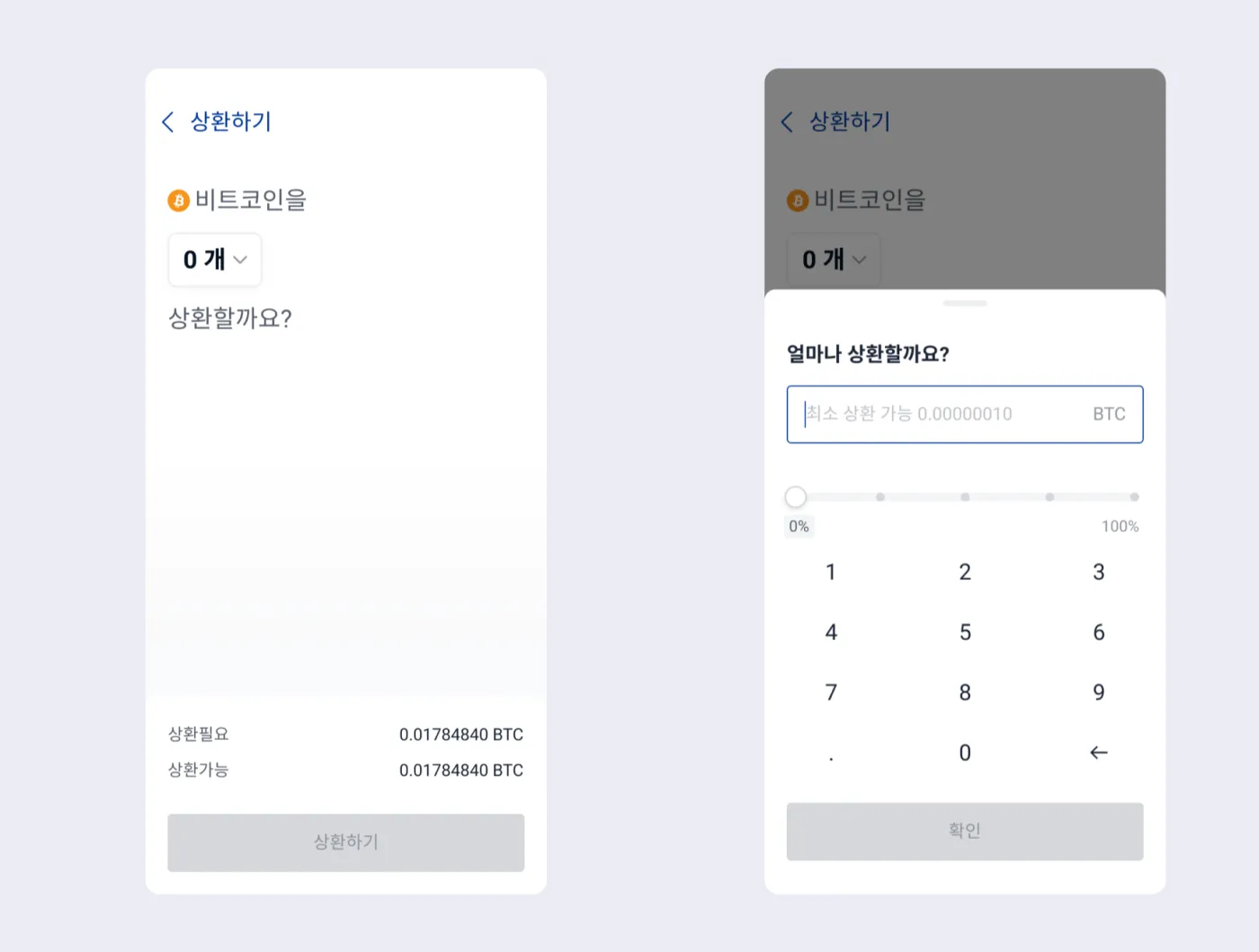
To repay, go to the 'Coin Borrowing' menu and select 'Coin Borrowing in Use'. There you can choose the asset and quantity to repay, and interest is included automatically.
You can only repay with the coin you borrowed. In other words, if you borrowed BTC, you must repay in BTC. Likewise, if you borrowed USDT, you must repay in USDT.
How can I make a profit with Coin Borrowing?
So how can you actually put Upbit's Coin Borrowing to use? One example is a short strategy aimed at short-term price gains: 'borrow USDT, sell it at a high, then buy it back.'
(1) Borrow USDT
Let's say you have KRW 10 million in your Upbit account. You go to Coin Borrowing and borrow USDT worth KRW 7 million at a 70% lending ratio.
Let's assume that at the time, 1 USDT is trading at KRW 1,400 on Upbit. In that case, you can borrow a total of 5,000 USDT.
(2) Sell USDT
Sell the 5,000 USDT you borrowed, worth KRW 7 million, for KRW on the spot market. This gives you KRW 7 million back in hand.
(3) Buy back USDT
Let's say that a few hours later, the price of USDT drops to KRW 1,350. Now you buy back 5,000 USDT. This time, you can get 5,000 USDT for KRW 6.75 million.
(4) Repay the loan
Now go to the Upbit Coin Borrowing service and repay the USDT you borrowed. This leaves you with a price gain of KRW 250,000 (before fees and interest).
Conversely, if USDT rises above the price you sold at, you can end up losing money. In other words, if the price of USDT climbs to KRW 1,450, you'll need more funds to repay. And in extreme cases, if the price of USDT surges due to something like a short squeeze, you could even be liquidated.
How do I check my Coin Borrowing history?
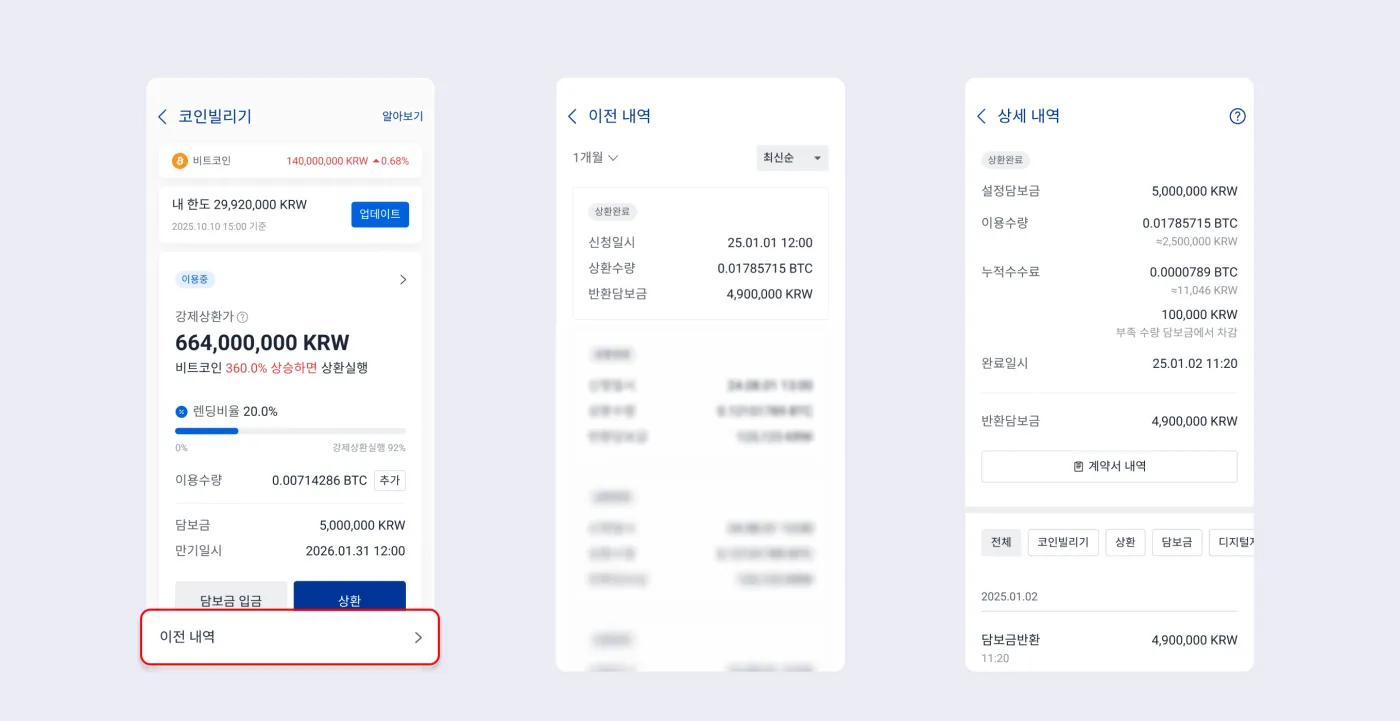
If you've used Coin Borrowing, you can check both your current and past activity at any time. The history shows exactly how much you borrowed, your collateral, accumulated fees, repayment history, and more.
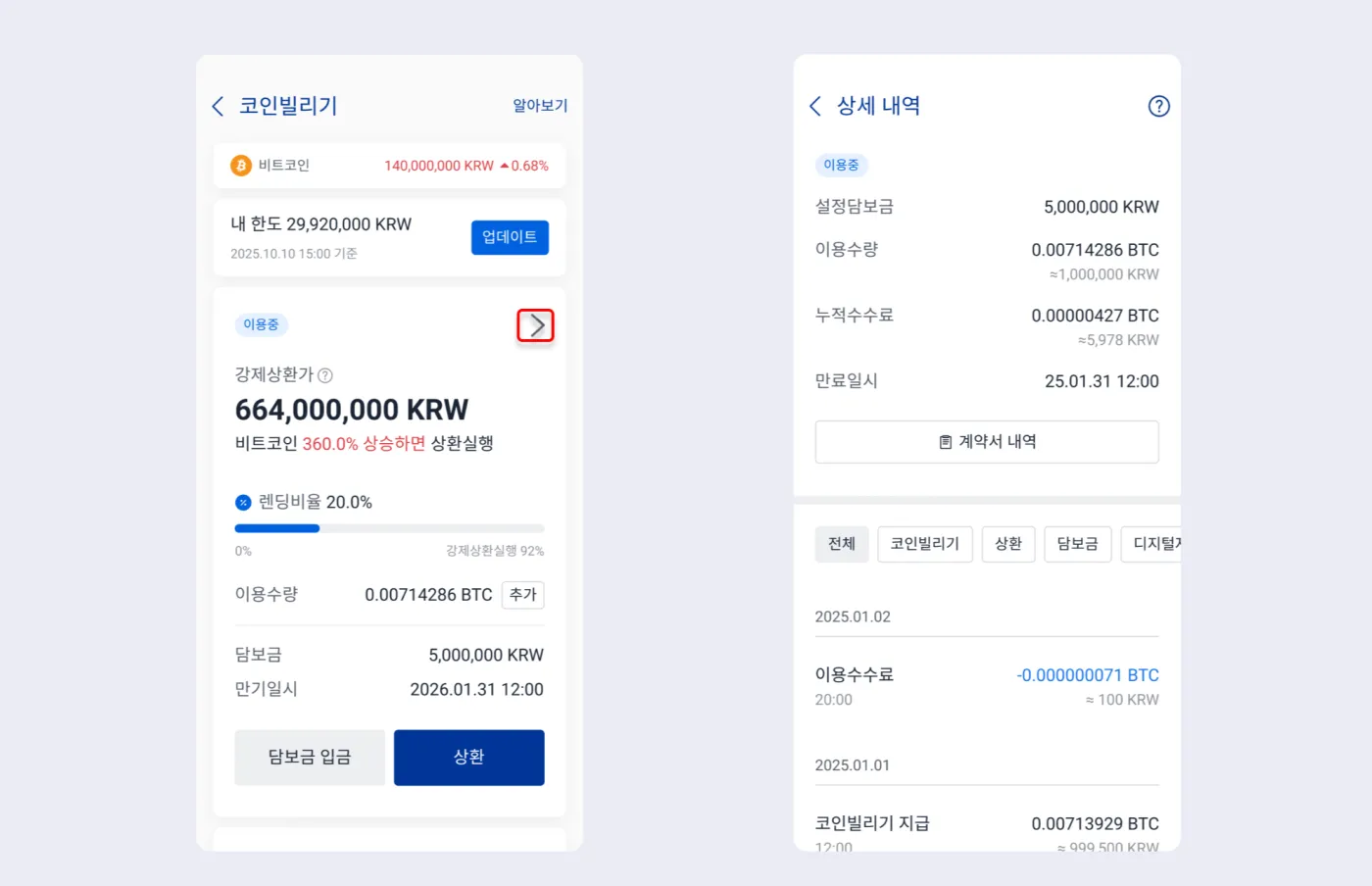
To check your Coin Borrowing history, tap the '>' button next to the product you're using. Or tap 'Previous History' at the bottom to see every Coin Borrowing product you've used so far.
Frequently Asked Questions (FAQ)
- Is Coin Borrowing a form of margin trading?
- Upbit's Coin Borrowing isn't traditional derivatives-based margin trading, but because you borrow virtual assets against the Korean won you hold and invest with them, it can be classified as 'spot-based quasi-margin trading.' Leverage expands your profit opportunities, but it also brings the possibility of losses and the risk of forced liquidation.
- Can I loop (repeatedly borrow) with Coin Borrowing?
- No. Looping strategies aren't possible with Upbit Coin Borrowing. The only asset you can use as collateral is Korean won (KRW), and re-borrowing by using borrowed virtual assets as collateral isn't supported. On top of that, you can only have one Coin Borrowing application at a time, so looping is structurally blocked.
- What are the fees for Upbit Coin Borrowing?
- There are three fees in total.
- Application fee: 0.05% of the confirmed quantity (charged immediately when you apply)
- Usage fee: 0.01% every 8 hours, about 0.03% per day
- Forced repayment fee: 1.5% of the repayment shortfall
- What is the lending ratio?
- The lending ratio is the ratio of borrowed assets to collateral. It can be set from a minimum of 20% to a maximum of 85%, and the higher the lending ratio, the greater the risk of liquidation. For example, if you put up KRW 10 million as collateral at a 70% lending ratio, you can borrow virtual assets worth a total of KRW 7 million.
- When does forced liquidation happen?
- If your lending ratio exceeds 92%, forced liquidation happens automatically. Forced liquidation also happens if you fail to repay by the loan's maturity date, and an additional forced repayment fee of 1.5% is charged.
- How do I repay borrowed coins?
- In the Upbit app's [Coin Borrowing] menu, select the loan you're using, then tap the [Repay] button at the top to repay part or all of it yourself. You can only repay with the coin you borrowed. For example, if you borrowed USDT, you must repay in USDT.
- What strategies can I use to make a profit with Coin Borrowing?
- Typical strategies include kimchi premium arbitrage and long/short strategies that take advantage of price volatility. A common example is borrowing USDT, selling it at a high price, then buying it back when the price falls to pocket the difference. However, if the price moves against you before you lock in a profit, you can take a loss, so risk management is a must.
- Where can I check my Coin Borrowing history?
- In the Upbit app, go to [More] → [Coin Borrowing] to see your active and past history separately. You can also view the borrowed quantity, collateral, lending ratio, repayment history, contract (PDF), and more.