How to Read Etherscan and Tips for Using Smart Contracts
5 min read · · Korean original
If you're interested in NFTs, DeFi, or crypto investing, you've probably come across terms like "on-chain data" or "smart contracts" at least once. One of the biggest features of blockchain technology is transparency. In other words, anyone can check the records. The problem, however, is that they aren't easy to check.
Etherscan is a "blockchain explorer" that solves exactly this problem. With Etherscan, anyone can easily search and check what's recorded on the blockchain.
- Etherscan is the leading block explorer for looking up the Ethereum blockchain in real time.
- You can check a wide range of data, including wallet addresses, transactions, smart contracts, and NFTs, and interact with them directly.
- It offers many features, such as minting, checking gas fees, viewing NFT ownership, and tracking whales.
What Is Etherscan?
Etherscan is a block explorer and data analytics platform for the Ethereum blockchain. On Etherscan, you can record and search every transaction, smart contract execution, and NFT transfer that happens on the Ethereum network.
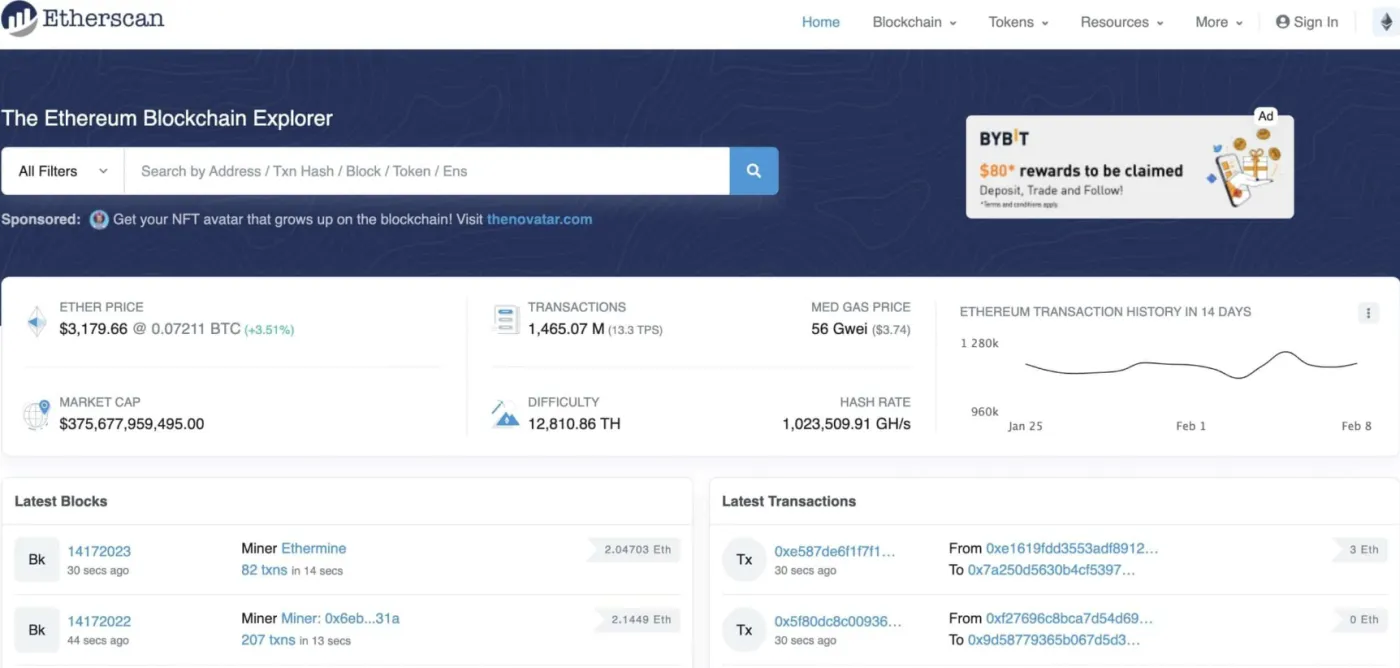
- Tracks Ethereum transaction records in real time
- Indexes information by block, wallet address, token, and smart contract
- Users search for an address or hash to view the data they need
Etherscan is not a wallet. It doesn't support trading directly or store assets. It only provides blockchain information and features that support smart contracts.
How Do You Use Etherscan?
(1) Looking Up a Wallet
Enter a wallet address in Etherscan's search bar, and you can check the following information.
- Current ETH balance
- ERC-20, ERC-721, and ERC-1155 tokens held
- The wallet's transaction history
- History of interactions through smart contracts
(2) Looking Up a Transaction
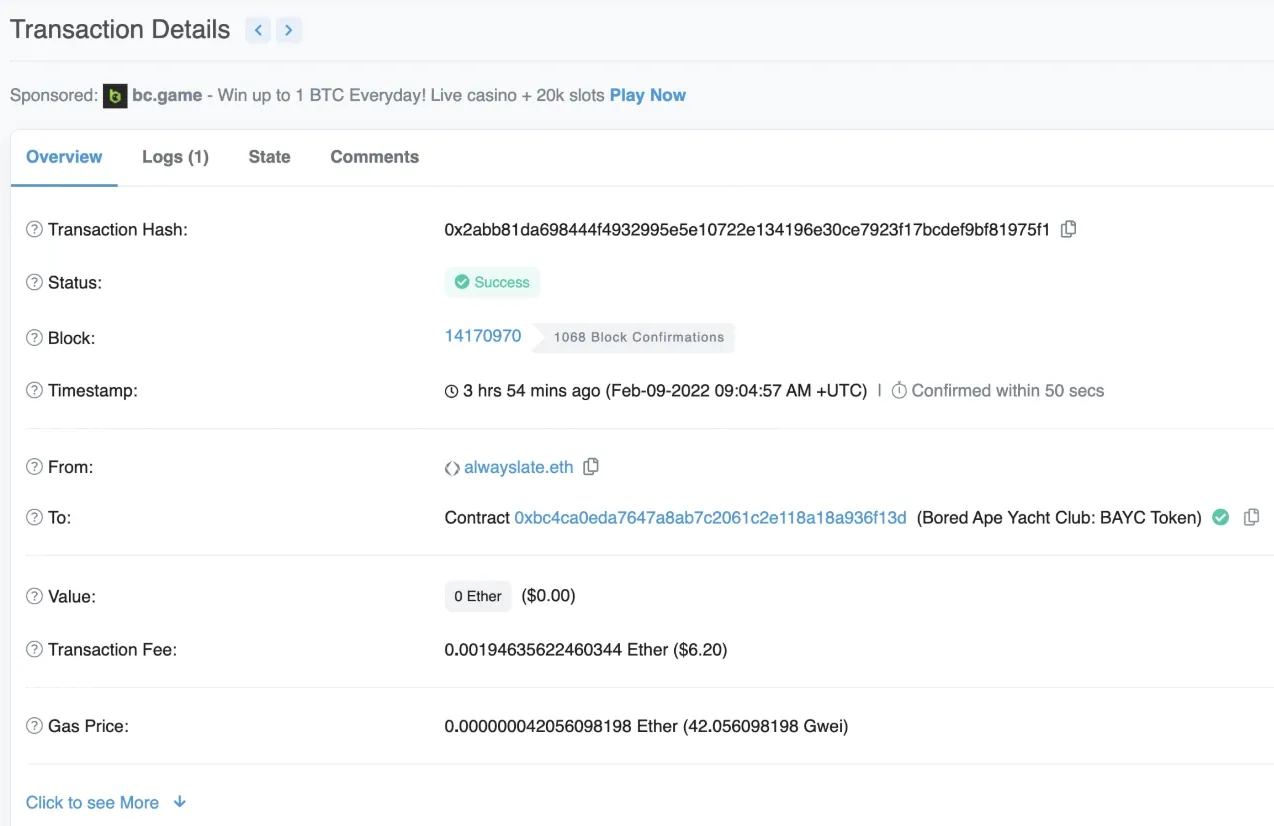
Search for a transaction hash (TxHash) to check the transaction's status, fee, sender and recipient addresses, the block number it was included in, and more.
| Field | Description |
|---|---|
| Status | Whether the transaction succeeded (Success / Pending / Fail) |
| Block | The block number where the transaction was recorded |
| From / To | The sending address and the receiving address |
| Value | The amount or value of ETH sent |
| Gas Fee | Transaction fee |
| Method | How the transaction was called (e.g., transfer, mint) |
(3) Checking Gas Fees
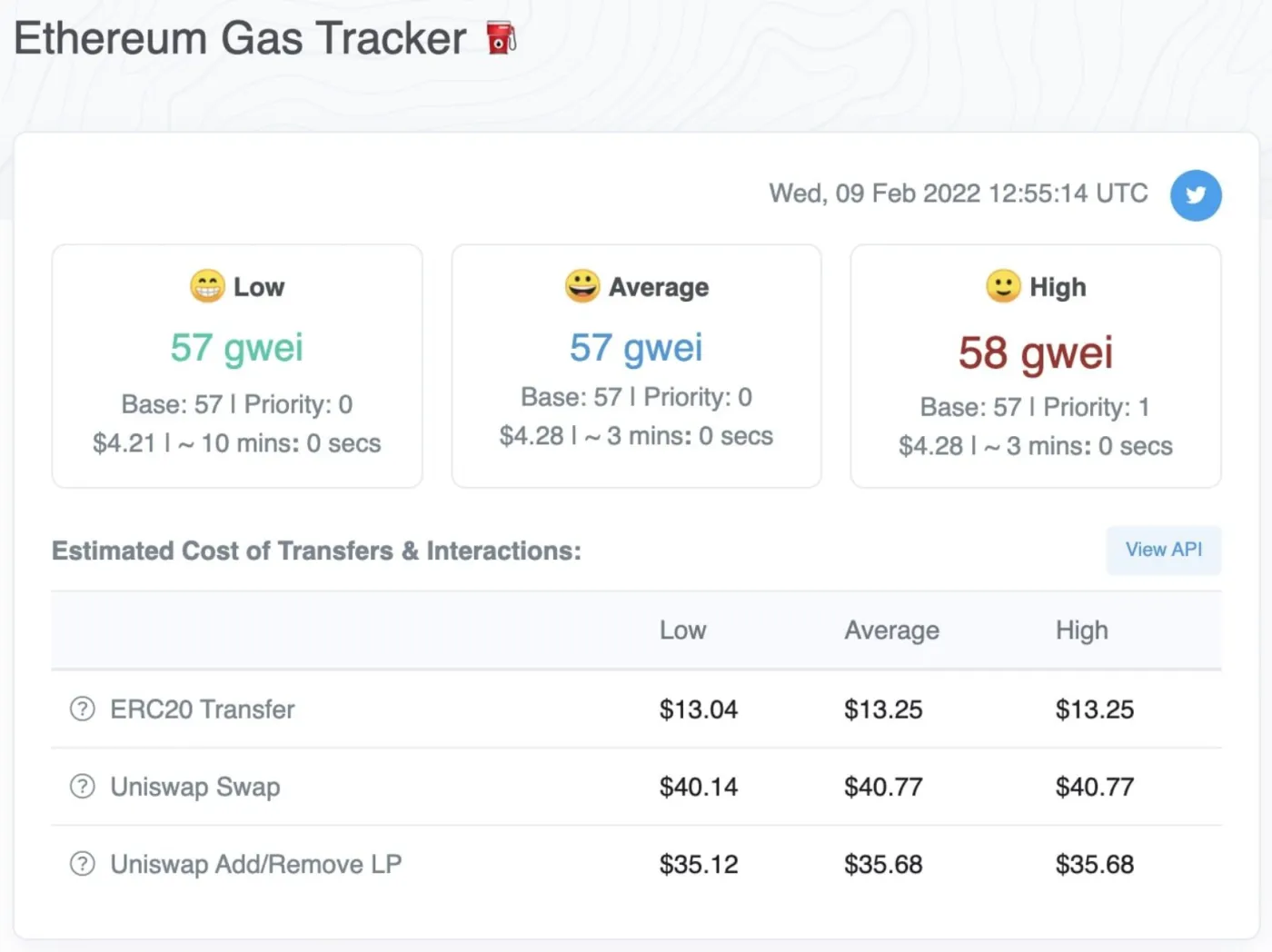
On the Ethereum network, you have to pay a gas fee for every transaction, and it changes in real time depending on how congested the network is. Etherscan provides a Gas Tracker page so you can check it in real time.
- Current average gas fee (in Gwei)
- Estimated fees (converted to ETH and USD)
- Estimated time for the transaction to be confirmed
- Ranking of the contracts that consume the most gas
The Gas Tracker doesn't just show the current gas fee. It also gives estimated costs for specific types of transactions (e.g., NFT minting). You can also use the historical gas fee data to figure out the best time to make a transaction.
(4) Calling Smart Contracts
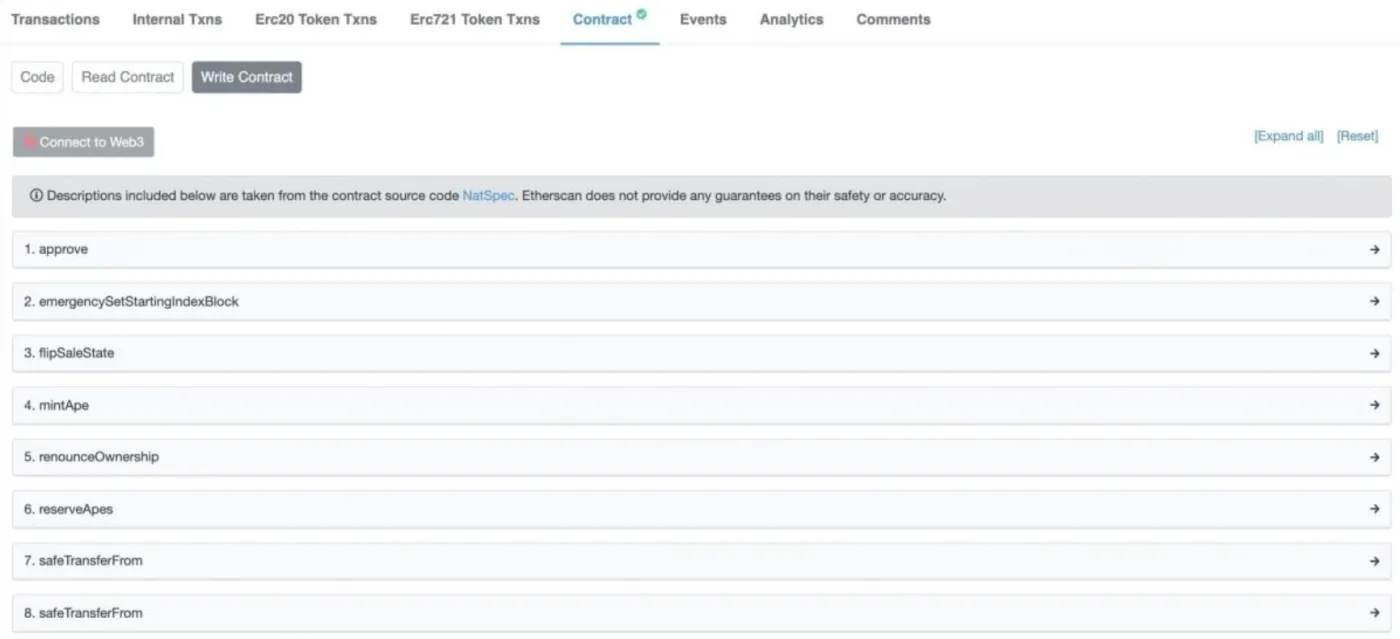
A smart contract is automated code that runs on the Ethereum blockchain and can automatically process transactions or asset transfers based on set conditions. On Etherscan, you can execute smart contract code, check variable states, view execution history, and more.
- Search for the smart contract address
- "Contract" → "Code" tab: view the source code
- "Read Contract" tab: look up state variable values directly
- "Write Contract" tab: create transactions directly (wallet connection required)
Long address strings can lead to phishing attacks or mistakes. In MetaMask, you can set a nickname for a contract address through its integration with Etherscan. After "Write," you must reject the transaction so that no fee is charged.
(5) Checking and Tracking NFTs
Etherscan also provides a UI that displays NFT images and even their traits. You can also use Etherscan to track a specific wallet address, identify early minters, and look up a wallet's holdings.
- Search for the collection's smart contract address
- Go to the "Inventory" tab
- Check the token ID, current owner address, last sale price, and image
You can also check the following details.
| Field | Description |
|---|---|
| Token ID | The unique number of the NFT |
| Owner | Current owner's address |
| Contract Address | Contract address |
| Creator | NFT creator |
| Last Sale | Last sale price |
| Traits | Trait information and rarity |
| Description | Description of the collection and the NFT |
(6) Sending Messages to Blockchain Wallet Owners
Etherscan recently introduced a feature for sending and receiving messages between wallet addresses. The "Chat with Owner" button connects you to Blockscan Chat, which offers the following features.
- Wallets with past transaction history can message each other
- You can communicate without sending an NFT
- The other party must also connect their wallet to receive messages
(7) Using the Developer API
Developers can use Etherscan's free API to build dApps, NFT dashboards, automated trading bots, and more.
- Balance lookup API
- Transaction history API
- Smart contract call API, and more
- Check popular ERC-20 and ERC-721 tokens
- Verified Contracts: a list of verified smart contracts
- Ethereum Charts: visual statistics on gas fees, block production speed, transaction counts, and more
Wrapping Up
Etherscan is not just an explorer. It's a tool that lets you directly view, interpret, and interact with the structure and data of the Ethereum blockchain. It's an essential tool that helps you experience transparency, the core value of blockchain, and a must-have service for beginners and advanced users alike.
If you want to understand blockchain and crypto more deeply and use them more safely and efficiently, it's a good idea to get comfortable with how to use Etherscan. That wraps up our look at Etherscan's many features and how to use them.
| Item | Link |
|---|---|
| Etherscan Main | https://etherscan.io |
| Gas Tracker | https://etherscan.io/gastracker |
| NFT Tracker | https://etherscan.io/nft-tracker |
| Blockscan Chat | https://blockscan.com/chat |
| API Docs | https://docs.etherscan.io |