How to Manage Risk Using Take Profit and Stop Loss
5 min read · · Korean original
Contents 5
Cryptocurrencies like Bitcoin offer traders unique opportunities to profit through their high volatility. However, without proper risk management, you could lose all your profits in an instant. This is exactly why you need a good trading plan that keeps you from making emotional decisions. How can you do that?
Key Takeaways
- Risk management strategies, such as setting take profit and stop loss orders, can help protect your funds from large losses.
- Binance Futures users can better manage their risk-to-reward ratio by using take profit/stop loss (TP/SL) orders.
- Some of the most successful traders even think of stop loss orders as "free insurance."
Binance Futures encourages users to protect their capital through responsible trading in the volatile crypto market. Self-control is one of the most important qualities traders need to cultivate to avoid compulsive trading or gambling. If you keep incurring losses, you can also activate the cooling-off feature, which forcibly blocks access to futures trading.
However, the best approach is to have a proper risk management strategy for taking profits and cutting losses, which is the most helpful way to prevent such misfortunes in the first place. The most effective yet simple tools are Take Profit (TP) and Stop Loss (SL). Setting take profit and stop loss orders lets you lower your risk and hold back from emotional judgments. This way, you can reduce stress and refrain from emotional decision-making throughout your trading journey.
Take Profit and Stop Loss Orders
Take profit and stop loss orders can be one of your exit strategies for each trade. These orders are executed when the price reaches a predetermined level, closing a long or short position for a profit or a loss.
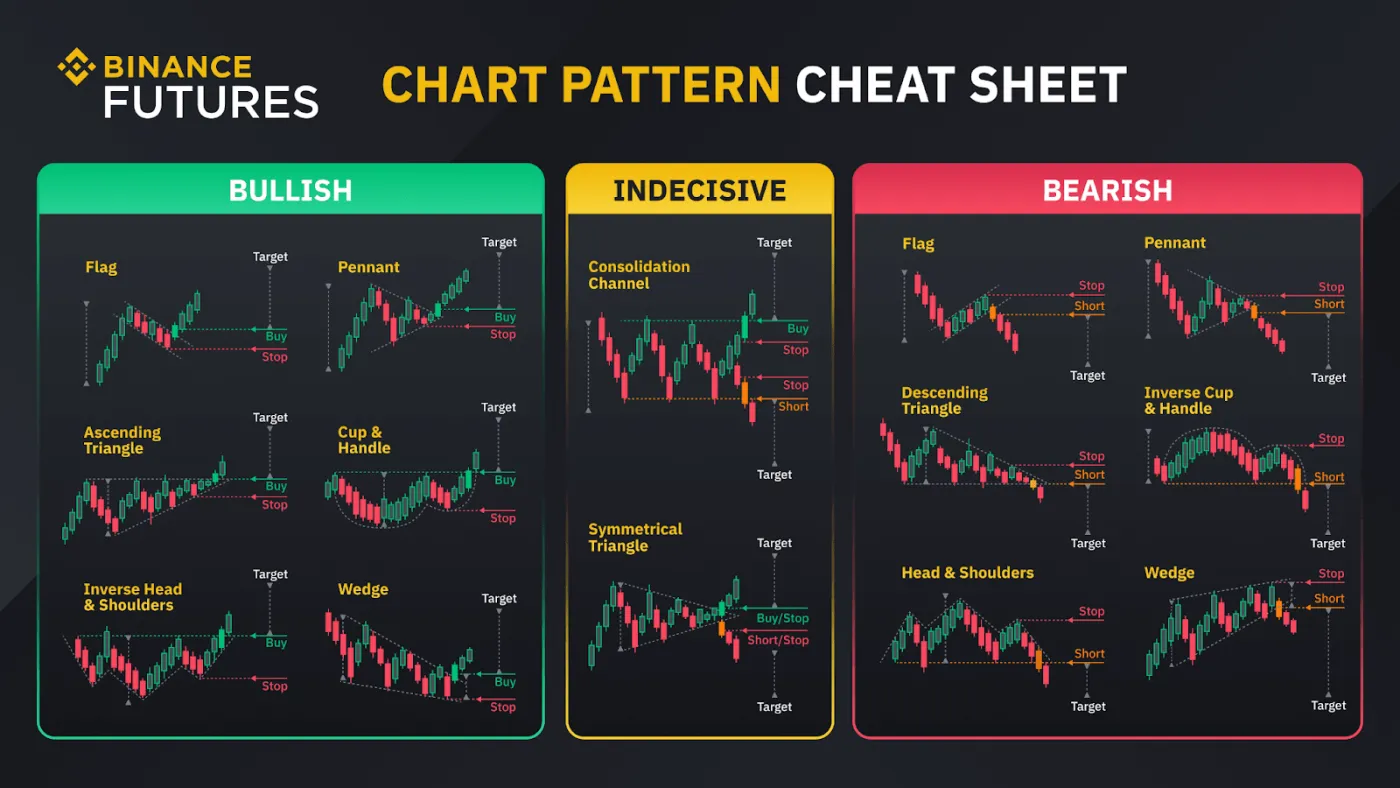
Your trading preferences based on technical analysis play an important role in deciding where to place your take profit and stop loss orders. Do you trade based on candlestick patterns, chart patterns, trend lines, or technical analysis? With take profit and stop loss orders, you don't have to worry about when to exit a trade or about second-guessing your decisions.
For example, a trader who enters a long position based on an ascending triangle can quickly decide where to place their take profit and stop loss orders. The height of the triangle's Y-axis can be used to set a potential target, while the triangle's hypotenuse shows the point at which the trend is invalidated. In other words, if the market moves against your analysis, you manage your risk by closing the position.
When you trade, don't forget that you should have your own entry and exit points. No one knows what will happen in the crypto market. That's why take profit and stop loss orders protect you from unexpected situations and let you control the profits and losses of every position you enter.
Advantages of Take Profit and Stop Loss Orders
Take profit and stop loss orders are both used to close positions, but they serve completely opposite functions. A take profit order closes a position for an expected profit. A stop loss order, on the other hand, closes a position at an expected loss.
Remember that you should calculate the risk-to-reward ratio to assess whether a position is worth entering. You'll want to know how much risk you're taking on for how much potential profit.
For example, a trade with a 15% profit target and a 5% invalidation point has a risk-to-reward ratio of 1:3, or 0.33. This means that for each unit of risk, the potential reward is three times as large.
The advanced take profit/stop loss feature makes these calculations easier on Binance Futures. Traders can set take profit and stop loss orders by entering their expected profit or loss percentage. Advanced TP/SL also shows the estimated profit and loss for take profit and stop loss orders based on the last price or the mark price.
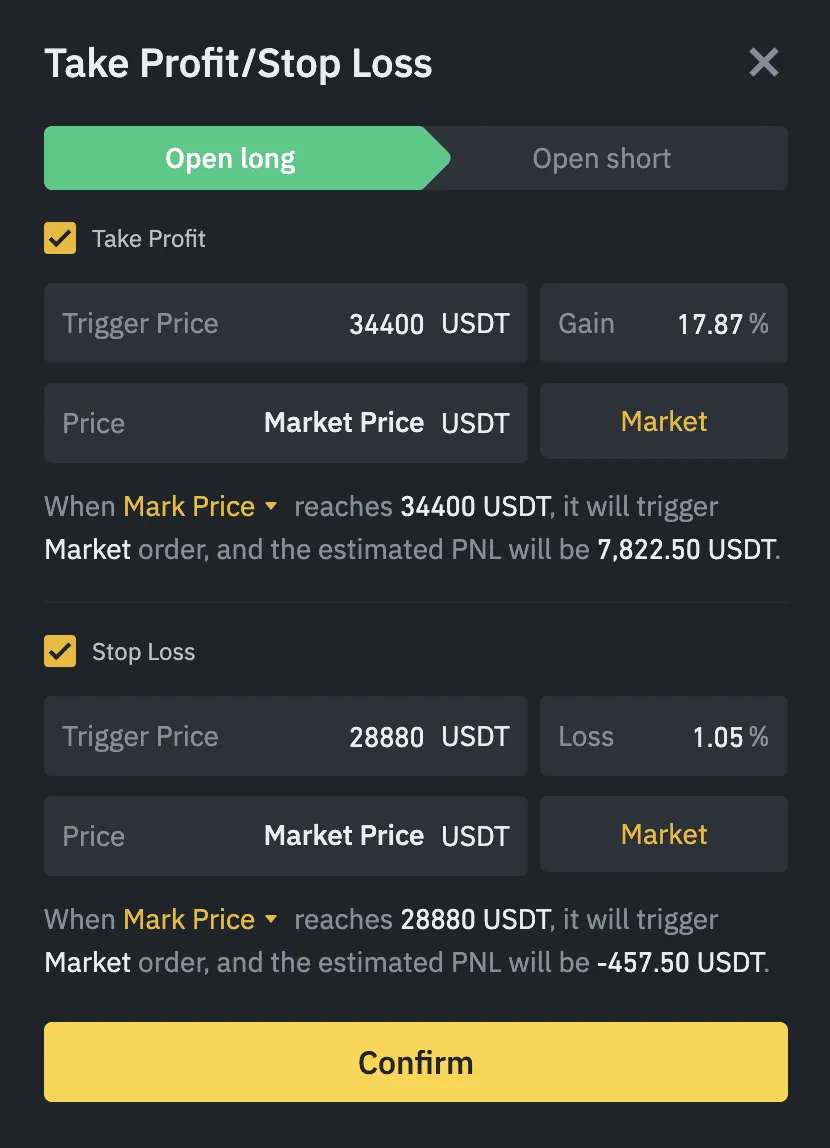
Take profit and stop loss orders are one of the best ways to lower your risk. Take profit orders help you lock in profits when you've correctly predicted the market's movement. Stop loss orders help you reduce losses when the market moves against your position. As a result, these features act as free insurance for your trading account.
Also, because take profit and stop loss orders are executed automatically at the right time, you can go about other activities while keeping your positions open.
How to Set Take Profit and Stop Loss Orders
Before setting take profit and stop loss orders, you first need to identify your trade setup and decide on your trigger conditions and position size.
Some traders may prefer candlesticks, while others may prefer chart patterns, trend lines, technical analysis, and so on. What matters is that you have a technical reason for entering a trade and points that tell you the best timing. You can use this information to decide what percentage of your available capital you can risk on a single trade.
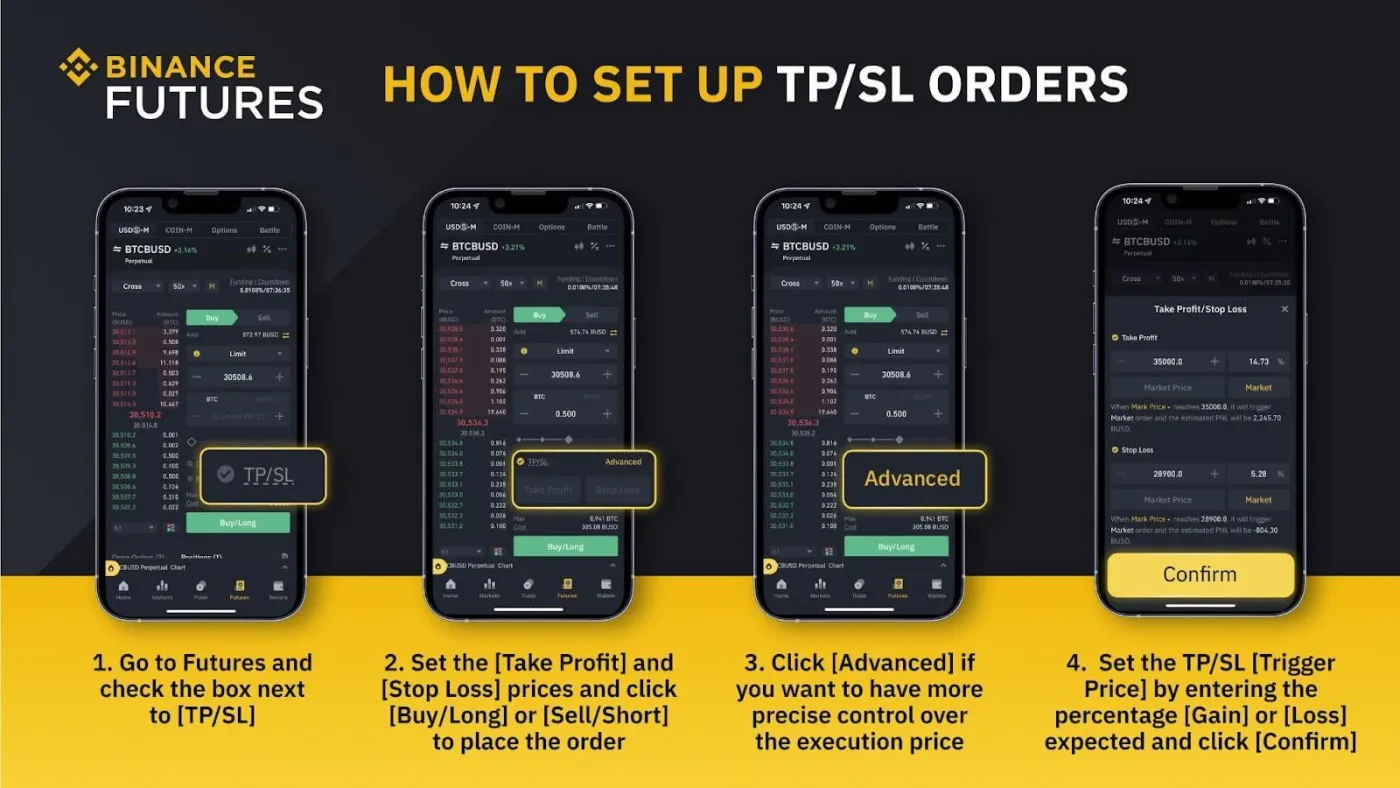
In the Binance app, you can easily set take profit and stop loss orders as you enter a position. Go to [Futures] and check the box next to [TP/SL], and you can enter your [Take Profit] price and [Stop Loss] price. You can also click [Advanced] to set the execution prices more precisely.
Test It Yourself
Traders need to manage their risk properly to make consistent profits in futures trading. In the volatile crypto market, a solid risk management strategy can help reduce potential losses.
Binance Futures encourages users to practice responsible trading by making a proper trading plan. Take profit and stop loss orders can reduce stress and protect your investment capital.
Try trading risk-free with free funds on Binance's demo mock trading website. The Binance test platform lets you use trial funds to experiment with different risk levels and practice your trading skills.
Once you clearly understand how to set take profit and stop loss orders, you can go back to live, real trading on Binance Futures.