What Is the Wormhole Portal Bridge and How Do You Use It?
4 min read · · Korean original
Contents 5
Hello, everyone. This is Bitpunk. In this post, we'll look at what the Wormhole Portal Bridge is and how to use it.
What Is the Wormhole Portal Bridge?
First, let's take a quick look at what the Wormhole Portal Bridge actually is. In the crypto ecosystem, a bridge means "a tool that lets you transfer assets between different networks."
For example, you use a bridge when you want to send ETH on Ethereum to networks like Arbitrum, Solana, or Kaia. What if there were no bridges? You'd have to deposit to an exchange and then withdraw again to that network, or, for unsupported networks, you wouldn't be able to move your assets at all, right?
To sum up, the Wormhole Portal Bridge can be described as "a simple relay service that lets you transfer assets between different networks."
How Does the Wormhole Bridge Work?
Before we actually start using the bridge, let's also go over how it works in simple terms. If you plan to use bridges going forward, this is something you really need to understand at least once, so take this chance to read just a few more lines!
The Wormhole Bridge uses a "lock and mint" method. What does that mean? For example, when you send assets from the Ethereum network (lock), you receive the assets on another network such as Solana (mint). Conversely, when you come back from Solana to Ethereum, the original "lock and mint" process runs in reverse.
How to Use the Wormhole Portal Bridge
Now let me walk you through how to use the bridge, step by step. Here, we'll use the example of transferring assets from Ethereum to Kaia (formerly Klaytn).
1. Access the Wormhole Bridge
First, go to the Wormhole Bridge Portal. Select Ethereum as the "From/Source" network and Kaia as the "To/Target" network. Next, choose the asset you want to send from the Ethereum network (ETH, USDT, etc.) and get ready to send it to the Kaia network.
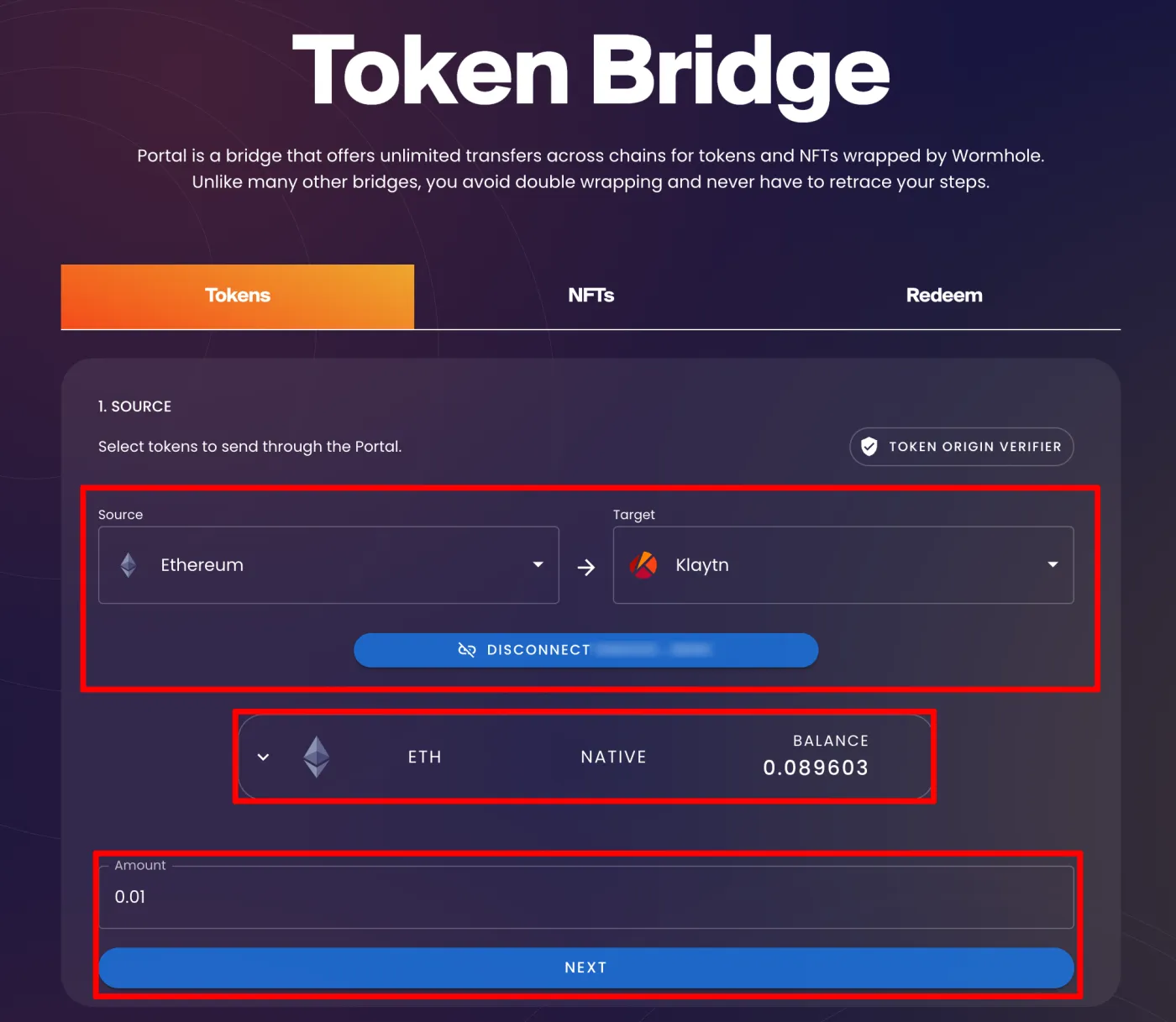
For reference, if the amount you want to transfer is large or the asset isn't well known, the regular bridge portal won't work, and you'll need to use the advanced bridge portal. The process is basically the same.
The next step is to connect your personal wallet. You can connect MetaMask or the OKX wallet that a lot of people use these days.
Finally, enter the amount you want to transfer. The important thing here is to leave a little of the native token (like ETH) to cover gas fees. Without gas, the transaction will fail, so be sure to check this, and then click "NEXT."
2. Review the Transaction
Before sending your assets, review the transaction one more time. Make sure the target network and the receiving address are correct, and that the transaction fee and contract are accurate. Here, it tells us the asset will be wrapped as WETH and sent, and asks us to confirm. If everything is correct, click "CONFIRM."
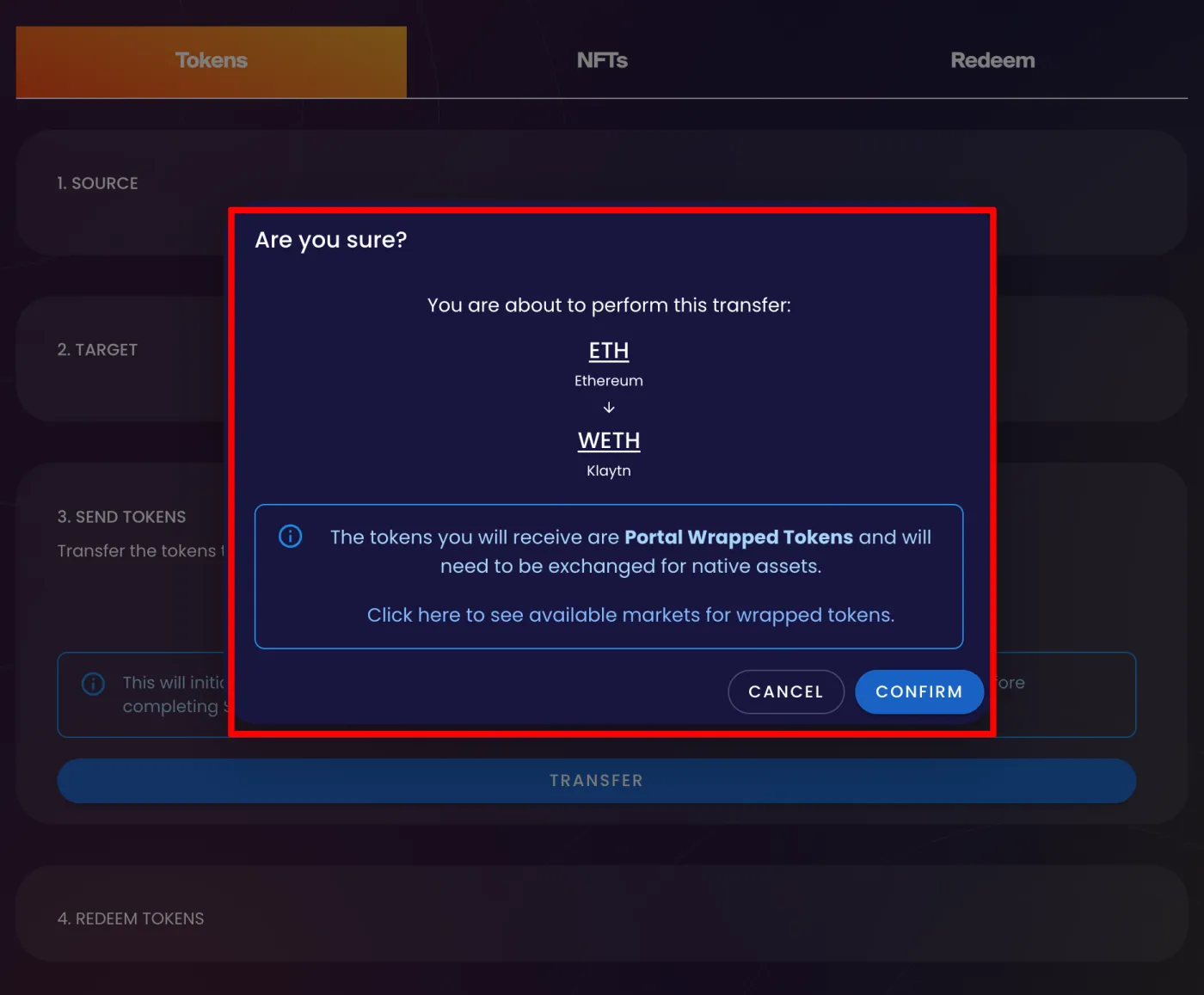
3. Sign the Transaction
A transaction window will appear. If all the information is correct, sign the transaction. The Wormhole Bridge takes a little time to complete a transaction. Depending on blockchain conditions, you'll need to wait anywhere from about 5 minutes to as long as 30 minutes.
4. Receive Your Assets
Once the transaction is complete, the "Redeem Token" button becomes active. At this point, you must click the "Claim" button for the assets to actually arrive in your wallet.
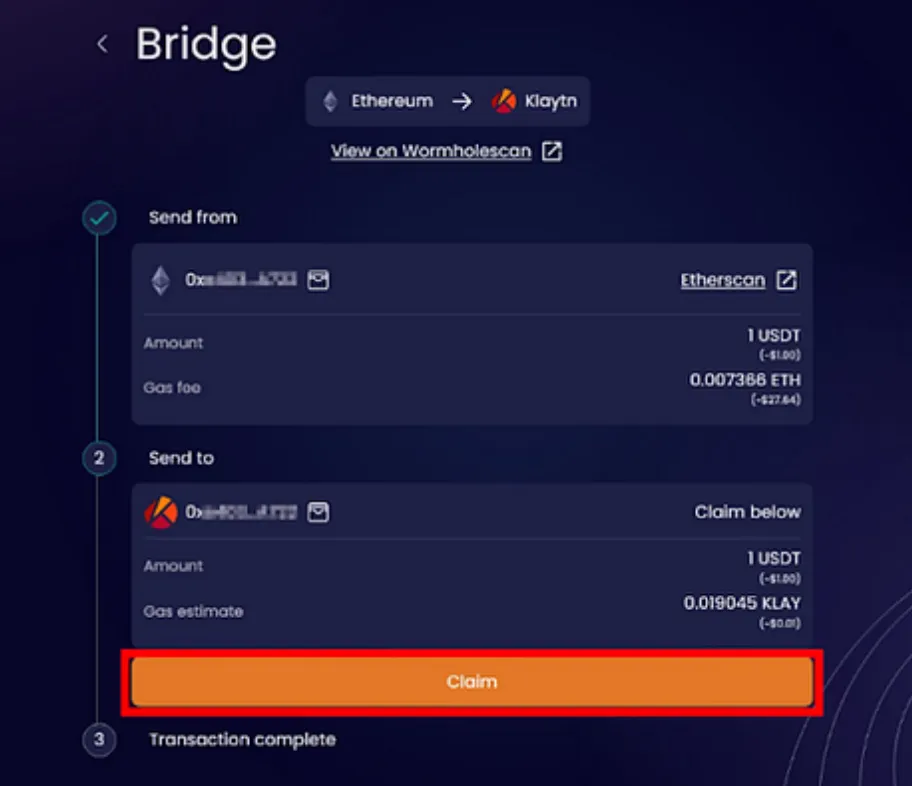
If you closed the page partway through or your wallet got disconnected, you can look up the transaction again on the Wormhole Explorer. Enter the transaction you found on the bridge site and you'll be able to receive your assets, so there's no need to worry too much.
How Can You Use the Wormhole Bridge Safely?
The Wormhole Bridge is generally considered safe, but there are a few things to keep in mind.
1. Be Careful with Large Transfers
It's best to avoid sending too large an amount all at once. Wormhole has been hacked before, so it's safer to split large amounts into several transfers.
2. Be Careful with Little-Known Tokens
When bridging tokens with low demand, problems can occur during the transfer, so be cautious with very minor tokens.
3. Check Transaction Fees
Fees differ by network and can rise depending on conditions. Ethereum in particular has expensive gas fees, so before transferring, it's essential to check that you have enough ETH to cover the fees.
Wrapping Up
With the Wormhole Portal, you can quickly and easily handle so-called "cross-chain bridging," which means transferring assets between different networks. The Wormhole Portal Bridge is a very useful tool in that it lets you freely transfer assets across a wide range of networks.
However, whenever you use a bridge, don't forget to always double-check the details of the transaction you're signing, and carefully verify the network status, fees, contract addresses, and so on!