How to Join the Binance Solv Megadrop (Web3 Wallet)
3 min read · · Korean original
Contents 8
A Solv Megadrop is now running on the Binance exchange. If you stake Binance Smart Chain-based Bitcoin in the Solv Protocol, you can receive a $SOLV coin airdrop and a range of other rewards. Here is how to take part, step by step.

Step 1: Log in to the Binance App
Open the Binance app and go to Wallet → 𝑊𝑒𝑏3. If you don't have a Web3 wallet yet, you may need to create one and back it up first.
Don't have a Binance account? Head to the sign-up page and complete your registration first.
Step 2: Transfer Bitcoin
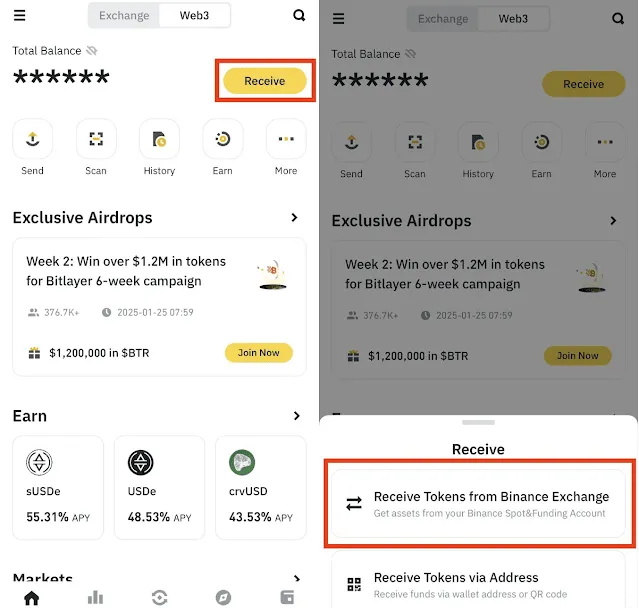
You need to transfer BTC from the Binance exchange to your Web3 Wallet. In your Web3 wallet, select [Receive Tokens from Binance Exchange], then transfer the BTC you hold.
Step 3: Select Binance Smart Chain (BEP-20)
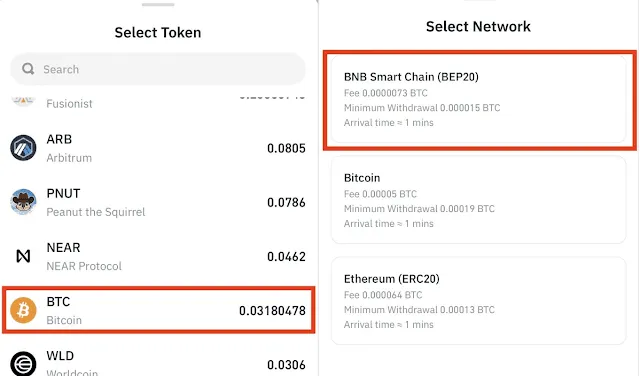
During the transfer, make sure the blockchain is set to Binance Smart Chain (BEP-20). This ensures that you correctly deposit the BTCB needed to join the Solv Megadrop.
Step 4: Enter the Transfer Amount
Enter the amount of BTC to transfer. You must withdraw at least 0.0001 BTCB. To leave yourself a little margin, withdraw around 0.00015.
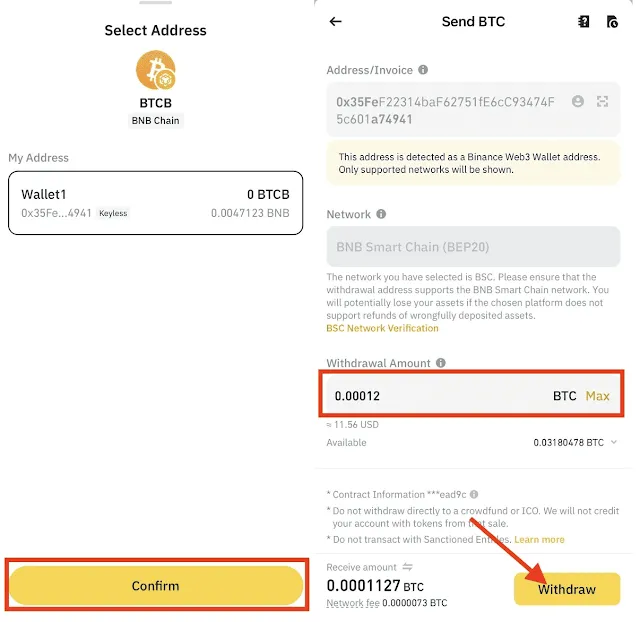
💡 Make sure your Binance Web3 wallet has a small amount of BNB (about $1) to use for gas fees. If you don't have any BNB, buy some and withdraw it via Binance Smart Chain.
Step 5: Complete the Megadrop Quest
(1) Open the Quest Page
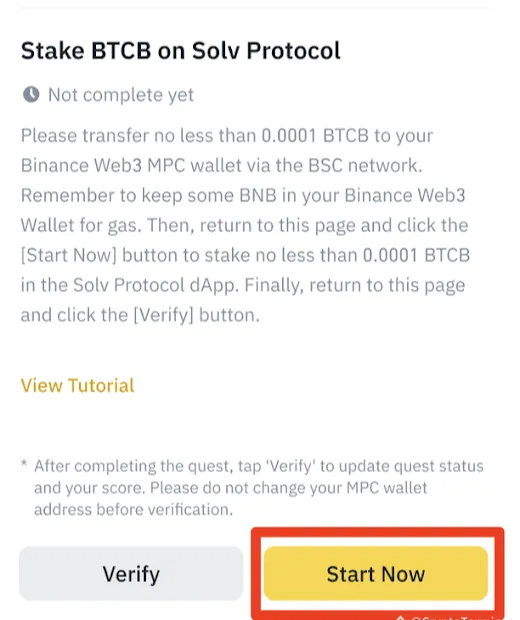
After logging in to Binance, go to the MegaDrop page and tap [Start Now]. You'll be taken to the Solv Protocol dApp.
(2) Connect Your Wallet
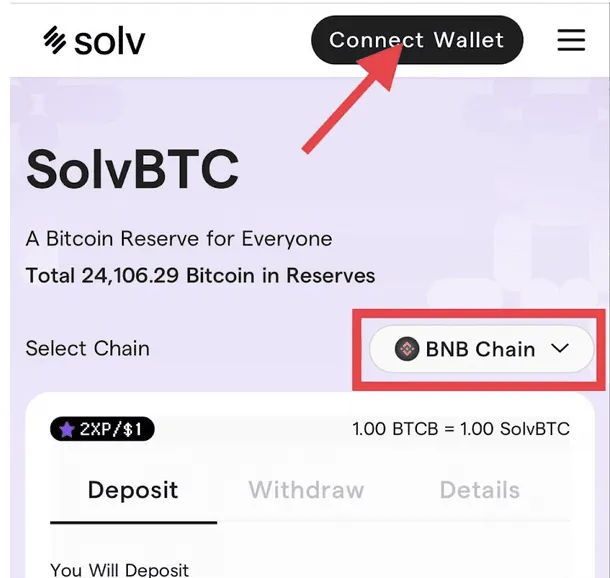
Tap [Connect Wallet] in the top right corner to connect your Binance Web3 wallet. Next, switch the network to BNB Chain.
(3) Stake BTCB
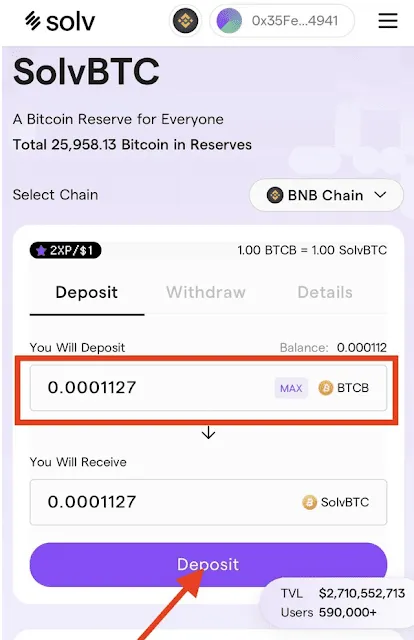
Enter the amount of BTCB you want to stake, then tap the [Deposit] button. The amount must be at least 0.0001 BTCB.
(4) Complete the Transaction
Confirm the transaction in your wallet to complete the quest.
(5) Verify Quest Completion
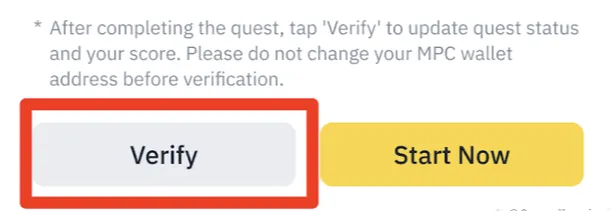
After staking, go to the Megadrop quest page and tap the [Verify] button. Once a green check button appears, you're done.
Step 6: Stake BNB on Binance
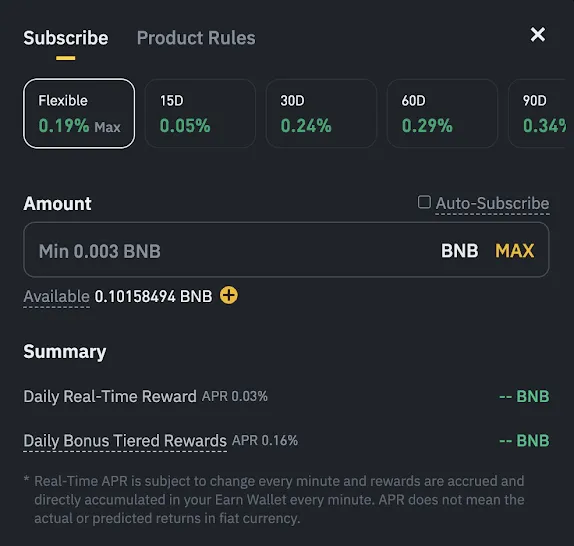
You can earn even more rewards by staking BNB on the Binance exchange. After logging in to Binance, go to the [Earn] page.
- After logging in to Binance, go to [Earn] > [Locked] to stake your BNB.
- You can choose a period of 15 to 120 days, and the longer the period, the bigger the boost you receive.
Step 7: Unstake and Withdraw
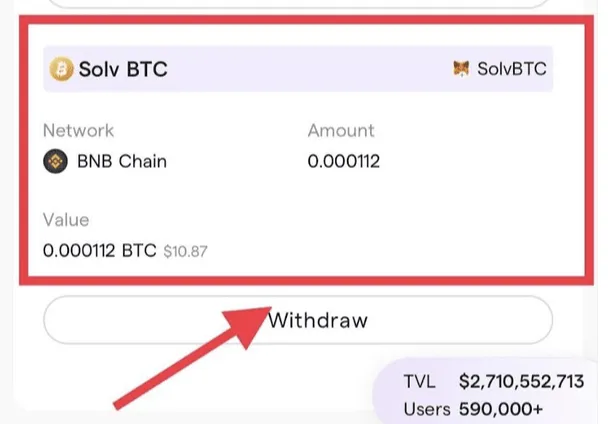
Once the Megadrop snapshot is complete, you're free to unstake the BTCB you deposited in Solv Protocol. Here's how to unstake BTCB from Solv Protocol.
- Open SOLV Protocol and go to [My Portfolio].
- Click [Withdraw] and sign the transaction.
- Your BTCB withdrawal will be completed within 7 days at most.
You can also unstake your BNB on the Binance exchange. In this case, your Megadrop rewards have already been paid out, so there's no problem, but keep in mind that you won't receive the interest on the BNB itself. Also, the unstaking period may take around 2-3 days.
Wrapping Up
That covers how to join the Megadrop running on the Binance exchange. Completing the Web3 Megadrop quest pays an average of $30–80 in rewards, so it's well worth taking the time to get it done.