How to Check a Transaction ID (TxID) on Binance
5 min read · · Korean original
Contents 5
Hello, this is Bitpunk. In this post, we'll walk through how to check a transaction ID (TxID) on the Binance exchange.

A TxID (Transaction ID) is a unique identification number assigned to each transaction that passes through a blockchain. With it, you can check the status of on-chain deposits and withdrawals, the number of block confirmations, and more.
What Is a Transaction ID?
Did you know that whenever you send or trade assets over a blockchain, every record is written on-chain? And each time such a record is created, a "unique string" is assigned to the block. This string is called a "transaction ID" or "transaction hash."
Simply put, a TxID is a kind of "receipt number" attached to each transaction. If you enter that number into a blockchain explorer such as Etherscan, anyone can look up the transaction details directly.
To sum up, a transaction ID is a unique string that lets you track each transaction, and through it anyone can transparently check activity on-chain.
How Do You Check a Transaction ID on Binance?
When you make an on-chain deposit or withdrawal using your Binance account, a TxID is assigned to each transaction. You can view that TxID in detail in the exchange's deposit and withdrawal history and on a blockchain explorer.
For example, let's say you withdraw 1 ETH from the Upbit exchange and deposit it into Binance. In this case, you can find the same "Ethereum transaction number" in Upbit's withdrawal history or in Binance's deposit history.
So, shall we check it for real? Here's how to check a TxID on Binance. First, log in to an account that has completed Binance sign-up and KYC verification. Next, click [Wallet] - [Overview].

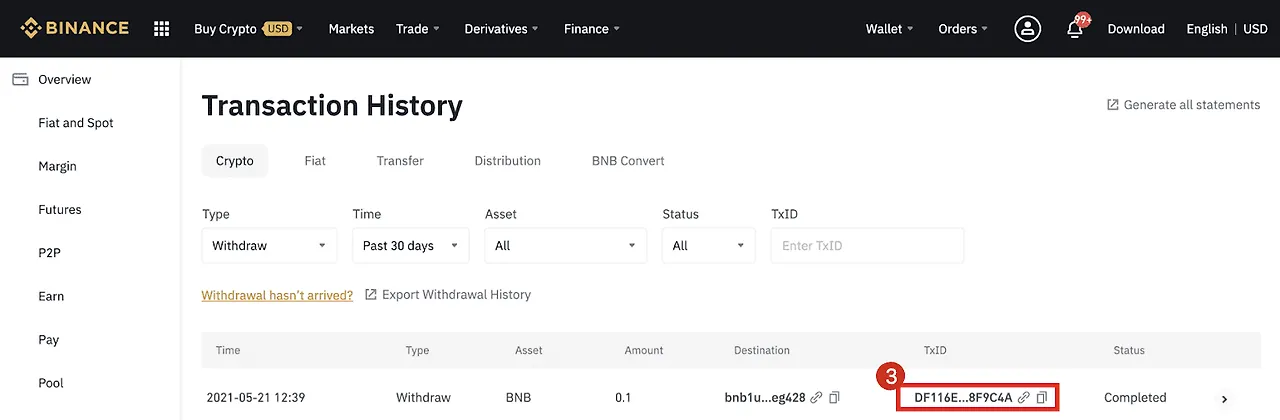
Click the [Transaction History] button in the top menu, and all of your past deposits and withdrawals will be displayed. Here, click the icon in the [TxID] section to view the transaction details or copy the TxID to your clipboard.
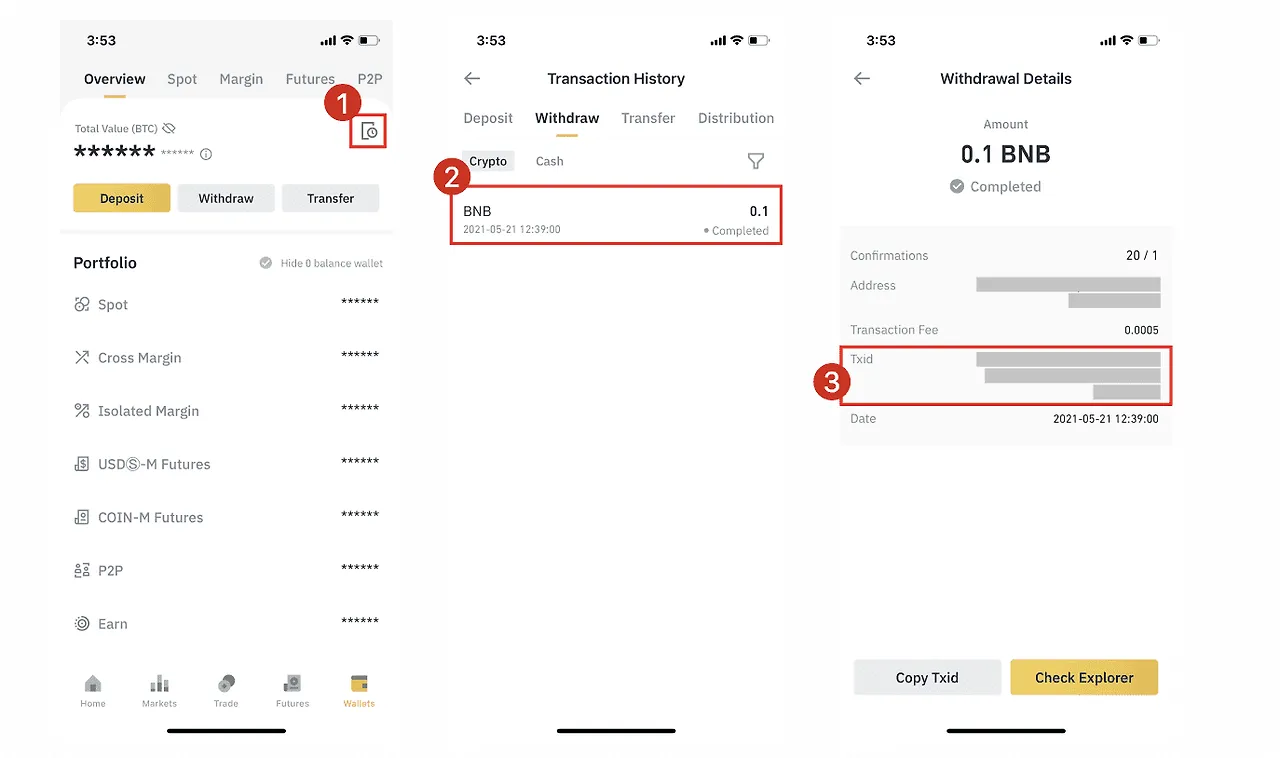
If you're using the Binance mobile app, you can find all transaction IDs related to deposits and withdrawals under [Wallet] - [History] - [Transaction History].
What Is a TxID Used For?
A transaction ID is a "unique string" that lets you check transaction details, including on-chain deposits and withdrawals. Through it, anyone can transparently view the on-chain information related to that transaction.
If you enter a TxID into a blockchain explorer, you can see details of the on-chain activity, such as whether the transaction was successfully included in a block, is still in progress, or has failed.
The best-known explorers include Ethereum's "Etherscan" and Binance Smart Chain's "BscScan." However, each blockchain explorer may support different chains, so before checking a TxID, it's a good idea to make sure you're using the explorer for the correct chain.
Also, on centralized exchanges like Binance, when an on-chain issue such as a delayed deposit or withdrawal occurs, you must attach the relevant TxID.
If you need to contact customer support about a blockchain deposit or withdrawal issue, providing the relevant transaction ID will help them handle your inquiry faster and more accurately.
Frequently Asked Questions (FAQ)
- Q1. I found the TxID, but the assets haven't arrived in my wallet. What should I do first?
- The first thing to do is look up the TxID on a blockchain explorer. Once you paste in the TxID, you can see the transaction status (Success, Fail, Pending, etc.).
- Q2. The blockchain explorer shows "Success," so why haven't my assets arrived yet?
- Even if the transaction shows as "Success," the exchange's internal deposit processing system may not have reflected it yet. Wait a little longer or contact customer support.
- Q3. What does "Fail" status mean? Are my assets gone?
- "Fail" means the transaction was not processed on the blockchain. In this case, the receiving platform won't be able to see the assets, and you should contact the customer support of the platform where you requested the withdrawal.
- Q4. What does "Dropped & Replaced" mean?
- This means the original transaction was replaced on the network. Check whether a new TxID was created, and look up the status again using that TxID.
- Q5. Why do Bitcoin (BTC) transactions take so long?
- With Bitcoin, a deposit is only completed once network confirmations are finished. Usually 3 to 6 confirmations are required, and you can check the confirmations on a blockchain explorer.
- Q6. My Tron (TRC20) transaction says "CONFIRMED" but the result is "FAIL." What does that mean?
- "CONFIRMED" means it was recorded in a block, but "FAIL" means the asset transfer failed. In this case, contact the withdrawal platform.
- Q7. Which blockchain explorer should I use for each network?
- Each network uses the explorers below.
Network Explorer Address Ethereum (ERC20) Etherscan etherscan.io BNB Smart Chain (BEP20) BscScan bscscan.com Tron (TRC20) Tronscan tronscan.org Bitcoin (BTC) Blockchain.com blockchain.com - Q8. What information should I prepare when contacting customer support?
- Having the following items ready will help you get a quick response.
- Names of the withdrawal and deposit platforms
- TxID (transaction ID)
- Network type used
- Withdrawal address and deposit address
- Transaction time
- Screenshot from the explorer (optional)
- Q9. Can every problem be solved just by checking the TxID?
- A. A TxID is the starting point for diagnosing a problem. However, whether the problem gets resolved depends on the exchange's internal systems, so if you find anything unusual, be sure to contact customer support.
Wrapping Up
A transaction ID is a unique string that lets you track transaction details on a blockchain. With a TxID, users can check the progress of deposits and withdrawals, or view and prove on-chain details.
Anyone can look up a transaction by going to the blockchain explorer for each chain and entering the TxID, and once a transaction is confirmed, it remains permanently preserved on the blockchain.