OKX Spot and Futures Trading Fees Explained (2 Ways to Get a Discount)
3 min read · · Korean original
Contents 4
Hello, this is Bitpunk. Today, we'll look at the spot and futures trading fees on the OKX exchange. We'll also go over 2 ways to get a discount on them.
OKX Spot Trading Fees
The spot fees on the OKX exchange are 0.08% for limit orders and 0.1% for market orders. For example, if you trade $10,000, a limit order incurs a fee of $8 and a market order incurs a fee of $10.
| Spot Trading | Fee |
|---|---|
| Limit | 0.08% |
| Market | 0.1% |
OKX Futures Trading Fees
The futures fees on the OKX exchange are 0.02% for limit orders and 0.05% for market orders. For example, if you trade $10,000 without leverage, you pay a limit fee of $2 and a market fee of $5.
| Futures Trading | Fee |
|---|---|
| Limit | 0.02% |
| Market | 0.05% |
2 Ways to Get a Trading Fee Discount
1. Sign Up with a Discount Link (30% Off)
If you create your OKX account through the link below, you can get a 30% discount on fees. Alternatively, enter the fee discount referral code bitpunk yourself when signing up.
When you do, be sure to check the exact discount rate, as shown below. If the rate isn't displayed, your fee discount is 0% and you get no payback at all. If it shows 10% or 20%, you're not getting the maximum discount.
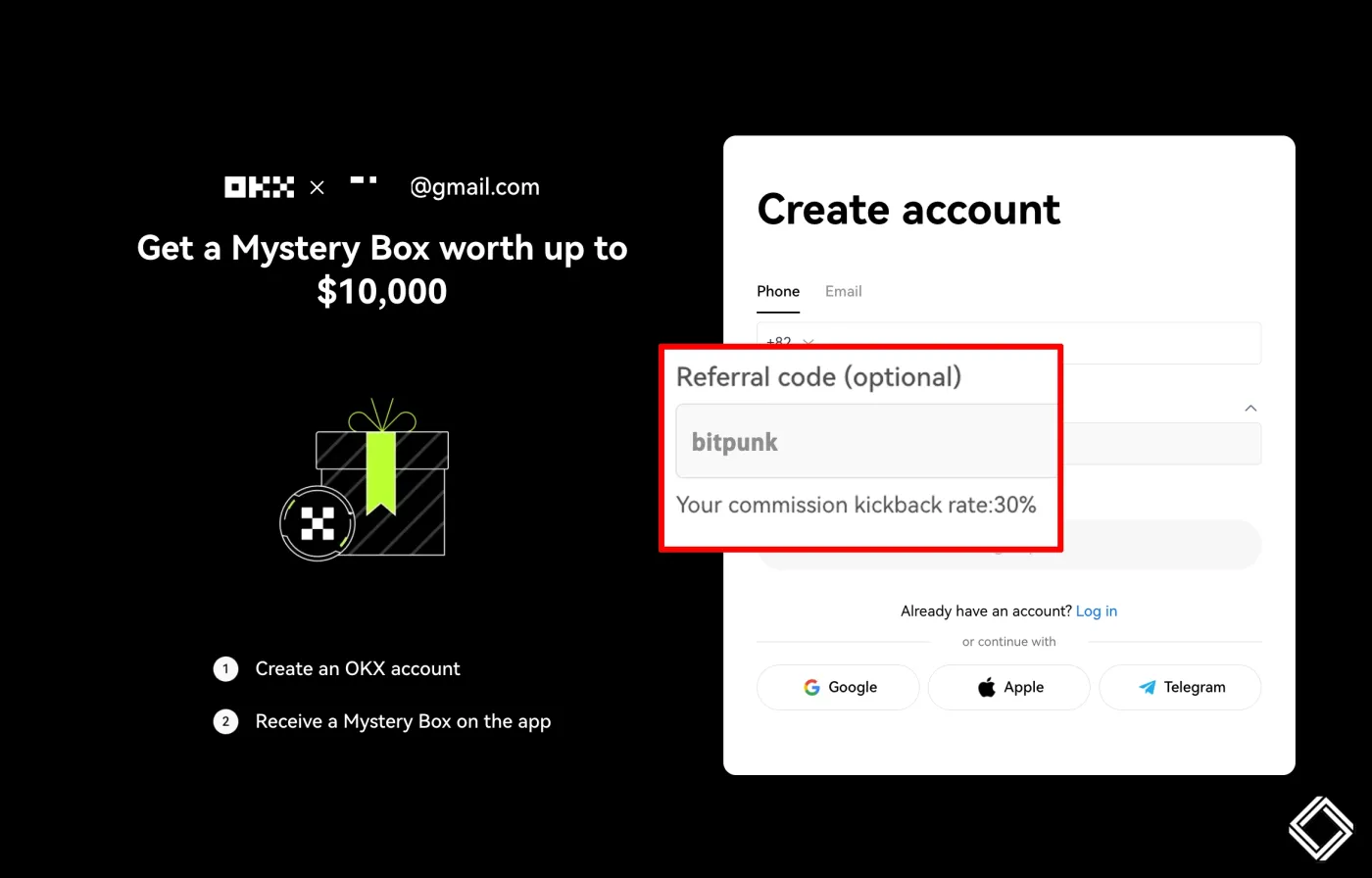
With this fee discount, your spot fees drop to 0.056% for limit orders and 0.07% for market orders. The same 30% discount applies to futures as well, bringing the final rates to 0.014% for limit orders and 0.035% for market orders.
| Order Type | Spot | Spot (30% Off) | Futures | Futures (30% Off) |
|---|---|---|---|---|
| Limit | 0.08% | 0.056% | 0.02% | 0.014% |
| Market | 0.1% | 0.07% | 0.05% | 0.035% |
2. Upgrade to VIP
Another way to get a fee discount on the OKX exchange is to raise your VIP tier. If you meet any one of the following conditions, you'll be automatically upgraded from the regular tier to VIP 1.
- Spot balance: 100,000 USDT or more
- Spot trading volume: 5,000,000 USDT or more
- Futures trading volume: 50,000,000 USDT or more
For reference, the balance and trading volume requirements for VIP tiers are calculated based on a 30-day average. For detailed requirements for each VIP tier, please refer to the OKX VIP fee schedule.
So how much do you actually save once you reach VIP 1? As shown in the table below, VIP 1 gives you a fee discount of close to 50% compared to regular users.
| Spot | Regular User | 30% Off | VIP 1 | VIP 1 + 30% |
|---|---|---|---|---|
| Limit | 0.08% | 0.056% | 0.045% | 0.0315% |
| Market | 0.1% | 0.07% | 0.05% | 0.035% |
Futures also get a fee discount of close to 50%. So if you do a lot of high-frequency futures trading, becoming a VIP on the OKX exchange may be a better choice in terms of fees compared to other exchanges.
| Futures | Regular User | 30% Off | VIP 1 | VIP 1 + 30% Off |
|---|---|---|---|---|
| Limit | 0.02% | 0.014% | 0.01% | 0.007% |
| Market | 0.05% | 0.035% | 0.03% | 0.021% |
How Do I Check My Fee Payback?
If you signed up through the OKX link shared above, the 30% fee difference is automatically paid back to your account every hour. You can view your payback history by going to 'Assets' - 'My Assets' and checking the 'Recent Transactions' tab.