
How to Safely Withdraw WEMIX from Upbit (1): Personal Wallet Edition
6 min read · · Korean original
Contents 8
- Precautions When Withdrawing WEMIX (Must Read)
- How to Withdraw WEMIX from Upbit
- Connecting WEMIX 3.0 to MetaMask
- Adding the Klaytn Mainnet to MetaMask
- Adding WEMIX Classic to MetaMask
- Withdrawing WEMIX from Upbit
- Migrating WEMIX Classic to the WEMIX 3.0 Mainnet
- How to Handle a Mistaken WEMIX Classic Deposit (Bonus)
With WEMIX being delisted from Upbit, here is a reliable guide for anyone withdrawing it to a personal wallet or another exchange.
This post is written based on Upbit. Withdrawal methods may differ from exchange to exchange, so if you used another exchange such as Coinone or Bithumb, please be careful.
| Withdrawing Exchange | Supported Network | Exchanges and Wallets That Accept Deposits |
| Upbit | Klaytn (KCT) | Bybit, MetaMask, Kaikas |
Because Upbit did not carry out the WEMIX mainnet migration, as you can see in the table above, you can only withdraw to a wallet based on the Klaytn mainnet (KCT).
You can use various wallets for the withdrawal, but among them we recommend MetaMask, which supports many networks and offers excellent security. For reference, Upbit will support withdrawals until 24:00 on January 7, 2023 (9 a.m.), so be sure to withdraw within that period.
Precautions When Withdrawing WEMIX (Must Read)
This is so important that I'll explain it once more. The very first thing you need to check when withdrawing WEMIX from Upbit is the transfer network. If you choose the wrong one, things get quite complicated, so please go through this post carefully.
Also, when you withdraw a coin from an exchange for the first time, it's a good idea to send a small amount first, confirm that it arrives safely, and only then transfer a larger amount.
Right now, WEMIX exists on both the Klaytn mainnet and the WEMIX 3.0 mainnet at the same time. So don't forget that you can only receive your assets properly if you deposit through the same network the exchange supports!
Upbit supports WEMIX withdrawals only through the Klaytn mainnet. Strictly speaking, WEMIX on Klaytn is called WEMIX CLASSIC, while on the WEMIX 3.0 network it is called WEMIX.
Now let's look at how to withdraw WEMIX (Classic) from Upbit.
How to Withdraw WEMIX from Upbit
First, you need to download and install MetaMask. If you don't have MetaMask yet, check out how to install MetaMask and set up your wallet safely first.
 How to Install and Use MetaMask (Complete Guide)3 min read
Connecting WEMIX 3.0 to MetaMask
Next, go to WEMIX.Fi, the WEMIX 3.0 DeFi platform. The WEMIX 3.0 network and the WEMIX coin will be added to MetaMask automatically.
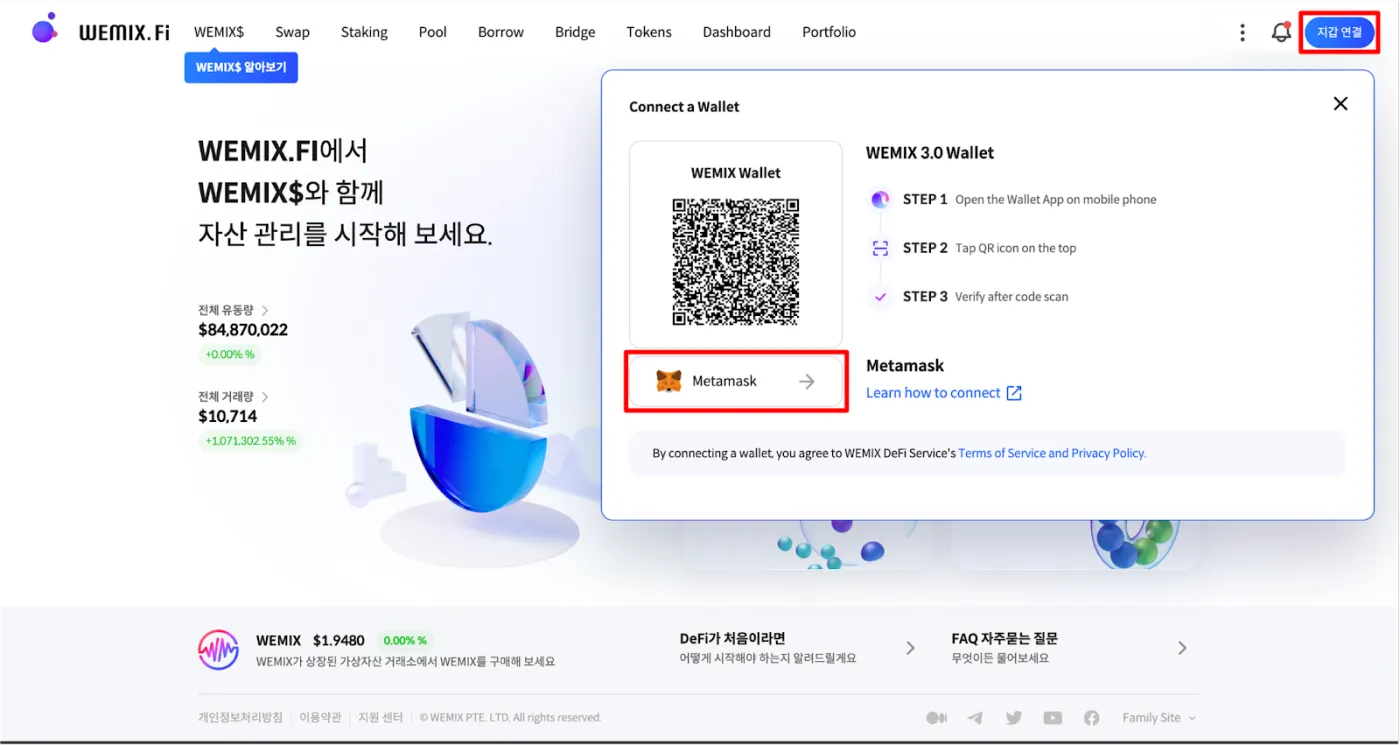
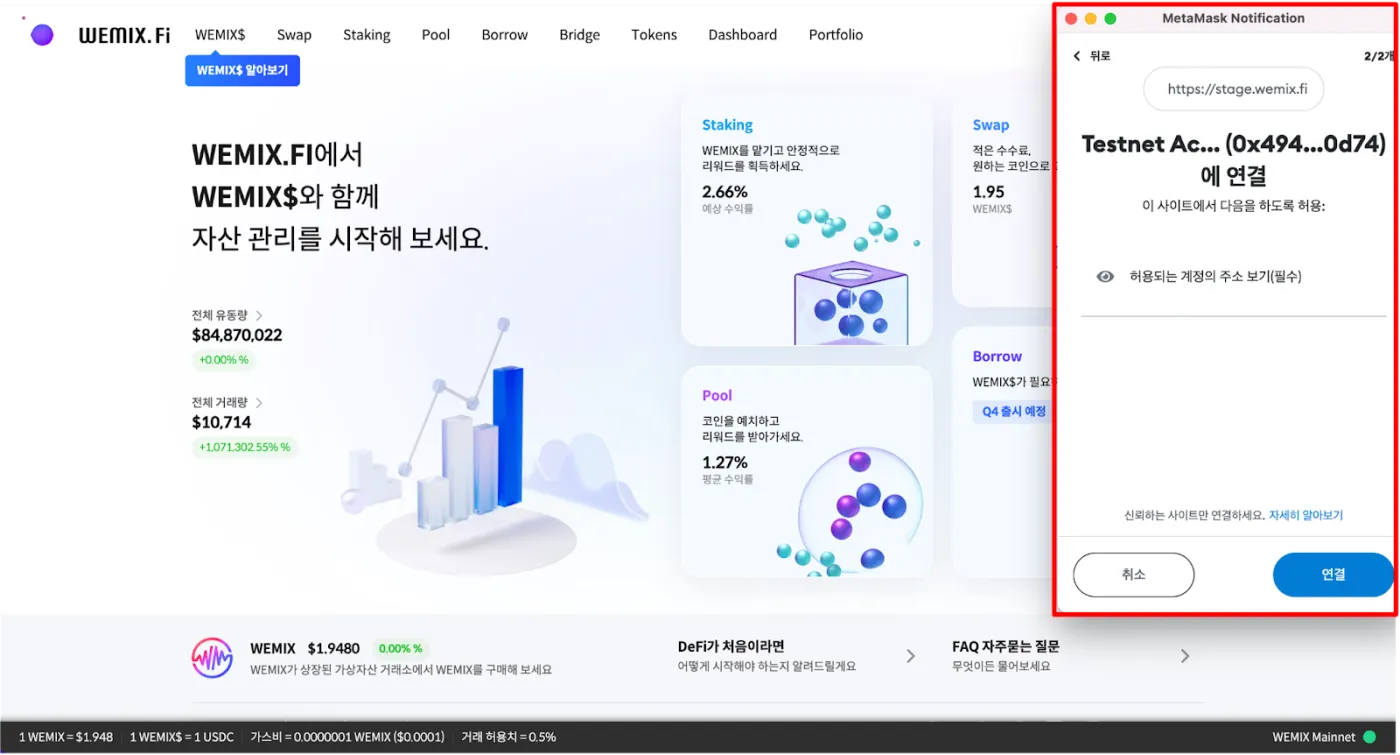
If WEMIX isn't added automatically, just add the information below to MetaMask. To add WEMIX 3.0 to MetaMask, select the network at the top of MetaMask and enter the following information.
- Network name : WEMIX3.0 Mainnet
- Chain ID : 1111
- New RPC URL : https://api.wemix.com
- Currency symbol : WEMIX
- Block explorer URL : https://explorer.wemix.com
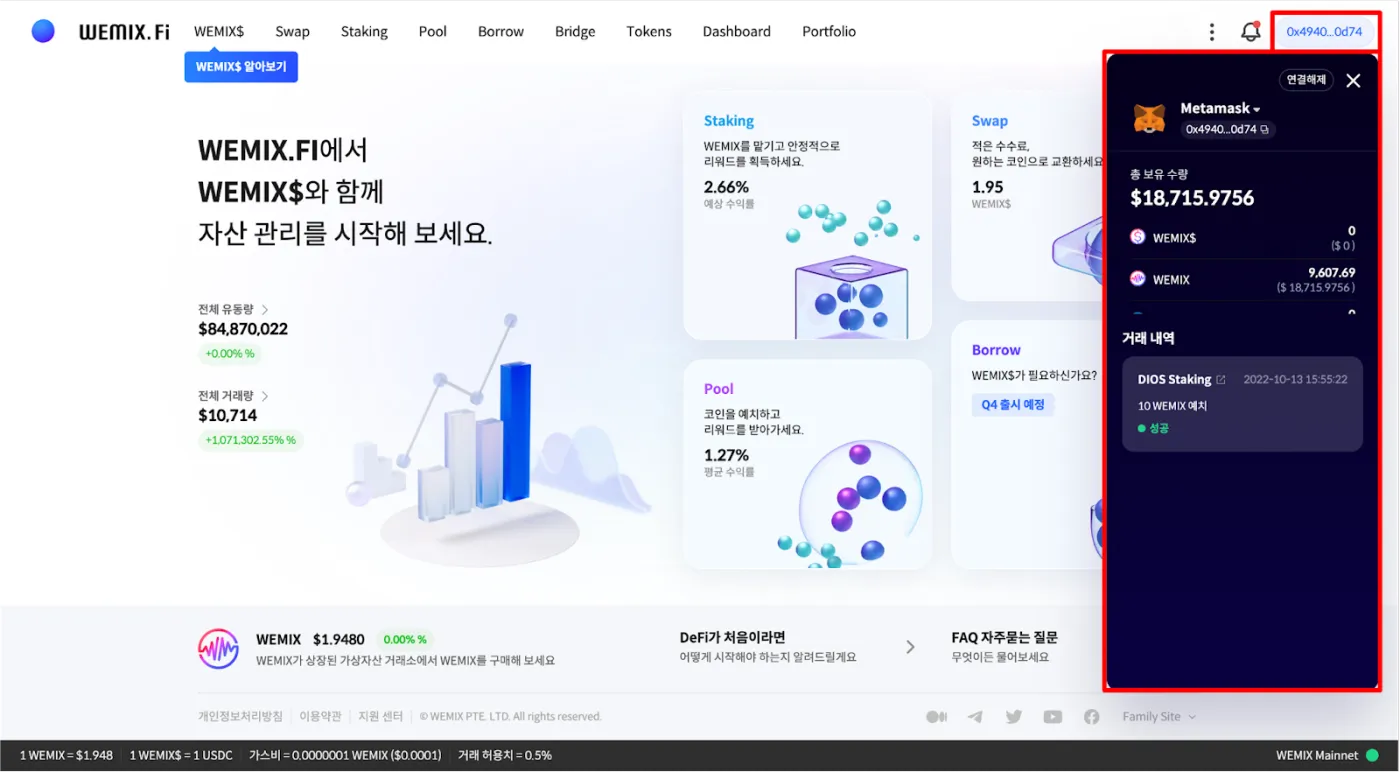
Once the wallet is connected successfully, your wallet address will appear in the top right corner of the website.
Adding the Klaytn Mainnet to MetaMask
Next, add the Klaytn network to MetaMask. Open MetaMask, tap the network selector at the top > Add network > Add a network manually, then enter the following network information.
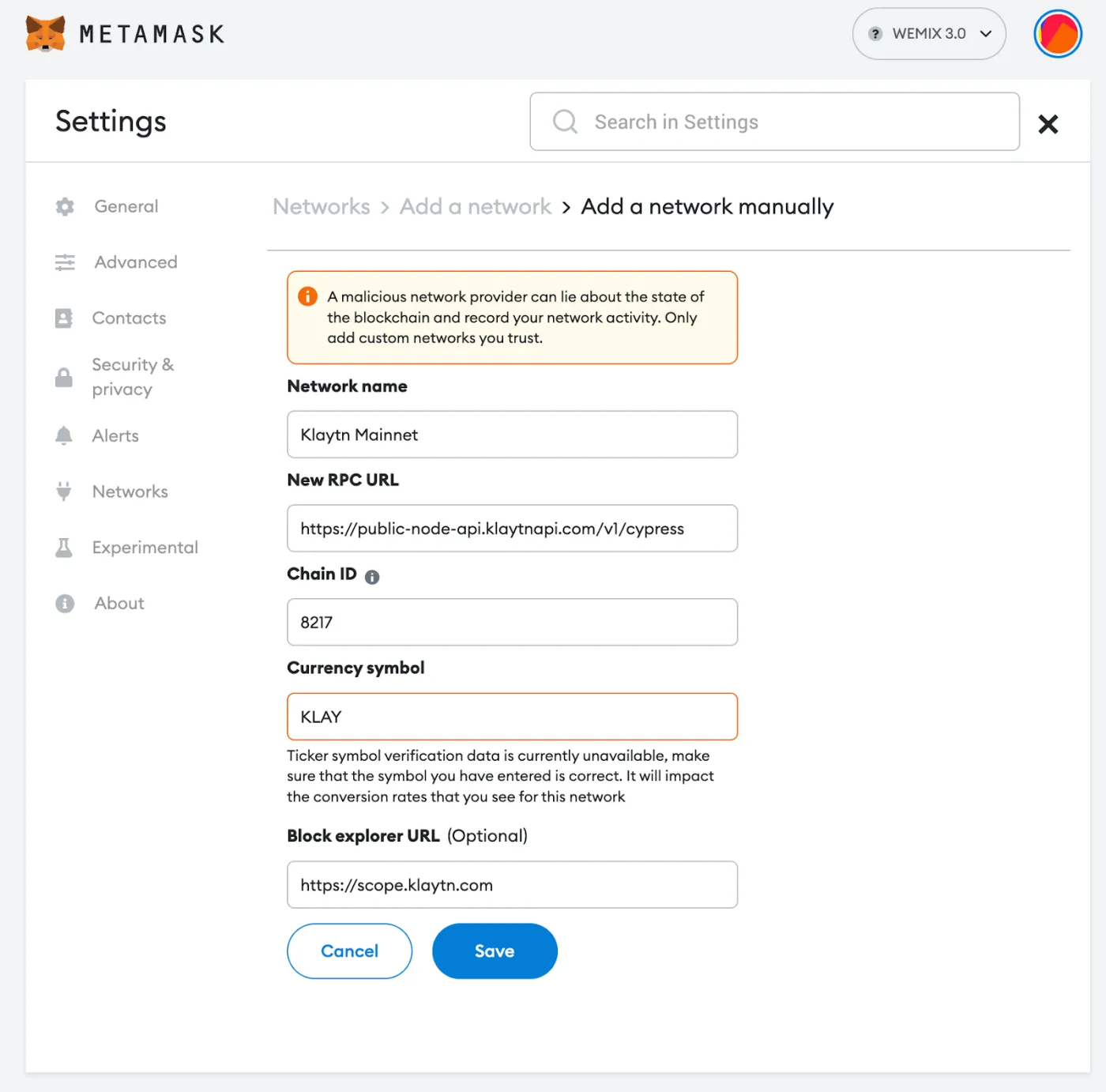
- Network name : Klaytn Mainnet
- Chain ID : 8217
- New RPC URL : https://public-node-api.klaytnapi.com/v1/cypress
- Currency symbol : KLAY
- Block explorer URL : https://scope.klaytn.com
Adding WEMIX Classic to MetaMask
Once the Klaytn network has been added to MetaMask, it should look like this.
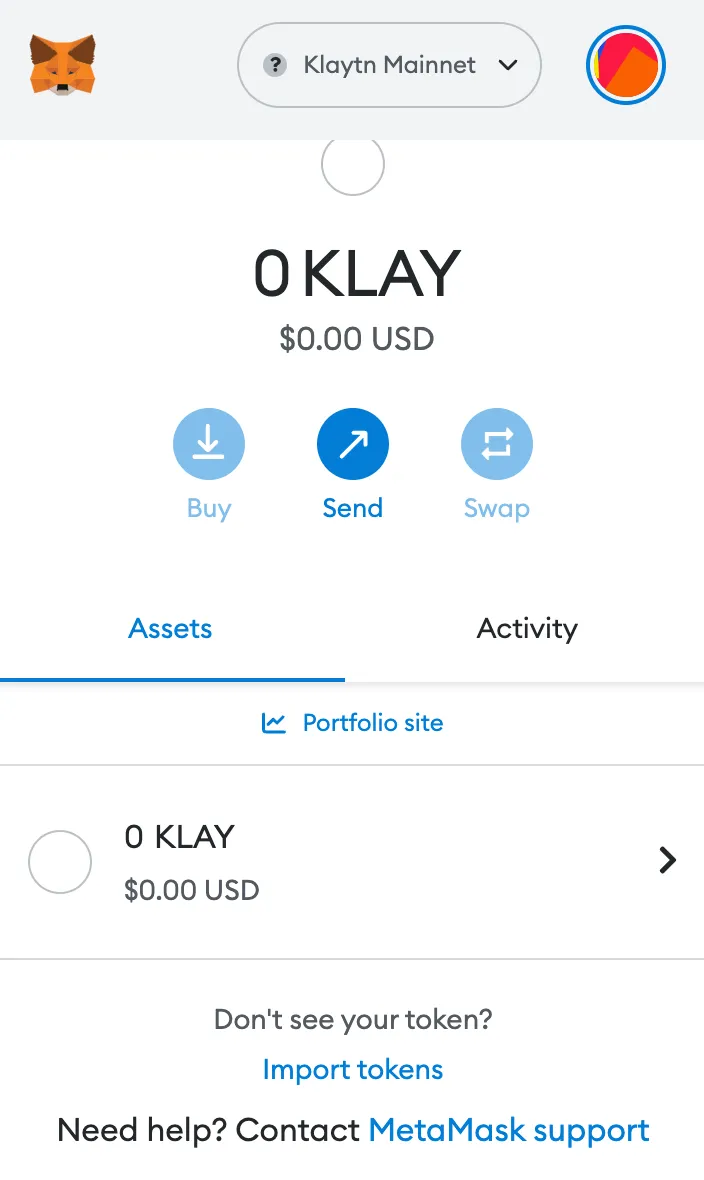
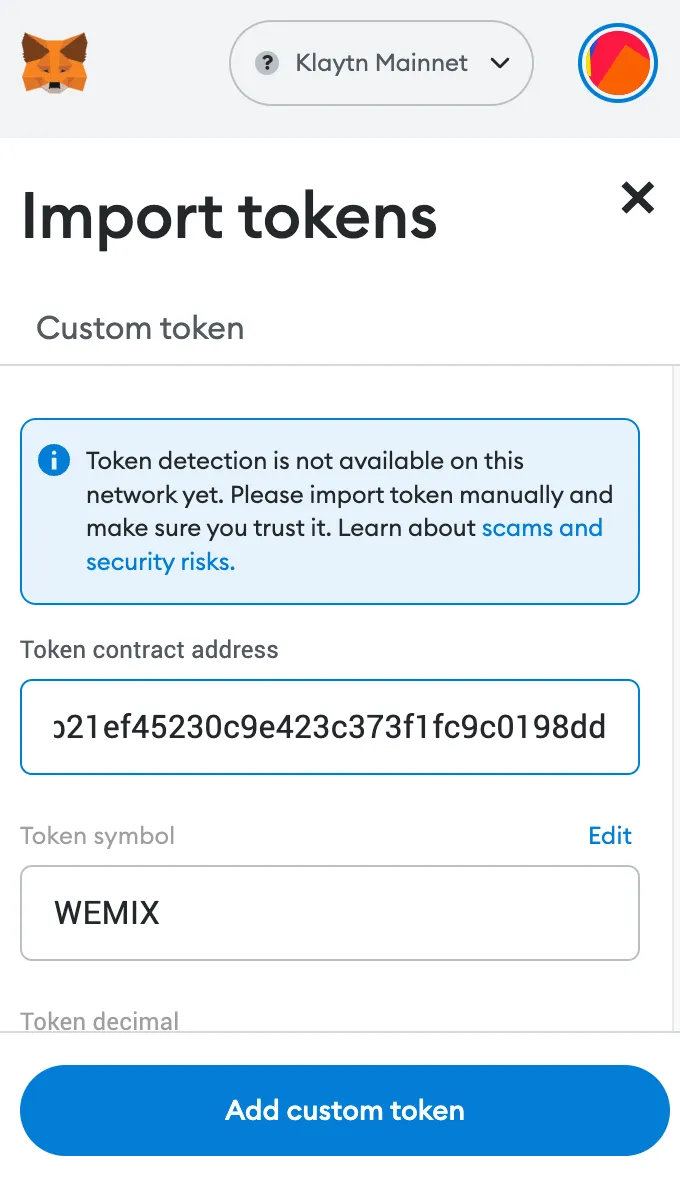
Now add WEMIX Classic on the Klaytn network. Click [Import tokens] and enter the token contract address below. The rest of the information will be filled in automatically.
- WEMIX Classic contract address : 0x5096db80b21ef45230c9e423c373f1fc9c0198dd
Withdrawing WEMIX from Upbit
It's finally time to withdraw WEMIX from Upbit. For amounts under KRW 1,000,000, you can withdraw WEMIX directly to your MetaMask address.
If the withdrawal amount is KRW 1,000,000 or more, you need to verify the withdrawal address as shown below.
To verify your wallet, log in to Upbit, go to MY, and verify your MetaMask wallet address as shown below.
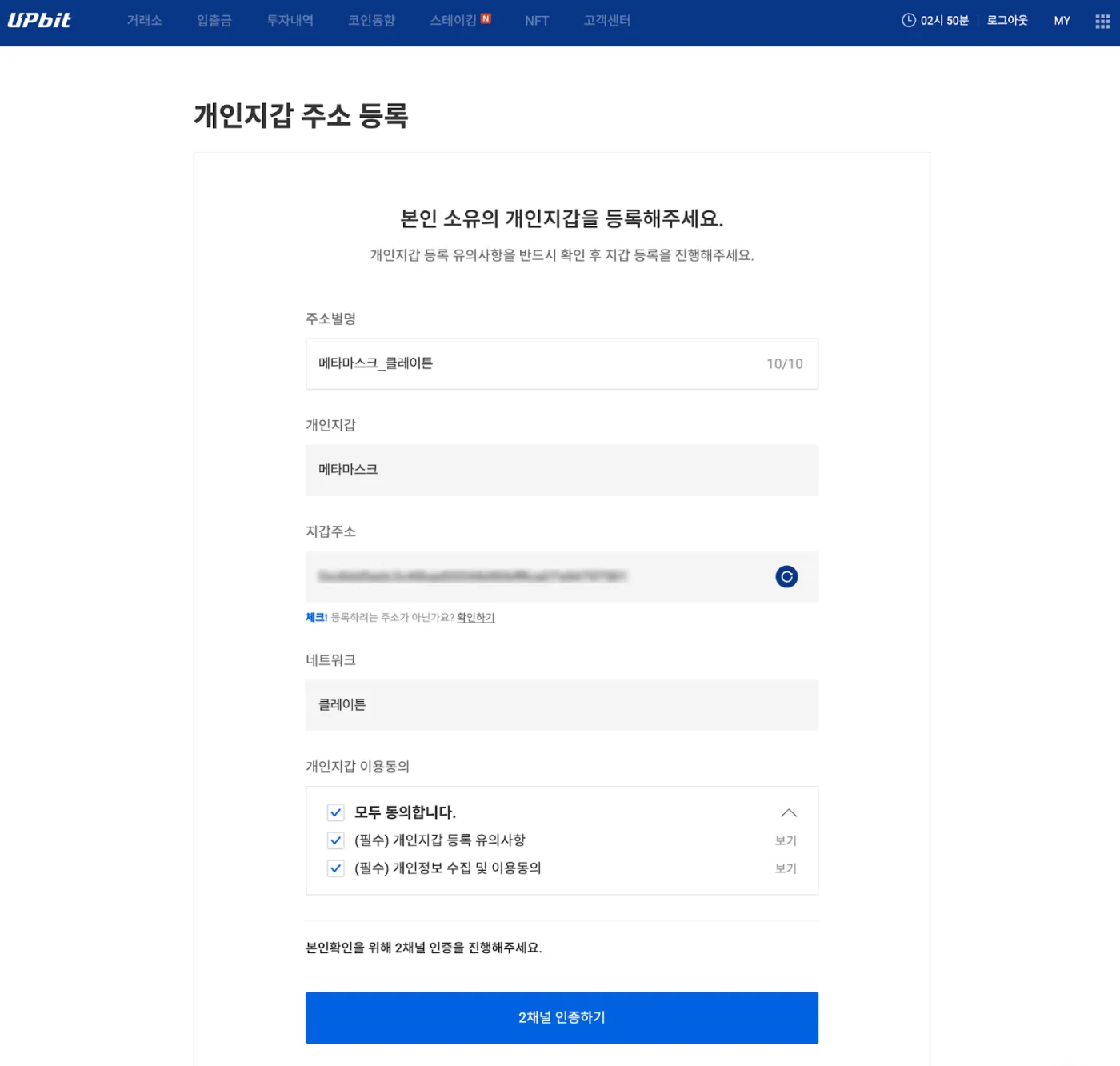
Now click the Withdraw button, enter the amount of WEMIX to withdraw, and enter your MetaMask address. At this point, please double-check with your own eyes that the address is correct. We recommend withdrawing a small amount first, such as 10 WEMIX, as a test.
After the withdrawal is complete, WEMIX Classic will appear on the Klaytn network in MetaMask as shown below. If you're curious about the transaction history, you can go to Klaytnscope and enter your wallet address.
Migrating WEMIX Classic to the WEMIX 3.0 Mainnet
This is the last step. If you plan to stake on WEMIX PLAY or use its services, you can use the WEMIX Classic you just withdrew from Upbit as it is.
However, if you want to use the WEMIX mainnet, for example on WEMIX.Fi, you need to convert it to WEMIX. To do this, we'll use the Multichain bridge.
How to Use the Multichain Bridge (Complete Guide)2 min readNow go to Multichain at https://multichain.org. Switch your MetaMask network to Klaytn and connect your wallet.
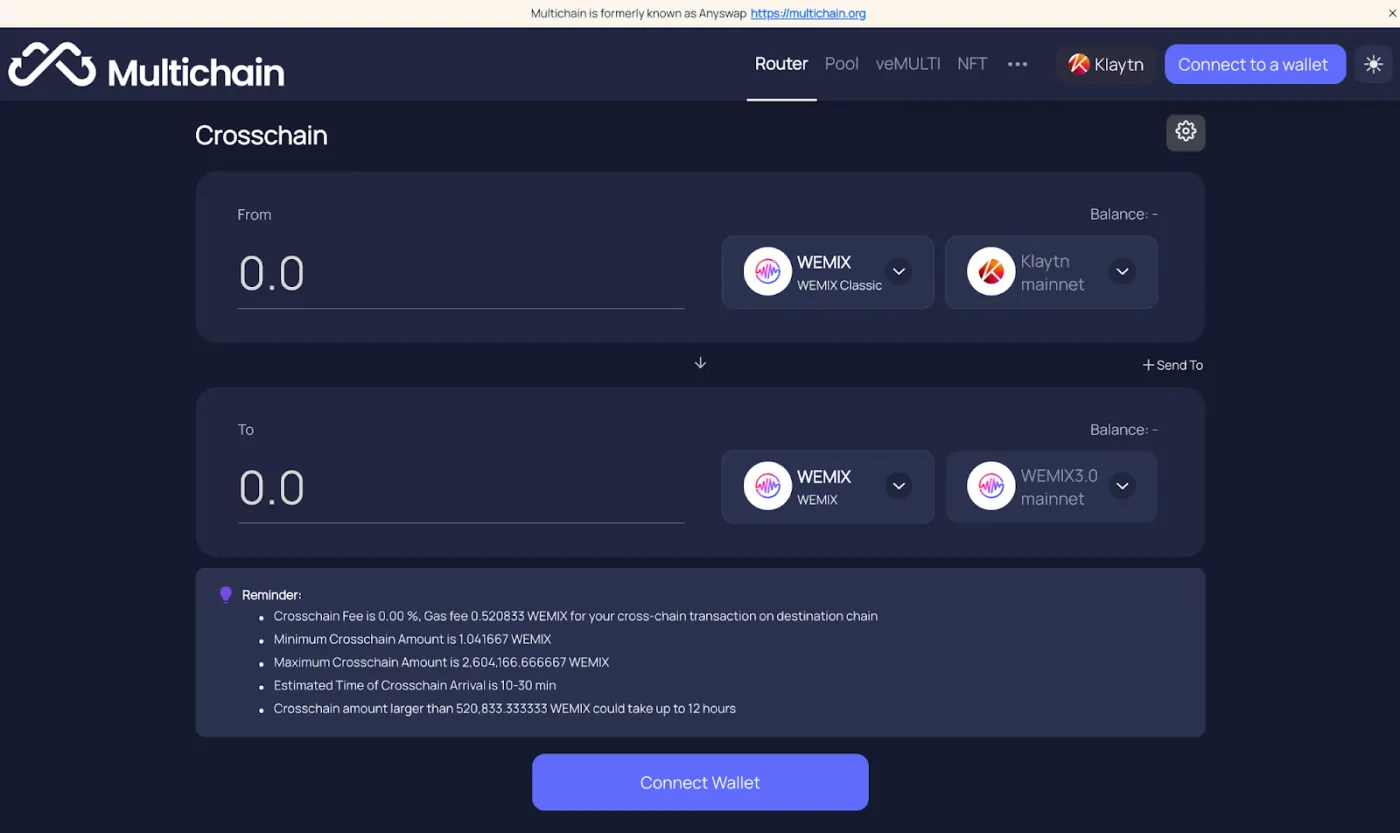
Next, select the coin and network you want to convert. As shown below, select WEMIX CLASSIC / Klaytn in the From section, and select WEMIX / WEMIX 3.0 in the To section. When you enter the amount you want to convert, the resulting amount is calculated automatically.
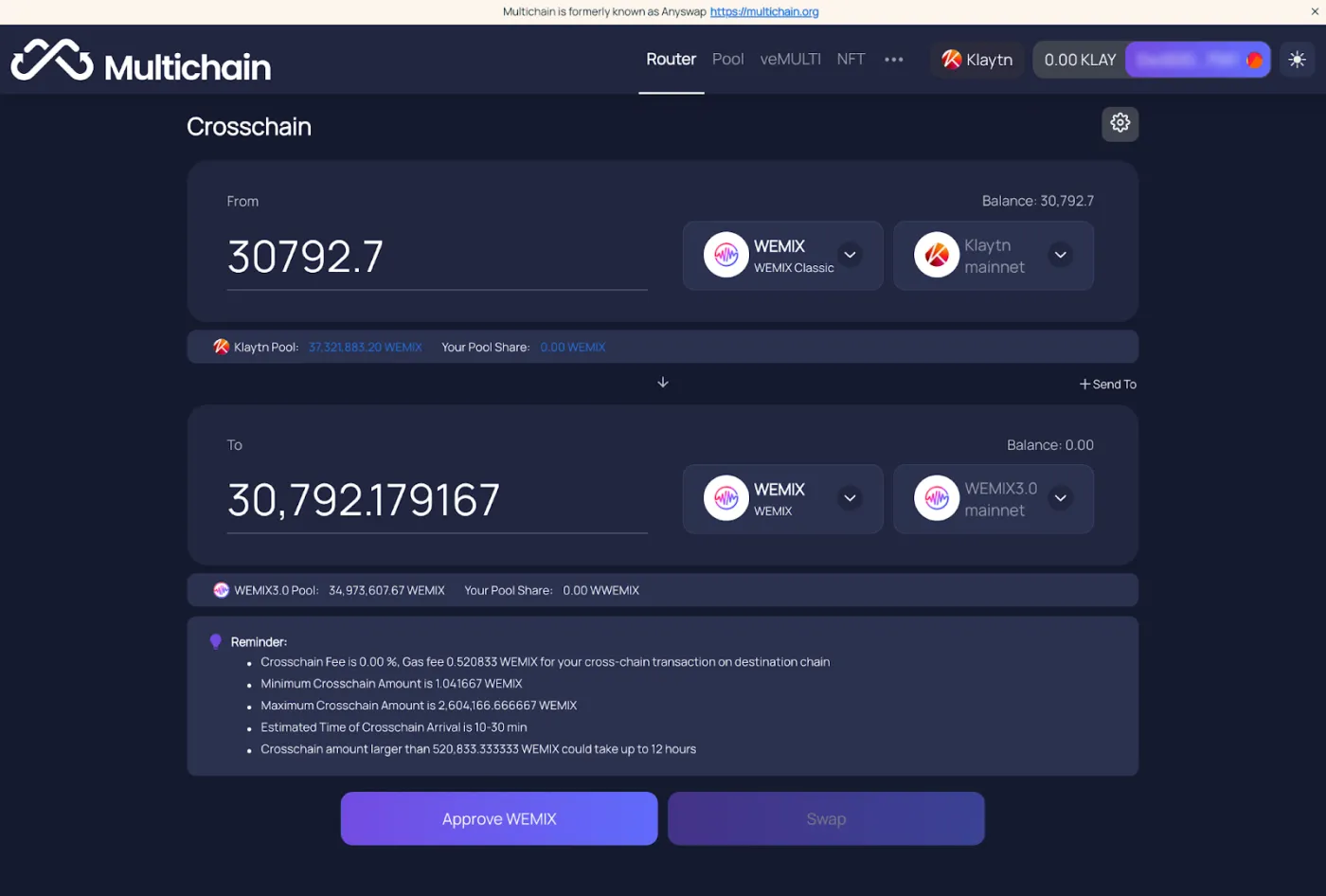
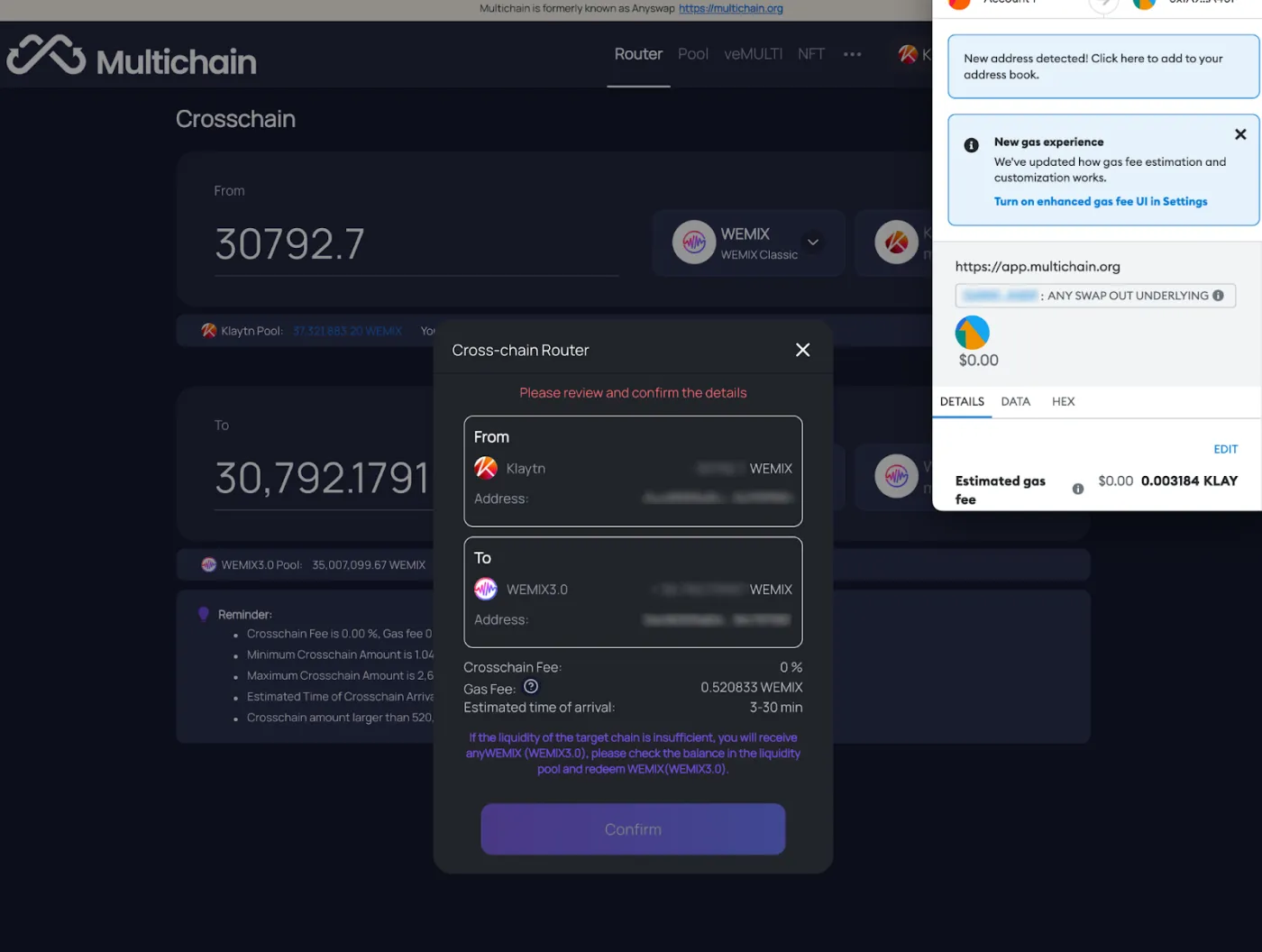
If the coin, network, and amount are all correct, click Confirm. Once you give final approval in MetaMask, the conversion will proceed.
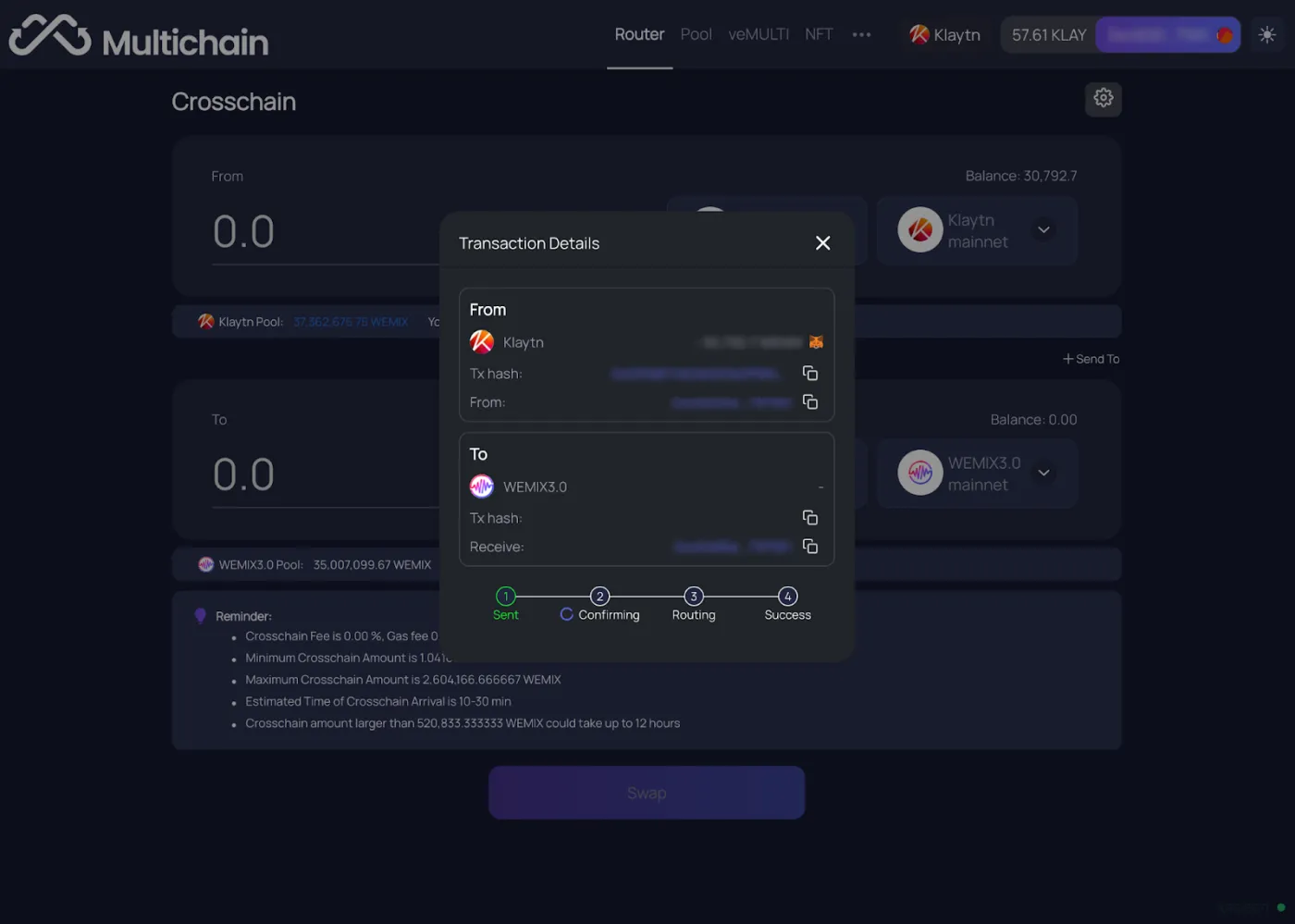
After a wait of 1 to 10 minutes, the conversion of your assets from WEMIX Classic to WEMIX will be complete.
That wraps up how to withdraw WEMIX Classic from Upbit and safely convert it to WEMIX 3.0.
If you'd like to withdraw to Bybit instead, sign up for Bybit through this link to get a 20% trading fee discount. For how to deposit WEMIX to the Bybit exchange, please refer to this post.
How to Handle a Mistaken WEMIX Classic Deposit (Bonus)
Did you deposit WEMIX Classic into a WEMIX 3.0 wallet, or mistakenly send it to the Ethereum network or elsewhere? In that case, you can recover your assets by exporting your private key.
This is exactly why I recommended using MetaMask, a personal wallet. Did you send it to the wrong network? Then please go through the steps in this post for adding the WEMIX coin and networks to MetaMask once again, in order from the top. The WEMIX coin that you couldn't see before should now appear.
If the problem happened not with a personal wallet but on an exchange or Klip, that exchange has to go through the same procedure above to recover your assets.
Finally, here are the contract addresses of the coins used in WEMIX conversions. You can paste them in directly, or verify them once more yourself before using them.
| Token Name | Token Symbol | Token Decimals | Token Contract Address |
| Ethereum | ETH | 18 | 0x765277EebeCA2e31912C9946eAe1021199B39C61 |
| USD Coin | USDC | 18 | 0xE3F5a90F9cb311505cd691a46596599aA1A0AD7D |
| Klaytn | KLAY | 18 | 0x461d52769884ca6235B685EF2040F47d30C94EB5 |
| Wemix | WEMIX | 18 | 0x7D72b22a74A216Af4a002a1095C8C707d6eC1C5f |
| Wemix Dollar | WEMIX$ | 18 | 0x53c0cAfFEB6D4f5A6a65aAE0a11a99d82DA852Ed |
| Staked WEMIX | stWEMIX | 18 | 0x9B377bd7Db130E8bD2f3641E0E161cB613DA93De |